Home Blog Page 15

Fujifilm Instax SQ1 vs Instax Mini 11

Fujifilm is known for making fantastic film cameras, and their Instax line of instant cameras are incredibly popular. In 2020, they released 2 new instant cameras: the Instax Mini 11 and the Instax SQ1. Both cameras are stylish and capable, however, there are some key differences. We compared the Instax SQ1 vs Instax Mini 11 to help you identify which camera is right for you.

Build & Film Size

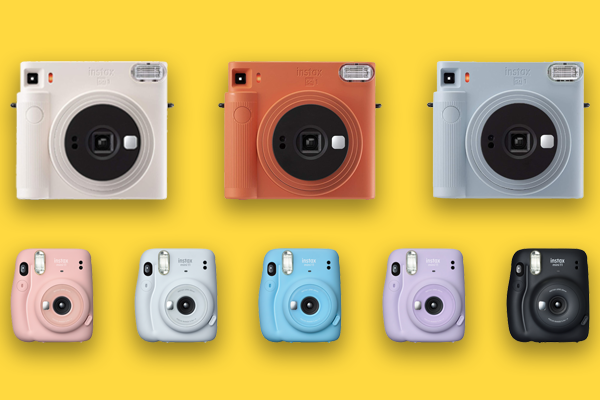
Both the Instax SQ1 and the Mini 11 are available in a range of different colorsThe Instax line of cameras employ colorful, sleek designs, and their latest models are no different.  Both cameras are available in a range of different pastel colors, and look and feel great. 

The most notable difference between the cameras is the size of film they use. The Instax SQ1 prints large, square photos, 1.5 times the size of the Mini 11’s photos. Mini 11 pictures are close in size to a business card, and will easily fit in your wallet. 

The build of each camera reflects their differing photo sizes.  Without batteries, a hand strap, or film, the SQ1 weighs 390g (13.8 oz), while the Mini 11 weighs 293g (10.3 oz). The SQ1’s bigger, square-shaped body has rounded edges and a textured grip. It’s comparably sized to its predecessor, the Instax SQ6. Conversely, the Mini 11 is noticeably slimmer than the Mini 9, its previous model. Check out our previous post about the Mini 11 vs the Mini 9 for more details on how they compare. 

Like the SQ6, the SQ1 uses 2 CR2 lithium batteries that offer an impressive 300-shot life. The Mini 11 has a 100-shot battery life, and uses 2 AA batteries. Other than the shutter, there are no buttons on the back or top of either camera. The minimalist interface reflects the simple capabilities of both cameras. 

Functionality & Performance

If you’re looking to buy your first instant camera, either model is a great choice. Both offer simple, user-friendly features that make them perfect for beginners. Unlike the SQ6 and Mini 9, neither of the new cameras offer manual exposure control.  Both the SQ1 and Mini 11 automatically adjust the shutter speed for every exposure. The return to simplicity is liberating, allowing you to focus on framing and having fun.

Like most Instax models, there’s a small “selfie mirror” on the front of each camera. Both models also offer Selfie Mode. That is, you can narrow the focal length, which makes for better selfies or close-up photographs.

Disappointingly, the focus on simplicity means neither camera offers a self-timer mode, nor any other additional functions. This is more surprising for the SQ1, given the SQ6 had a variety of additional features including multiple different shooting modes. The removal of these bells and whistles means the key difference between the SQ1 and the Mini 11 is the size of their bodies and photos.

Nobody buys an instant camera for outstanding image quality, yet both cameras perform well. The SQ1 and Mini 11 deliver detailed imagery with nice color and contrast. The automatic exposure on both cameras does a great job; just keep in mind that the flash fires with every shot.  You can also now get Square format Instax monochrome film, which was previously only available for Instax Mini and Instax Wide formats. 

Price

The Instax SQ1 is currently available for $99.99, discounted from $149.99 until early January. Meanwhile, you can get the Instax Mini 11 with a pack of film and other accessories for $89.95. 

Which Camera Should I Buy?

With the release of the SQ1, Fujifilm has made it very easy for you to decide between their Square and Mini instant cameras. Comparing the Instax SQ1 vs Instax Mini 11, there is no clear winner. Instead, it comes down to your personal preference for photo size. 

The Instax Mini 11 has a smaller body, shorter battery life, and produces photos that fit in your wallet. The Instax SQ1 has a bigger body, bigger photos, and a longer battery life. Both cameras are simple and fun to use. Whichever model you choose, you’ll have no trouble smiling when the flash goes off. 

The Best Gimbal For Your Smartphone 2020

As smartphone cameras have become more powerful, new accessories and equipment have been developed to match. A smartphone gimbal enables you to capture smooth, stable video, even when walking or moving your phone. While the best gimbal for your phone may come down to personal preference, we’ve identified some of the best systems currently available. 

DJI OM 4

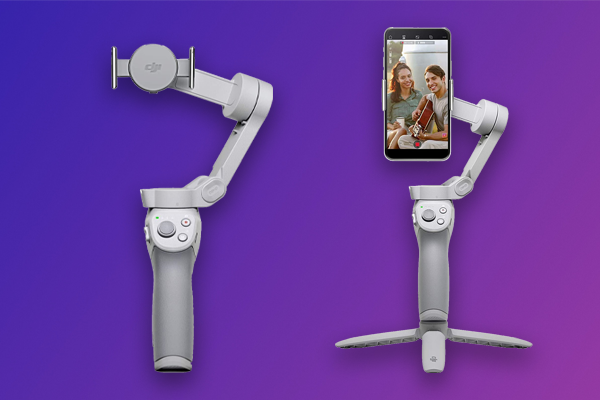
DJI OM 4DJI manufactures some fantastic camera stabilization systems. They’re a market leader for aerial systems, aka drones. However, they also make some great gimbals for cameras and phones. In 2020 they released the DJI OM 4, and it’s their best gimbal for smartphones yet.

The OM 4 is foldable and weighs just 405g (0.89 lb), making it incredibly portable. The gimbal uses a magnetic quick-release design that allows you to attach and remove your phone very easily. It can handle phones up to 290g (0.64 lb).  With a 15-hour battery life and ergonomic grip, you’ll have no trouble using it for hours. 

The previous model, the DJI Osmo Mobile 3, is lighter, but uses a larger, non-magnetic clamp to connect to the phone. An attachable grip tripod is also included with the OM 4, whereas you’ll need to purchase the combo kit to get it with the Osmo Mobile 3.

The gimbal connects to your phone using Bluetooth and the DJI Mimo app. The app will enable you to track any object while recording, and also has some really cool features including time lapse capabilities and DynamicZoom, which automates the trippy dolly zoom effect. Like with the Osmo Mobile 3, you can also use the impressive gesture control feature to start recording when you’re in front of the camera. 

The DJI OM 4 guarantees smooth, stable recording and is loaded with features that will enhance your videos. At $149, it’s a great value gimbal. 

Zhiyun Smooth 4

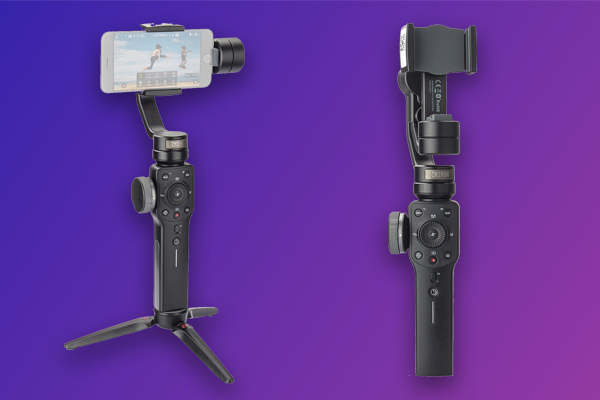
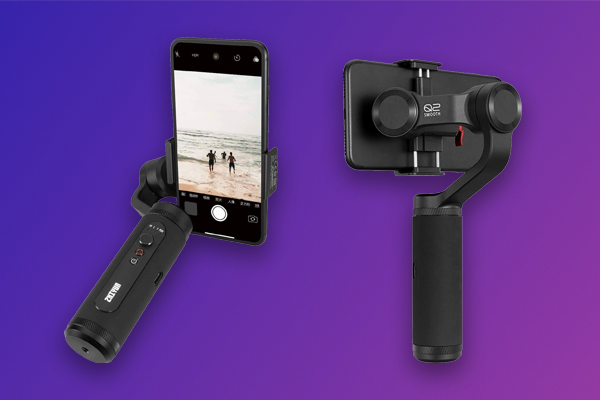
Zhiyun Smooth 4Zhiyun has a great range of gimbal products, including two smartphone gimbals, the Smooth 4 and the Smooth Q2 (see below). The Smooth 4 is older and larger than the Q2, so we’ll touch on it first.

Weighing 547g (1.21 lb), the Smooth 4 is big, but makes up for it with a convenient, user-friendly control panel. There’s a dial on the side you can use to control focus or zoom manually, while two triggers on the back allow for controlled camera movements, such as tilts and pans. A small tripod extension is included with the gimbal.  

Like DJI, Zhyun’s ZY Play app extends the functionality of their gimbals. The app enables time lapse, object tracking, slow-motion, and also has a dolly zoom effect they call Vertigo. The creative PhoneGo mode helps you to create a scene transition using rapid movement. 

The Smooth 4 has a 12-hour battery life, with an indicator on the handle for easy monitoring. The gimbal also supports two-way charging. That is, you can charge your phone through the gimbal even while the gimbal is charging.

Despite its size, the Smooth 4 has a little trouble with bigger phones. The maximum supported weight is 210g (0.46 lb). However, when fitted with the right phone, the gimbal delivers reliably smooth, stable video, and its user-friendly controls make it a pleasure to use.  The Zhiyun Smooth 4 has a 12 hour battery life and costs $139.99. 

Zhiyun Smooth Q2

Zhiyun Smooth Q2The Zhiyun Smooth Q2 was released in 2019 and feels like the Smooth Q4’s baby sibling. Weighing 390g (0.86 lb), The Smooth Q2 is considerably smaller, yet can support heavier phones, up to 260g (0.57 lb). Of course, that’s not the only improvement. 

Like the Smooth 4, the Q2 offers object tracking, time lapse capabilities, and the Vertigo shot via the ZY Play app.  Unlike the Smooth 4, the Q2 can spin your phone 360 degrees while recording, has a 17 hour battery life, and allows you to control your phone’s native camera app. 

The Smooth Q2 also has a more minimalist interface. There’s fewer buttons, and no dial for adjusting the focus and zoom. However, the gimbal’s small joystick does still provide some nice control. You can use it for smooth camera movement while recording. 

The Smooth Q2’s sleek, aluminum build is remarkably portable. In fact, it’s not much bigger than the average smartphone, so you can fit it in any bag or a large pocket. Currently available for $149, it’s another great value gimbal. 

Which Gimbal Should I Choose?

The best gimbal for your smartphone depends mostly on you. All three gimbals featured above are affordably priced, high-functioning, and deliver steady, stable video.

If portability is a priority, go for the Zhiyun Smooth Q2. It’s arguably more, if not equally powerful to the other two gimbals, yet smaller and lighter. If you want a gimbal that gives you complete control, particularly over the focus and zoom, the Smooth 4 is a great choice. Meanwhile the DJI OM 4 is a great blend of portability and usability. Whichever model you choose, all three gimbals are well worth their price tags. You won’t regret your choice. 

How to Start a YouTube Channel | All the Gear You Need

Courtesy of Sony

YouTube is the 2nd most popular website in the world. The video sharing platform has over 2 billion active users, while roughly 3 billion people watch at least one video per month. The top YouTubers – content creators that post videos to the platform – earn millions of dollars every year. So if you weren’t already wondering how to start a YouTube channel, maybe you should.

The best thing about YouTube is that anyone can upload content, for free. If you’ve never made a video other than on your smartphone, don’t worry. When it comes to YouTube content, creativity trumps quality. You’re making a vlog, not arthouse cinema. 

Most of the popular (and highest-earning) YouTubers are not professional filmmakers. Their content is popular because it’s highly original and engaging. On a platform that has 500 hours of content uploaded every minute, the biggest challenge is standing out. 

If you want to know how to start a YouTube channel, the first thing you should learn is what gear you’ll need. While there are plenty of poor quality videos that have gone viral, they’re typically one hit wonders. YouTube channels with a large subscriber base, i.e. a recurring audience, output stable, high resolution videos with great sound and lighting. Once you’re equipped with the right gear, you can too. 

To help you learn how to start a YouTube channel, below we’ve listed the gear essentials you’ll need to make great-looking videos. Just don’t forget who helped you get started once you’re rich and famous. 

Camera

Best Vlogging Cameras for Beginners 2020

A camera is the most essential piece of equipment you’ll need. While you may prefer to use your smartphone, using a DSLR or mirrorless camera is recommended. Smartphone cameras record videos that look great on a phone. However, they lose resolution when played on a larger screen. You’ll also need a smartphone gimbal to ensure stable video. 

DSLR and mirrorless cameras use larger sensors that allow them to capture vividly detailed photos and videos. They also have stronger autofocus capabilities, and most have built-in image stabilization. It’s still recommended that you use a gimbal or tripod, yet depending on the camera, you may be able to get by without one. 

We recently posted about the best vlogging cameras that were released in 2020. The list includes the Sony ZV-1, a camera that was specifically designed for vloggers. However, all the cameras in the list are great for vlogging because they are powerful, portable, and easy to use.

When deciding on a camera, remember, you don’t necessarily need the most expensive or high functioning model.  A powerful camera is useless to you if you don’t know how to use it. Focus on finding a camera that you’re comfortable using. Ideally, it should also have a flip out screen. 

If you don’t want to purchase or carry around multiple lenses, consider a fixed lens system. There are several point & shoot cameras that are great for vlogging, including the Sony ZV-1 or the Canon G7X Mark IIIf you want to shoot aerial footage, the DJI Mini 2 is a great drone for beginners. Similarly, if you plan to record underwater or in extreme conditions, an action camera like the GoPro Hero9 or the Ricoh WG-60 will serve you well. 

Gimbal or Tripod

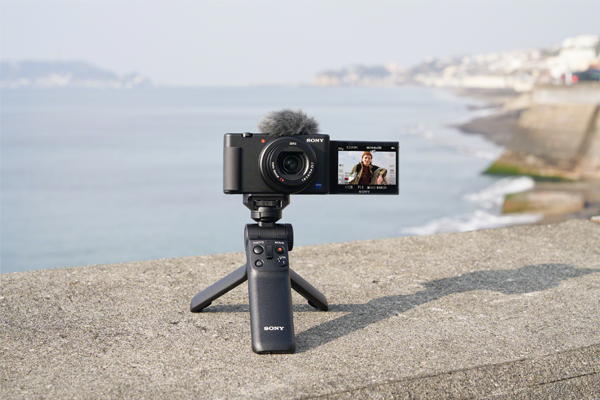
The Sony ZV-1 attached to a Sony GP-VPT2BT
The Sony ZV-1 attached to a Sony GP-VPT2BT | Courtesy of Sony

If you’ve ever seen the film Cloverfield, you’ll understand why using a gimbal or tripod is important. Shaky videos are physically hard to watch. While ‘shaky-cam’ can be employed as an artistic effect, more often than not it’s disorienting and irritating. It’s more likely to repel viewers from your channel than attract them.

While most modern cameras have built-in image stabilization, using a tripod is the best way to ensure your video will be stable. 3 Legged Thing’s Punks Anarchy Brian travel tripod is a good quality system that won’t break your budget. If you’re using a Sony ZV-1, the Sony GP-VPT2BT is a Bluetooth grip and mini tripod designed to work with the vlogging camera. It’s great if you plan to walk while talking directly into the camera. 

A gimbal will also allow you to move your camera while recording and still capture smooth, stable video. If you’re using a smartphone, the Rode Vlogger Kit (for iOS, USB-C, or 3.5mm mobile devices) is a good option. Meanwhile the Zhiyun Crane 2 and the DJI Ronin-S gimbals work well with many DSLR and mirrorless cameras, including the Canon EOS Rebel T7i and the Canon EOS M50 Mark II

Microphone

Photo by Christian Wiediger

As vlogging has increased in popularity, camera manufacturers have made an effort to improve the microphones built-in to their cameras. For example, the three-capsule microphone built into the Sony ZV-1 is remarkably good. The camera also comes with a wind screen to help the microphone work better outdoors. However, you’ll always get better quality audio using an external microphone.

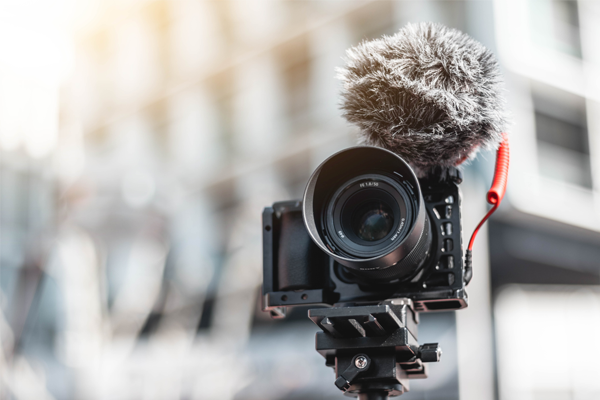
Many vloggers use a hot shoe or on-camera microphone, i.e. a microphone that mounts on top of their camera. These microphones are typically directional, meaning they are designed to record sound coming from the direction it’s pointed in, instead of all ambient sound. This makes it ideal for videos where the subject is speaking into the camera. The Rode VideoMic Pro+ is a popular model.

Lavalier microphones are also a good option. Also called lapel or clip-on microphones, they are designed to be worn by your subject, close enough to their mouth to capture their voice. Check out the video below by Rode which includes some great tips on getting started with a lavalier microphone. 

Rode has multiple lavalier microphones that are great for vlogging, including the Wireless Go which allows you to wirelessly record sound directly into your camera, smartphone, or computer. 

If you don’t mind your microphone being in frame, the Blue Yeti USB microphone offers great value. You can get the microphone with an arm stand, pop filter, and shock mount for $164.99. The microphone will need to be close to you or your subject’s face, but it records broadcast-quality audio directly into your computer. You could use it just as successfully to record a podcast, a medium many successful YouTubers have subsequently pursued.

Lighting

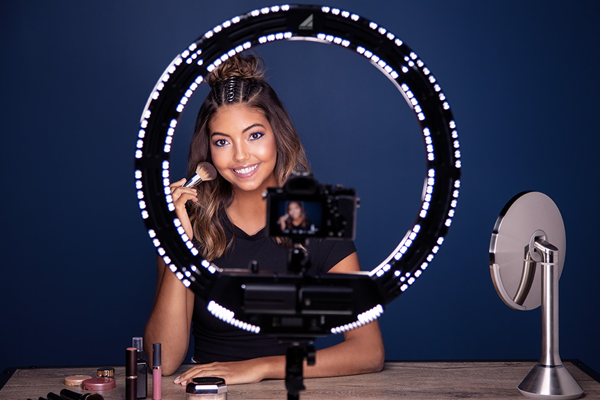
Vlogger using a Westcott 18-Inch Bi-Color LED Ring Light
Westcott 18-Inch Bi-Color LED Ring Light | Courtesy of Westcott

The most commonly used lighting setup for videos and photography is three-point lighting. It involves using three different types of light – key light, fill light, and back light. 

Key light shines directly on your subject and is the principal source of light in your frame. Fill light also shines on the subject, but from the side and at a lower angle. Fill light should be softer than your key light, and serves to even out the lighting so there are no shadows. The back light shines on your subject from behind, highlighting them with a rim of light. Together, the lights ensure your subject is adequately illuminated, while everything else in frame is bathed in natural-looking light. The Westcott 403 uLite 3-light kit is an affordable bundle that will allow you to use a three-point setup. 

You don’t necessarily need a three-point setup to light your video. However, understanding how different types of light impact your video will help you achieve the look you want.

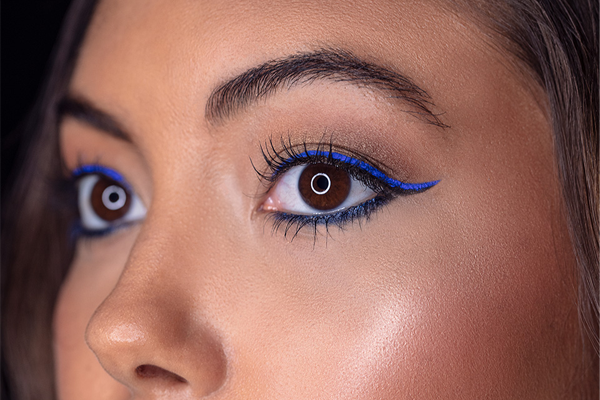
LED ring lights are a popular accessory when it comes to YouTube video lighting. They are mostly used as a key light for beauty vlogs, or any video where the subject is speaking directly into the camera. The circular shape reduces shadow and casts a bright, even light on your subject. They also add a pleasing circle of light to your subject’s eyes.

Courtesy of Westcott

Westcott’s 18-inch bi-color LED ring light comes with batteries and a stand, and can be mounted with a smartphone, DSLR, or mirrorless camera (up to 10lbs). It’s affordably priced at $199.90. 

Summary

Hopefully you now have a good idea of how to start a YouTube channel. We’ve touched on some of the gear you’ll need to get started, but when it comes to YouTube, creativity is the best tool at your disposal.

Which External Drive Should I Use? | SSD vs HDD

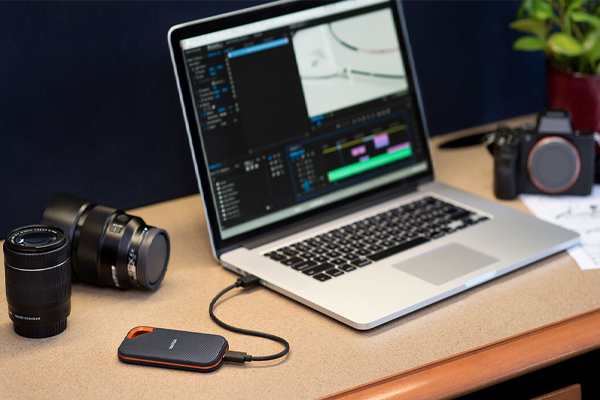
Data storage is a contentious topic, and critical to a successful project workflow.  If you’re planning to use an external drive, there’s an important decision you have to make. Do you want an SSD or HDD? Hard disk drives (HDD) are more commonly used, while a solid-state drive (SSD) is generally smaller, faster, and more expensive. However, the SSD vs HDD debate has intensified in recent years as more affordable SSDs like the Sandisk Extreme PRO Portable SSD V2 have been released.

If you’re not sure which type of external drive you should use, we’ve broken down the pros and cons of both below. But first, what’s the difference?

Hard Disk Drive (HDD)

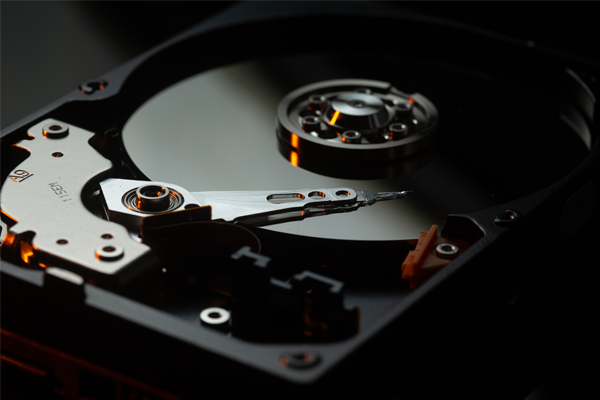
The internal mechanics of a hard disk drive
The internal mechanics of a hard disk drive | photo by Benjamin Lehman

A hard disk drive is a data storage system used in most computers and servers. A HDD uses moving electromechanical parts coated in magnetic material to read and write data. Most HDDs contain circular, flat disks made of glass or metal called platters. The platters rotate, while magnetic heads on a moving arm read and write data to the surface of each platter. The mechanism looks like a small, metallic record player. 

If you’ve used an external HDD before, you may have been warned to be careful about moving it, and not to move it at all when it’s in use. That’s because a physical jolt could potentially disrupt the moving parts as they are reading and writing data.  Imagine if you dropped an actual record player on the ground while it was playing music. Wouldn’t you be surprised if it continued playing? Similarly, if you’ve ever dropped a computer on the ground and experienced data loss, it’s because the mechanics of the internal HDD were damaged.

Solid State Drive (SSD)

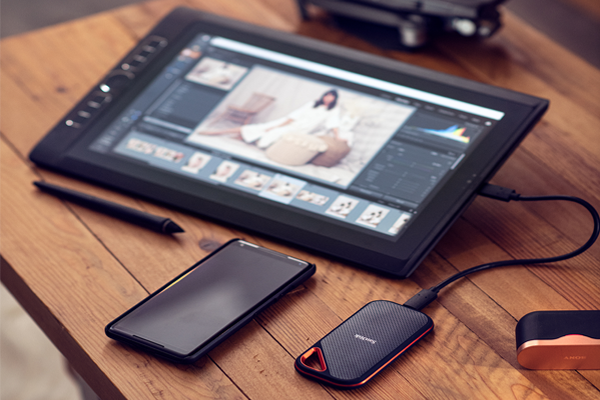
The SanDisk Extreme PRO Portable SSD V2 in use | Photo by Dani Diamond

A solid-state drive also stores data, however it uses different internal components.  The name, solid-state, references the fact that an SSD does not contain moving parts. Instead, an SSD uses two microchips: a flash memory chip that stores the data, and a controller chip. The controller chip manages the data and communicates with the computer or electronic device that’s using the SSD.

While they may not be as prolific as HDDs, SSDs are not new. The founders of SanDisk filed a patent for a flash-memory alternative to a magnetic disk drive in 1989, and released the first commercial solid-state drive in 1991. The SSD had a 20MB capacity and cost $1000. Today, SSDs have much larger capacities and much lower price tags. They are used inside smartphones, tablets, and some computers, including most Apple computers. 

SSD vs HDD

The obvious advantage of an SSD is the lack of moving parts. As a result, an SSD is physically smaller, and less susceptible to damage when it experiences a bump or shock. Using a microchip instead of an electromagnetic disk, an SSD can also read and write data faster than a HDD. 

The Extreme PRO Portable SSD V2 is SanDisk’s flagship solid-state drive. The SSD weighs 77.5g (0.17 lb), and comes in three sizes, 1TB, 2TB, and 4TB. The SSD is IP55 water and dust resistant, vibration resistant up to 1500G, and can withstand a drop from up to 2 meters. The Extreme PRO V2 also has a read and write speed of up to 2000 MB/s, twice as fast as the previous generation.  Each size costs $299.99, $499.99, and $899.99 respectively. 

Conversely, most HDDs have bulkier, heavier builds and much slower read and write speeds, approximately 130MB/s. They often have comparable water and drop resistance to SSDs, however this only applies when the HDD is not in use. The internal moving parts mean a HDD is more fragile when reading or writing data. The cost for a 1TB HDD ranges between $70-100.

The advantages of the SSD are clear. It’s smaller, more durable, and can read and write data at 15 times the speed of most HDDs.  Every project faces unique challenges, yet the Extreme PRO V2 is guaranteed to offer safer storage of your data and incredibly faster transfer times. 

SanDisk Extreme Pro Portable SSD V2 vs Other SSDs

Photo courtesy of SanDisk

The SanDisk Extreme PRO Portable SSD V2 also offers advantages over other SSDs. As mentioned, SanDisk recently released a new generation of this model with twice the read and write speed, up to 2000 MB/s. While there are SSDs on the market that technically offer a faster speed, they suffer a disadvantage. Data throttling.

Technical innovation means that SSDs can now read and write data at faster speeds. Consumers have also come to expect smaller, more portable bodies. As a result, SSDs are drawing more power within a smaller build, increasing the risk of overheating.  A 2015 study found that high temperatures wear down flash memory faster than heavy usage, and that cooler drives generally last longer. 

Most SSDs have built-in temperature sensors that enable them to identify when the drive is starting to heat up. After 10-20 minutes of use, they start to turn off in nanosecond intervals to cool down. While this process prevents overheating, it also slows the read and write speed of the drive. The process is called data or thermal throttling. The forged aluminum core of the SanDisk Extreme PRO SSD allows it to stay cool without throttling. That means it can sustain a faster read and write speed for longer than other SSDs on the market. 

Other benefits of the Extreme PRO V2 include 5-year limited warranty, compatibility with USB-C smartphones, and password protection backed by 256-bit AES hardware encryption. 

The Verdict

Unless you have strict budget restraints, there is a clear winner in the SSD vs HDD debate. Solid-state drives have a smaller build and will more safely store your data than a HDD. Technological innovation means new SSD models like the SanDisk Extreme PRO Portable SSD V2 can also sustain considerably faster read and write speeds than a HDD without overheating. When investing in an external drive, you may find that a dollar spent is worth more than a dollar saved.

Sigma 35mm f/2 DG DN Contemporary Lens Review

Sigma recently announced 3 new Contemporary lenses as part of the I Series, a collection of lenses for full-frame, mirrorless cameras. Thanks to Sigma, we were given early access to the new lenses, which include a 24mm f/3.5, a 35mm f/2, and a 65mm f/2. Here’s our Sigma 35mm f/2 DG DN Contemporary lens review. 

Build 

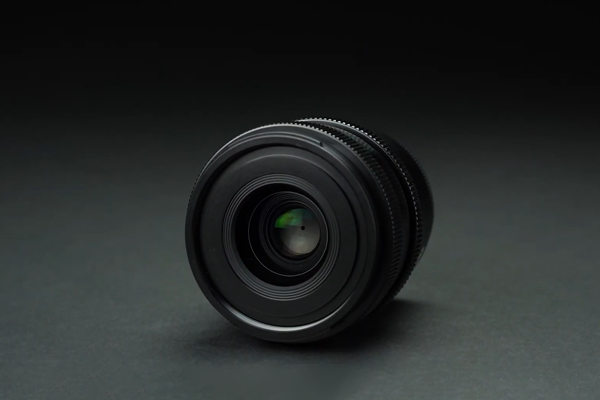
Sigma 35mm f/2 DG DN Contemporary LensSigma’s I Series is all about compact, high quality lenses. The 35mm f/2 DG DN Contemporary lens exemplifies this. The lens has a compact, metallic build that looks and feels great, as well as a ridged focus ring and aperture ring. There’s a switch on the side for toggling between autofocus and manual focus, but no lock switch or click switch for the aperture ring like you can find on some of Sigma’s Art lenses

The Sigma 35mm f/1.4 DG HSM Art lensy doesn’t have a lock switch or click switch either, although it does have a wider aperture. However, at 665g (23.5 oz), the 35mm Art lens is over twice as heavy as the new 325g (11.5 oz) Contemporary lens. 

Internally, the 35mm f/2 lens uses aluminum parts like Sigma’s Cine lenses. SLD glass and high-refractive index elements help to correct chromatic aberration, while three glass-molded aspherical elements suppress flare, field curvature, and other types of aberration.

Performance

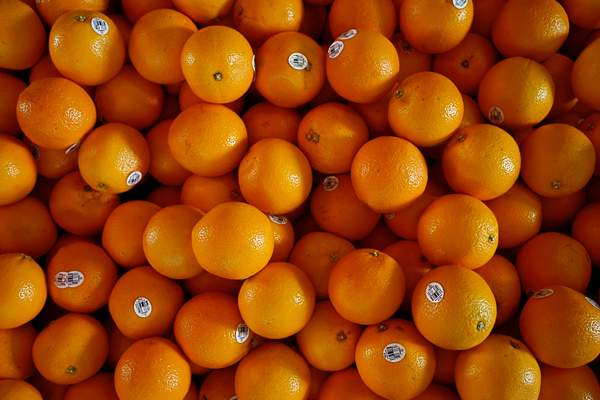
Photo of oranges taken using a Sigma 35mm f/2 DG DN Contemporary lens on a Sony a7 III
Photo taken with a Sony a7 III using the Sigma 35mm f/2 DG DN Contemporary lens

The lens is incredibly versatile. The wide 35mm focal length means you can use this lens for a variety of styles, from landscape to portrait photography. The 9-blade diaphragm and f/2 aperture means the lens also works well in low-light and delivers pleasing bokeh.

Using the lens with a Sony a7 III, we found it worked well with the camera’s fast autofocus. The lens’ minimum focusing distance is just 27cm, so you can also get pretty close to your subject without losing focus. The imagery we captured was sharp, detailed, and vividly colored.

Shooting into the sun at one point, we did get a small lens flare. However, the lens generally does a good job of suppressing it. We didn’t notice any other issues with aberrations, ghosting, or field curvature. 

Summary 

Overall, the Sigma 35mm F2 DG DN Contemporary is a great all-rounder lens that will pair well with any full frame L-mount or E-mount camera. The robust performance capabilities of the lens means it’s suitable for multiple different styles, while its compact build makes it easy to carry with you wherever you go. You can pre-order the lens now for $639.

Best Vlogging Cameras for Beginners 2020

Vlogging has steadily increased in popularity over the past 10 years.  In response, camera manufacturers have started releasing cameras specifically targeted at vloggers. In order to help out aspiring content creators, we’ve compiled a list of the best vlogging cameras for beginners that were released in 2020.

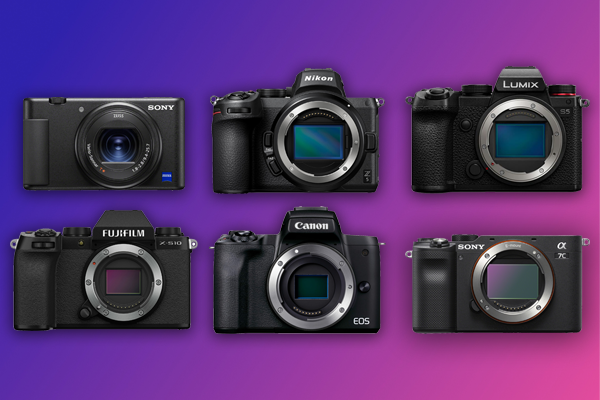
A good vlogging camera is powerful, portable, and easy to use. Mirrorless cameras are generally smaller than DSLRs, so it should be no surprise that every camera featured below is a mirrorless system. They’ve also all been optimized to make recording high quality video as easy as possible. Without further ado, here are 2020’s best vlogging cameras for beginners.

Sony ZV-1
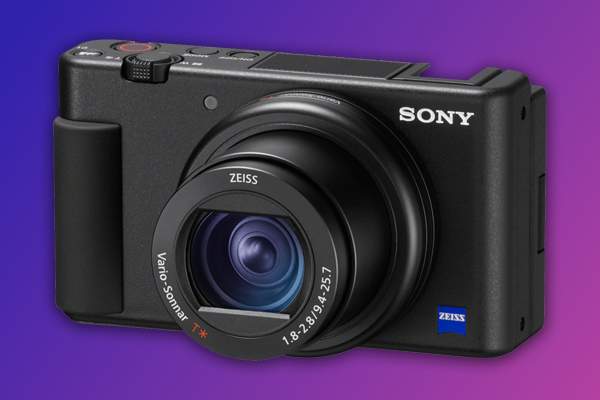
Sony ZV-1The Sony ZV-1 is an impressively small camera that weighs just 294g (10.4 oz) when loaded with a battery and memory card. While seasoned vloggers may prefer an interchangeable lens system, a fixed lens camera like the ZV-1 is great for beginners. With a 24-70mm focal length, you’ll be able to use it in most settings. The wide f/1.8-2.8 aperture range means the lens also works well in low light and produces a shallow depth of field and nice bokeh.

The camera has a flip-out vari-angle touch screen, large record button on top of the camera, and a recording light on the front. All that to say, it’s very easy to record yourself using this camera. Compatibility with Bluetooth grips like the Sony GP-VPT2GBT and impressive image stabilization means you can walk and talk while recording and still produce watchable footage.

One downside of the pocket-size camera’s build is that you can’t replace the battery or memory card while it’s attached to a tripod or grip. Battery life is also not ideal, at just 45 minutes per charge when recording multiple video clips.

Image quality, however, is fantastic. The ZV-1 has high frame rate capabilities for slow motion recording, and can output 4K video with full pixel readout.  From a skin smoothing feature to smart auto-exposure adjustment, the camera is additionally loaded with intelligent settings that will make your videos look incredible.

Meanwhile, the camera’s built-in 3 capsule microphone records remarkably clear audio. A windscreen is included so you can record effectively outside, too.

The Sony ZV-1 is the ultimate point & shoot camera, and can be purchased now for $698. Compactly built and loaded with features, you’ll be amazed at how easy this camera makes it to produce professional grade videos.

Canon EOS M50 Mark II
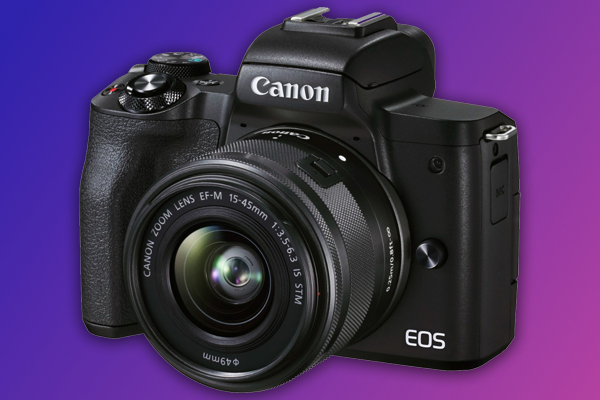
Canon EOS M50 Mark IIFirst released in 2018, the Canon EOS M50 went on to become one of the best-selling mirrorless cameras of all time. The Canon EOS M50 Mark II was recently announced, expanding on its popular predecessor to offer features specifically catered to vloggers and content creators.

The M50 Mark II has the same compact build, powerful APS-C sensor, and image processor as the original M50. The camera can output 4K UHD 24p video and up to 120p HD video for slow motion. 

One of the enhancements made for the Mark II is an improved autofocus system. The Mark II has strong eye and facial detection autofocus, which can now be used when the camera is in AI Servo AF mode. That is, the camera’s autofocus mode that enables it to track a moving subject. On the M50 Mark II, you can use the AI Servo AF mode when shooting videos as well.

Another new feature is the record button on the camera’s flip-out, vari-angle LCD touch screen. This makes it easier to use the camera to record yourself. The camera also has a feature that helps you produce vertically-oriented video for social media platforms like Instagram. Wi-Fi and Bluetooth connectivity means that images and videos can be easily transferred from the camera to your smartphone using Canon’s Camera Connect app. You can also easily use the camera as a webcam. 

Check out our post comparing the M50 Mark II to the original M50 for a more detailed breakdown of their differences, and why the M50 Mark II is a great choice for vloggers. You can also pre-order the camera now for $599. Did we mention that it also comes in white?

Panasonic LUMIX S5
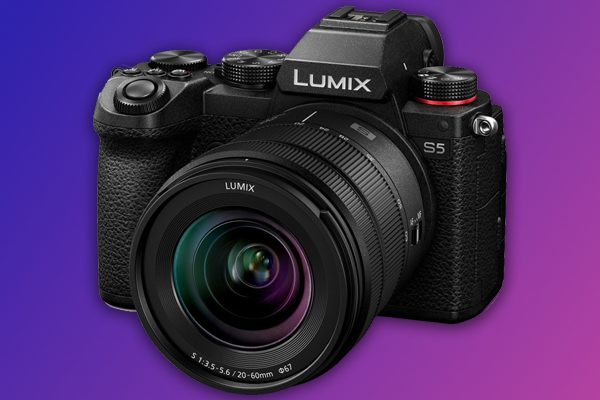
Panasonic LUMIX S5When the Panasonic LUMIX S5 was first announced in September, we knew we were in for a treat. At $1,997.99, it’s the priciest camera in this list. However it’s also arguably the most powerful. 

The 24.2MP full-frame camera offers an incredible photo and video performance. The LUMIX S5 can record 4K Full HD 60p 4:2:0 10-bit video internally, albeit with an APS-C sized crop. Plus, an optimized heat dissipation system allows the camera to handle unlimited 4K recording (at 30p 4:2:0 8-bit). V-Log/V-Gamut compatibility means the camera offers over 14 stops of dynamic range, while High Resolution mode allows you to capture incredibly detailed 96MP imagery. The camera also offers an impressive extended ISO range, from 50 up to 204,800. 

High resolution mode and a flexible ISO and dynamic range means the S5 is great for astrophotography. The Live View Composite mode feature is also great for capturing vivid long exposures of the night sky.

Other nice features include 5-axis in-body image stabilization, 2 memory card slots, and an ergonomic, weather-sealed build. While the autofocus is not a crowning feature, it has been improved since earlier LUMIX models like the S1. Ultimately, there’s plenty to love about the LUMIX S5. 

Nikon Z 5
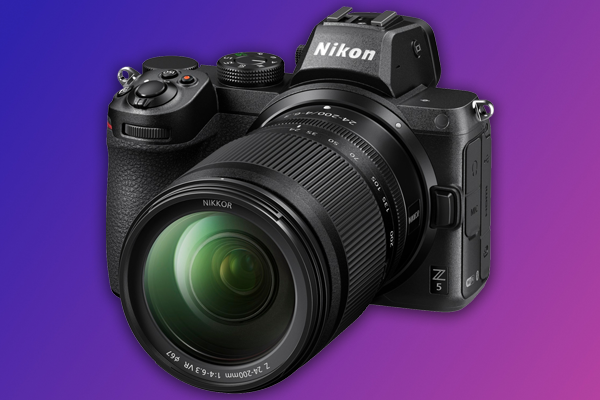
Nikon Z 5The Nikon Z 5 has been marketed as an entry-level full-frame camera. The camera is an optimal blend of functionality and simplicity that’s perfect for beginners.

A 24.3MP sensor and EXPEED 6 image processor enable the Z 5 to record 4K UHD video at 30p, and 1080 HD video at 60p. The camera outputs detailed, sharp imagery. An expandable ISO range up to 102,400 means the camera also works well in low light.

The camera is equipped with many of the same features as a high-end full frame camera. There’s 2 UHS-II SD card slots, a quad VGA electronic viewfinder, and 5-axis image stabilization (when the camera is used with a Nikkor Z lens). The camera also has a tilting touch screen, albeit one that lacks the flip-out flexibility of a vari-angle screen. 

Featuring a 273-point autofocus system with eye detection functionality, the Z 5 does a great job of keeping your subject in focus, even if it moves around the frame. Combined with the camera’s image stabilization and electronic vibration reduction, the Z 5 is great for shooting video. You can also capture stills while recording. 

At 590g (20.9 oz), the camera is very portable, with a weather-sealed, magnesium alloy shell.You won’t have any issues taking the camera with you wherever you go, especially if you’re planning to go viral. You can grab the camera now for $1,196.95

Sony a7C

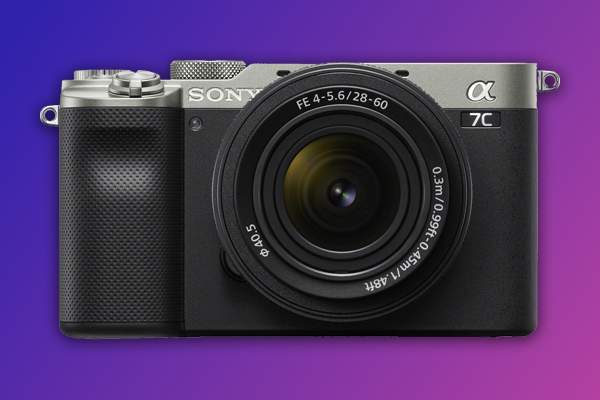
Sony a7CAt 509g (17.95 oz), the a7C is Sony’s smallest full frame camera. In fact, it’s one of the smallest full-frame camera systems in the world.

The a7C uses a 24.2MP full-frame sensor and BIONZ X processor to record 4K 30p 4:2:0 8-bit video internally with full pixel readout. The high resolution sensor gives the camera 15 stops of dynamic range and the ability to work well in low light.  The (expanded) ISO range of 50 to 204,800 also helps. The camera produces fantastic imagery, with excellent color reproduction and low-noise. 

The a7C is equipped with 5-axis in-body image stabilization and a powerful autofocus system. You’ll be pleasantly surprised at the sharp, stable video you can record while using the camera handheld. When recording with a wide-aperture lens, the camera can also capture deep, aesthetically pleasing bokeh. 

Offering fantastic functionality and an incredibly small build, the Sony a7c is a great choice for vloggers that value portability and performance in equal measure. You can purchase the camera now for $1,798 in black or silver, or read our full review here.

Fujifilm X-S10
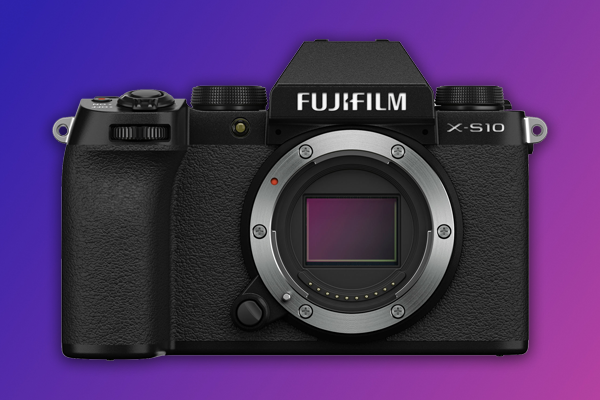
Fujifilm X-S10The X-S10 is the latest addition to Fujifilm’s X series, and a great option for vloggers. The 26.1MP APS-C camera has a compact, ergonomic build and delivers a powerful photo and video performance. You can order the camera now for just $999.

Most Fujifilm cameras have a layout that emphasizes manual control. The X-S10 employs a simpler design that makes the camera easy to use. The camera has automatic and semi-automatic modes that aren’t featured on models like the X-T4 and X-T30. However, it does have the same sensor and image processor, enabling it to deliver high quality imagery.

Color reproduction on the X-S10 is outstanding, with 18 film simulation modes that will help you capture incredible visuals. When it comes to video, the camera can record 4K 30p 4:2:0 8-bit video internally with no crop, and can go up to 240fps in full HD for slow-motion. The X-S10 can handle recording for up to 30 minutes continuously. Meanwhile, the fast hybrid autofocus system features face and eye detection. It will keep your subject sharp, even in very low-light. 

The X-S10 is extremely portable. The camera weighs just 465g (14.6 oz) when loaded with a battery and memory card. There’s a flip out vari-angle touch screen, 5-axis in-body image stabilization, and the all metal frame feels durable, although it does lack weather sealing. There’s also only one memory slot, for UHS-I SD cards. 

The X-S10 is incredibly functional, and Fujifilm have made a concerted effort to make it as easy to use as possible. Not bad for a camera under $1K. As we concluded in our full review, the Fujifilm X-S10 is a high quality, low cost camera. You’ll be glad you chose it to help you make your vlog.

Summary

This concludes our list of the best vlogging cameras for beginners. If making a vlog is one of your goals for 2021, make sure to add one of the cameras above to your holiday wish list. 

The Sigma I Series | A New Range of Full-Frame, Mirrorless Lenses

Three new lenses were announced today as part of the Sigma I Series, a new collection of full-frame, mirrorless exclusive lenses. In addition to the three new lenses, the I Series includes the Sigma 45mm F2.8 DG DN lens, which was released last year. The three new lenses are a 24mm F3.5 DG DN, a 35mm F2 DG DN, and a 65mm F2 DG DN. Courtesy of Sigma, we were given a sneak peek at the I Series, and we’ve compiled everything we know so far below.

About the Sigma I Series

The I Series offers a range of high quality, competitively-priced prime lenses for L-Mount and Sony E-mount cameras. Built to the same standards as Sigma’s Cine lenses, the I Series lenses have a stylish, high-end look and feel. All lenses in the series have a durable, metallic build with ridged, easy-to-grip focus and aperture rings, and dust and splash-proof sealing. 

It’s important to note that the I Series is not a new product line alongside Sigma’s Art, Sports, and Contemporary lines. The four lenses that currently make up the series are all Contemporary lenses. However, Sigma may also add Art and Sport lenses to the series in the future. 

The series was developed to offer mirrorless, full frame camera owners more compact, high quality lens options. We’ve delved deeper into the individual lenses that make up the series below. 

Sigma 24mm F3.5 DG DN Lens

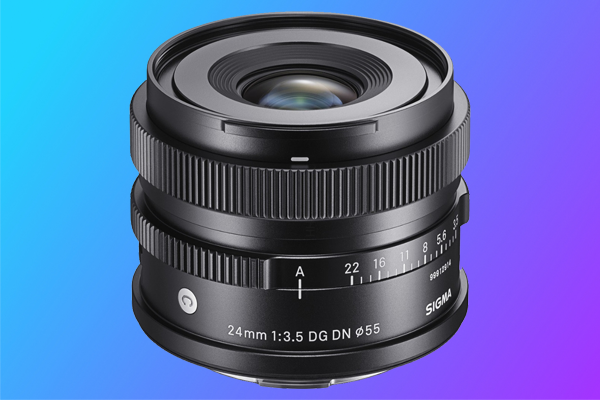
Sigma 24mm F3.5 DG DN LensThe Sigma 24mm F3.5 DG DN lens is a lightweight, high-performing wide-angle lens. The lens is remarkably small considering its sophisticated optical construction that uses SLD glass and glass-molded aspherical elements. It’s the perfect partner to a powerful yet petite camera like the Sony a7C. Paired together they are one of the smallest full frame camera systems in the world. 

The 24mm F3.5 DG DN outputs impressive visuals with edge-to-edge sharpness and eye-pleasing bokeh. A minimum focus distance of 10cm and a maximum reproduction ratio 1:2 means you can also use the lens effectively for both landscape and close up photography.  The lens’ smooth focus drive technology enables it to work well with fast autofocus systems, while its fast, quiet motor means the lens works great for video too. The 24mm F3.5 DG DN is an impressively powerful lens, which is all the more incredible given its size.  You can pre-order the lens now for $549. 

Sigma 35mm F2 DG DN Lens

The Sigma 35mm F2 DG DN Contemporary lens is just as impressive. Like the other lenses in the series, it has a compact, durable, metallic body, while SLD glass, high-refractive index elements, and glass-molded aspherical lenses in the internal construction of the lens help suppress aberrations, field curvature, flare, and ghosting. 

The versatile 35mm focal length and wide maximum aperture means this lens works great for a variety of styles. It’s now available for pre-order for $639. Check out our Sigma 35mm F2 DG DN review video below for more information about this lens.

Sigma 45mm F2.8 DG DN

The 45mm F2.8 DG DN Contemporary lens was released last year, however it still embodies the core design features of the Sigma I Series. That is to say, it’s a high quality, high performance lens with a compact build. 

45mm is a relatively rare prime focal length, but don’t think that means you’ll only use this lens occasionally. Slightly wider than everyone’s favorite lens, the nifty-fifty, the 45mm F2.8 lens is arguably more robust, without the risk of distortion that can come with a 35mm or wider focal length. You’ll be comfortable using this lens for everything from street to still life photography. 

The lens is also incredibly light, weighing just 215g (7.5 oz), making it easy to carry with you everywhere. This is great considering it’s impressive performance capabilities. This everyday lens also has a fairly low-cost price tag of just $449.

Sigma 65mm F2 DG DN

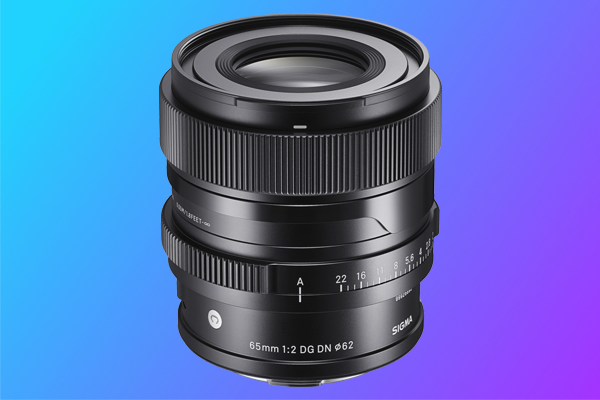
Sigma 65mm F2 DG DN LensAs the longest lens in the I Series, the Sigma 65mm F2 DG DN does not disappoint. Like its siblings, the telephoto lens has a compact, durable build and impressive performance potential. The lens captures beautiful, ultra sharp imagery, even at its maximum F2 aperture. 

The 65mm focal length produces a narrow field of view and shallow depth of field that makes for excellent portraits and cinematic video. Internally, glass-molded aspherical lenses correct comatic and spherical aberration, helping the lens to produce large, circular bokeh.  Similarly, SLD glass is used to correct axial chromatic aberration, which can be more noticeable in telephoto lenses. 

Prime lenses can often feel restricting. However, that’s not the case with the 65mm, nor any of the lenses in the Sigma I Series. Satisfying bokeh and a compressed perspective allow for aesthetically pleasing visuals, whether you’re photographing a subject that’s close by or faraway. Considering the versatility, compact build, and performance power of the lens, its pre-order price of $699 is a great deal. 

Which Lens Should I Buy?

If you only have room in your budget for two of the I Series lenses, make them the 24mm and the 45mm. Together, they provide a nice focal length spectrum that will cover you for most situations. Both lenses also have the same filter size, 55mm, and don’t weigh very much, so carrying them around in your bag won’t be burdensome. 

If you only have the budget for one lens, go with the 35mm. It’s a great all-rounder lens, capable of producing rich, detailed visuals whether you’re snapping scenery or photographing portraits. Of course, if you know you’ll be photographing landscapes more often, you may prefer the 24mm, the widest lens in the series. It’s still versatile enough that it can handle other styles as well. Likewise, if you’ll mostly be photographing people, the 65mm captures flattering imagery. 

Whether you’re a pro looking to expand your collection of prime lenses, or a beginner looking to purchase your first, there is a Sigma I Series lens that’s perfect for you. All four lenses in the series have high quality performance capabilities, a lightweight yet durable build, and are remarkably well priced. You’ll be happy with any lens from the Sigma I Series.

Sony Lens Buying Guide | A Sony Lens for Every Style

Choosing the right lens is one of the most important decisions you’ll make as a photographer. While it’s great to have options, the variety of lenses available can make it difficult to decide which one is best. In particular, photographers and videographers that use a Sony camera have a wide range of high quality Sony lenses to choose from. This Sony lens buying guide seeks to help you identify which lens is best for you based on what you like to shoot.

Lens Mount & Sensor Size

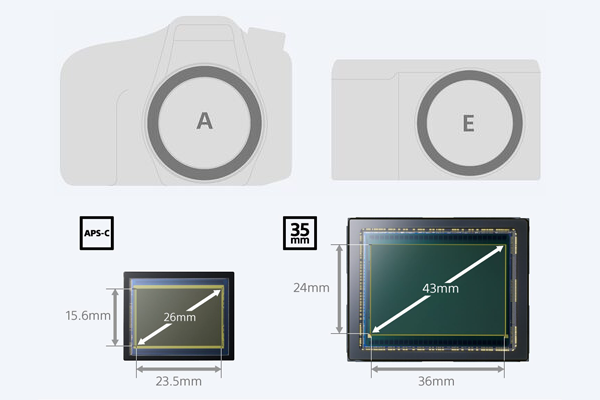
Graphic displaying the difference between A-mount and E-mount cameras and full-frame and APS-C sensors
A graphic displaying the difference between Sony A-mount and E-mount cameras, and full frame and APS-C format sensors | Courtesy of Sony

Sony makes lenses for two different lens mount systems,  A-mount and E-mount. The A-mount is standard on Sony’s Translucent Mirror cameras, while the E-mount is used by their range of mirrorless camera systems. Both A-mount and E-mount cameras use full frame and APS-C sensors, and there are lenses available for both formats. Generally you can use an APS-C-format lens on a full frame camera, although the resulting imagery will be cropped. Full-frame lenses should not be used on APS-C cameras. 

Prime vs Zoom Lenses

Every camera lens is either a prime or a zoom. A prime lens has a fixed focal length (e.g. 50mm), while a zoom lens offers a focal length range (e.g. 24-70mm). Because prime lenses are optimized for a specific focal length, they are capable of capturing sharper, better quality imagery. They’re also lighter and typically more expensive. A zoom lens is more versatile, allowing the photographer to use different focal lengths without having to carry around multiple lenses. The compromise is a heavier build and slight decline in image quality.

Professional photographers tend to prefer prime lenses. They generally have a good idea of what focal length they need, so it makes sense to prioritize image quality over focal length flexibility. Similarly, zoom lenses are great for beginners as they allow them to experiment with different focal lengths and are usually more affordable. However, most photographers and videographers have at least one lens of each type. Sony manufactures both zoom and prime lenses.

Portrait Photography 

Photo by Vivek Trivedi

Most portrait photographers use a telephoto or long-focus prime lens with a wide aperture. A longer focal length, between 80-200mm, is ideal for portrait photography as it more realistically represents your subject, and allows you to stand at an appropriate distance from your subject, even when capturing a close-up shot. 

While you can use a wider focal length, proceed with caution. Anything wider than 50mm may result in distortion, which is not ideal when you’re photographing someone’s face. A longer focal length is more flattering, making your subject look thinner. 

You should also use a lens with a wide aperture. A wide aperture will let more light into the shot and can add some visually pleasing bokeh to the background. Check out our post about the basics of portrait photography for more tips about this style.

Lens Recommendations

If you’re shooting on a full frame, E-mount camera such as the a7S III, a7 III, or a7R IV, the Sony FE 85mm f/1.4 G Master prime lens is a great choice. 85mm is an excellent focal length for portraits, accurately capturing your subject while allowing you to take close-up photos without standing too close. The wide aperture also enables a very shallow, visually pleasing depth of field. The lens produces vivid, sharp imagery that will make your subject look great. 

The 85mm f/1.4 lens is currently priced $1,798, but don’t fret if this is out of your budget. Sony makes another 85mm E-mount lens with a f/1.8 aperture and a more affordable $568 price tag. Weighing 13.1 oz (371g), it’s less than half the weight of the 29 oz (820g) G Master lens. The 85mm f/1.8 lens also has a faster autofocus. However, the G Master lens outputs a slightly better image quality. The lens’ wider, f/1.4 max aperture enables it to perform better in low-light and produces a creamier bokeh.  

Another alternative is the Sony FE 70-200mm f/2.8 GM OSS lens. The best thing about this lens is that it gives you the focal length flexibility of a zoom lens, yet still manages to produce incredibly sharp imagery throughout the focal range. However, at 52.21 oz (1.48kg), it’s also considerably heavier than the 85mm prime lenses. 

If you’re using an APS-C E-mount camera like the Sony a6000, you can still use either of the above lenses, though they will be subject to a 1.5x crop. If you use an A-mount camera, the Sony 70-200mm f/2.8 G SSM II lens is a powerful zoom lens that works great for portrait photography.  

Landscape Photography

Photo by Bence Balla-Schottner

A wide focal length is much better suited to landscape photography. Wide angle lenses allow you to capture a large field of view, producing imagery with a longer depth of field. As a result, when photographing a picturesque landscape you’ll be able to include more scenery in your frame while also maintaining focus. 

One downside of a wide focal length is distortion. The field of view of the human eye is generally considered to be consistent with a 50mm focal length. Therefore, anything wider will produce imagery that looks slightly unnatural to the human eye. However, it’s relatively negligible in landscape photography until you go lower than 20mm. Distortion is also not always bad, and can be used to capture visually interesting photographs.

You can also use a telephoto lens to great effect in landscape photography. A telephoto lens is defined by having a focal length that’s longer than its physical length.  Therefore, they typically have focal lengths of 70mm or higher. The benefit of using a telephoto lens in landscape photography is that you can photograph a large, faraway subject in intricate detail. It’s better suited to photos focused on a specific landmark rather than a vast landscape. 

For landscape photography, a high quality zoom lens is recommended over a prime. In portrait photography, a prime lens makes sense because it’s easy to adjust the distance between you and your subject. That’s not so simple when your subject is a mountain range or a sunset. It’s not very convenient to carry multiple lenses if you’re hiking to a scenic viewpoint. Worse, if you only have a single prime lens and the focal length isn’t right, you may need to walk a long distance to make it work. A versatile zoom lens is far more convenient.

Lens Recommendations

The Sony FE 16-35mm f/2.8 GM is an exceptional E-mount, full frame lens for landscape photography. The wide-angle zoom lens captures beautiful, sharp imagery throughout its focal range, while its f/2.8 aperture allows it to work well in low-light and produce decent bokeh. If you use an A-mount camera, the Sony 24-70mm f/2.8 ZA SSM II Vario Sonnar T* lens is an equally strong choice. 

The 16-35mm is a full-frame lens, and while you can technically use it on an APS-C camera, it’s not recommended. Sony G Master lenses are a premium range, and the lenses have price tags that match their high quality build. Using the lens on an APS-C camera means cropping the lens to the equivalent of a 24-52mm focal length. You may as well invest in an APS-C lens that better suits your camera, like the Sony 16-55mm f/2.8 G lens.  

If you’re more interested in capturing faraway subjects in close detail, a telephoto zoom lens is more appropriate. The Sony FE 70-200mm f/2.8 GM OSS lens we recommended above for portraits is a telephoto lens, and can also be used for landscape photography. If you’re using an A-mount camera, the Sony 70-200mm f/2.8 G SSM II lens is another powerful, telephoto zoom lens. 

Still Life Photography

Photo by Alisa Anton

Still life photography is the art of photographing an inanimate subject. For example, photographing a clock on the wall of your house, or a potted plant that sits on your desk. Product photography and food photography are sub-genres of still life photography. 

Compared to landscape and portrait photography, still life photography is the easiest style to get creative with your composition. Because your subject is an inanimate object instead of a person or a scenic vista, it’s easier to adjust everything in your frame to produce a pleasing image. Still life photography is all about the mise-en-scène, a french cinematography term that essentially refers to everything that’s in frame. 

A wide-angle lens is not ideal for still life photography as per the risk of distortion. Sometimes you may have a lot to capture in frame, but it’s advised you don’t go any wider than 35mm. Often, you’re photographing a small, inanimate subject in close proximity, so a longer focal length makes sense. A longer focal length means a larger working distance, i.e. the distance between your lens and your subject, so you don’t have to stand too close. 

Macro photography is technically a different style, however a macro lens can still be used effectively in still life photography. Macro lenses have a 1:1 magnification ratio, and are designed to capture sharp, detailed photographs of small subjects. 

Lens Recommendations

The Sony 90mm f/2.8 Macro G OSS is a full-frame Sony E-mount lens that works great for macro and still life photography. As a prime, the lens is designed to capture ultra sharp imagery at the 90mm focal length, and it does. The narrow field of view and wide aperture mean you can capture some really nice imagery using this lens. It’s perfect for the shots where you want to be up close and personal with your subject. 

If you want something wider, the Sony Distagon T* FE 35mm f/1.4 ZA is an incredibly versatile full-frame E-mount lens. Yes it’s wide, but not so wide that it will add unnatural distortion to your imagery. It’s a great lens to use if you need to capture multiple objects together in a single frame. The remarkably wide aperture means it also works great in low-light, and generates superb bokeh. However, the best thing about this lens is that you can use it effectively in a studio product shoot then immediately take it outside and use it to capture a great photo of the sunset. It’s a great all-rounder lens. 

Other Lens Recommendations

Ask any professional photographer what their first lens was and they’ll probably say a ‘nifty-fifty’. That is, a 50mm prime lens with a wide aperture. It’s a great lens for finessing your photography skills for multiple reasons. Firstly, as we mentioned earlier, the 50mm focal length produces imagery that most closely resembles the field of view of the human eye. Additionally, a wide aperture creates a shallow depth of field, resulting in a creamy, bokeh-filled background that makes your subject stand out. It’s a great lens to use for a variety of styles. 

Another benefit of a nifty-fifty is that there is a wide spectrum of options, stretching from budget-friendly to high-end. Sony alone makes multiple 50mm lenses. There’s the $1,498 Sony Planar T* FE 50mm f/1.4 ZA lens or the more affordable $248 Sony FE 50mm f/1.8 lens for full-frame, E-mount cameras. There’s also a $348 Sony FE 50mm f/1.8 lens for APS-C E-mount cameras.   

Summary

The purpose of this Sony lens buying guide was to highlight some of the best Sony lenses currently available, and to help explain how different lens specifications can have an impact on your photos. Understanding how focal length, aperture, and other specs impact your photos will ultimately help you become a better photographer. Lens consideration is a critical component of planning a shoot, and whether you’re taking a portrait, landscape, or still life photograph, there’s a Sony lens available that’s right for the occasion.

Focusrite Clarett vs Scarlett 3rd Gen | Audio Interface Comparison

According to Focusrite, their Scarlett range of audio interfaces has helped produce more records than any other range of interfaces in history. However, Focusrite also manufactures another line of USB interfaces. The Clarett range includes 3 interface models and is also relatively popular with musicians, producers, and audio engineers. But what’s the difference between the two? We compared the Focusrite Clarett vs Scarlett (3rd generation) interfaces to find out.

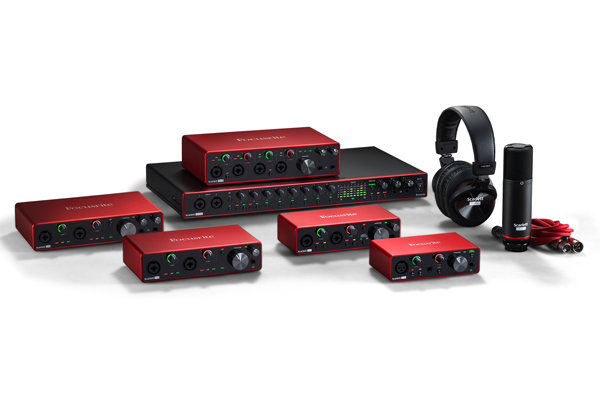
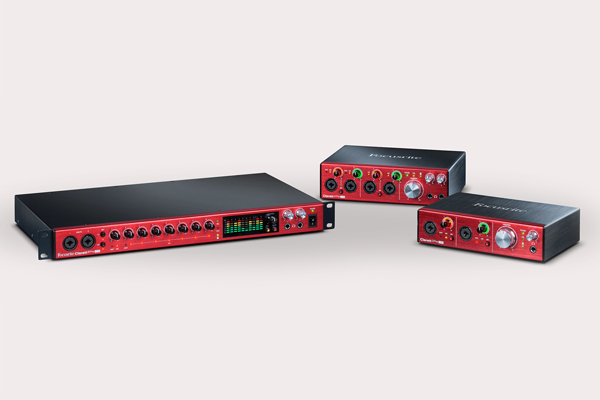
The Focusrite Clarett interfaces include the 2Pre, 4Pre, and the 8Pre. The Scarlett interfaces include the Solo, 2i2, 4i4, 8i6, and the 18i20.

Inputs/Outputs

Focusrite Scarlett 3rd Generation
Focusrite Scarlett 3rd Generation | Image courtesy of Focusrite

Before you decide on a range, it’s important to consider how many inputs and outputs you’ll require. There are six Scarlett audio interfaces to the Clarett’s three, with more options for consumers that don’t require as many inputs and outputs. 

For example, let’s take a look at the Scarlett Solo, the most affordable Scarlett audio interface. The Solo has 1 XLR preamp, 1 line level input, and 2 balanced line outputs. It’s a great option for a musician or vocalist who only ever needs to record a single input. It’s currently available for just $109.99. 

Conversely, the smallest Clarett audio interface is the Clarett 2Pre. This 10-in 4-out interface has 2 combo mic/instrument/line level XLR inputs, 1 stereo loopback input, 1 optical ADAT input (allowing you to add 8 additional inputs), 1 5-pin MIDI input/output, and 4 balanced line outputs.  It’s currently priced $439.99. 

Comparing the Scarlett Solo and Clarett 2Pre indicates a key difference between the two ranges. With a wider range of input/output options, the Scarlett range has more mass market appeal. In fact, as we pointed out in our Scarlett interface comparison post, the key differentiator between Scarlett models is the number of inputs and outputs per interface.

Clarett is different. With fewer models starting at a higher price point, Clarett is a high-end range targeted at musicians and artists that require more inputs and outputs and a higher quality recording. This is more evident when comparing the audio recording specs of both ranges. 

Sound Quality

Focusrite Clarett range
Focusrite Clarett | Image courtesy of Focusrite

The specs suggest that Clarett interfaces can record sound at a higher quality. If you were to record sound using an interface from each range and listen back, you may even hear the difference. But it’s worth noting that interfaces from both ranges convert sound at a professional grade quality of 24-bit/192 khz.

The frequency response on Scarlett interfaces is 20hz-20khz, while the maximum mic input level (at minimum gain) is +9dBu. Clarett interfaces can record a response from 20hz-35khz, and a maximum mic input level of +18dBu. Similarly, the Solo preamps have a gain range of 56 dB and a dynamic range of 111dB A-weighted, while the Clarett preamps reach 57 dB of gain and a maximum input level up to 119 dB A-weighted.

These differences translate to a higher headroom on the Clarett interfaces, allowing them to handle higher input levels without distortion or clipping. The headphone output on Clarett interfaces also has a higher maximum output level of 16 dBu to the Scarlett’s 7dBu. This ensures you can hear the additional detail you’re recording via a Clarett interface. 

Similarities

As mentioned, All interfaces from both ranges convert at the same rate up to 24-bit/192 khz, and also offer Air mode on at least 1 input. Air mode is an optional feature that boosts high frequencies to enhance sound quality, particularly for vocal or acoustic recordings. 

Interfaces from both ranges also have a similar look and feel and a portable, lightweight build. The Scarlett 18i20 and Clarett 8Pre differ slightly from their siblings. The 18-in, 20-out interfaces have a long, thin build and attachable ears for easy racking in a studio.

Verdict

Focusrite offers 9 great audio interfaces across two ranges. However, the best audio interface for you depends on your personal requirements. The Scarlett range provides you with a wider variety of options starting at a lower price point. Clarett interfaces offer more inputs and outputs and stronger recording capabilities.

Whatever you personally decide is best between the Focusrite Clarett vs Scarlett ranges, there’s a Focusrite audio interface that’s right for you.

Leica Q2 vs Q2 Monochrom vs M10 Monochrom | Leica Camera Comparison

Today Leica announced the release of the Q2 Monochrom, their latest black & white camera. Following the M10 Monochrom, the Q2 Monochrom is the second monochrome camera Leica has released this year. As you may have guessed, the new camera is also closely related to the Leica Q2. We decided to compare all three cameras (Leica Q2 vs Q2 Monochrom vs M10 Monochrom) to help prospective customers determine exactly which Leica model is right for them.

Sensor

Photograph taken on Leica Q2 Monochrom
Photograph taken on Leica Q2 Monochrom | F8, 1/800s, ISO 200 | Photo courtesy of Leica Camera

All three cameras have high resolution, full frame CMOS sensors. The Leica M10 Monochrom has a 40MP sensor, while the Q2 and Q2 Monochrom have a 47.3MP sensor. However, the sensors on the Q2 Monochrom and M10 Monochrom cameras are also monochrome. This enables them to produce imagery at an even higher resolution, albeit only in black and white. 

Let’s quickly explain why that’s the case. Camera sensors create color in photographs using a color filter array (CFA). Most sensors use a Bayer CFA, a grid of alternating red, green, and blue pixels, to add color to your image. As a result, each pixel in the resulting photograph is only capturing one-third of the light because each pixel can only replicate its specific color (a red pixel can’t display blue light). Monochrome sensors don’t use a CFA, allowing them to capture light in every pixel and produce more detailed imagery.

The additional light and detail in imagery generated by a monochrome sensor equates to a small increase in resolution. That means the Q2 Monochrom technically produces imagery closer in resolution to the 64MP Leica S3 than the Q2. The M10 Monochrom produces imagery at about the same resolution as the Q2.

Build

The new Leica Q2 Monochrom
The new Leica Q2 Monochrom | Photo courtesy of Leica Camera

The Q2 and Q2 Monochrom share the same small, lightweight build. They weigh 734g (25.3 oz) when fitted with a battery, and have a fixed Summilux 28mm f/1.7 ASPH. lens. The sensor is the key distinguishing factor between them. Leica describes the Q2 Monochrom as the first, full frame compact camera ever to be made with a dedicated monochrome sensor.

The M10 Monochrom weighs 660g (23.3 oz) with a battery. However, it’s not a fixed lens system. Once fitted with a lens, it weighs more than the Q2 and Q2 Monochrom. The camera is compatible with M Lenses, and R lenses with an adapter.

All three cameras have a magnesium frame with a stylish matte black finish, although only the Q2 and Q2 Monochrom have weather sealing. Additionally, only the Q2 wears Leica’s signature red logo on its front. Like the M10 Monochrom, the Q2 Monochrom omits color, using gray, white, and black fill for all engravings.

Performance

As mentioned, all three cameras can produce high resolution imagery and can work well in low-light. The monochrome cameras have a small advantage, capable of reaching a higher ISO (100,000) without generating too much noise.

While the fixed 28mm lens on the Q2 and Q2 Monochrom cameras has some restrictions, its wide max aperture (f/1.7) and digital zoom capabilities mean it can handle most styles of photography. While either one will be the most expensive point-and-shoot camera you’ll ever buy, that’s not to say you aren’t getting value. It’s an optimistic view, but it can be refreshing not to have to carry around extra lenses, or worry if you’re using the right one. The versatility of the fixed lens means you can capture great photos in most settings. Plus, like their cameras, Leica lenses are extremely high-end, so you’ll save money in the long run. If you don’t want to limit yourself to a single lens, however, the M10 Monochrom is the easy choice.

It’s important to mention that the M10 Monochrom is strictly for manual photographers. The camera has no autofocus nor video capabilities. Both the Q2 and Q2 Monochrom, however, can output 4K video and have fast, accurate autofocus, including tracking and face detection functionality. Additionally, they have a continuous shooting rate of 10fps. The M10 Monochrom maxes out at 4.5fps. 

While the price tags on all three cameras may scare away some customers, you can’t deny their performance potential. Despite their simple, elegant design, all three cameras have the capacity to output outstanding visuals. Leica has mastered the art of simplifying functionality to benefit their customers, ensuring you never feel like you’re paying more for less.

Leica Q2 vs Q2 Monochrom vs M10 Monochrom Spec Comparison

Comparing the specs side-by-side helps clarify the differences between the three cameras.

Leica Q2Leica Q2 MonochromLeica M10 Monochrom
Sensor47.3MP Full Frame CMOS Sensor47.3MP Monochrome Full Frame CMOS Sensor40MP Monochrome Full Frame CMOS Sensor
ISO50 - 50,000100 - 100,000160 - 100,000
Lens CompatibilityFixed Lens - Leica Summilux 28 f/1.7 ASPH., 11 elements in 9 groups, 3 aspherical elementsFixed Lens - Leica Summilux 28 f/1.7 ASPH., 11 elements in 9 groups, 3 aspherical elementsCompatible with Leica M Lenses, R Lenses with Adapter
Memory Card Slots111
Storage TypeSD/SDHC/SDXC memory cards. Recommendation: UHS II memory cardsSD/SDHC/SDXC memory cards. Recommendation: UHS II memory cardsSD cards up to 2GB/SDHC cards up to 32GB/SDXC cards up to 2TB
Continuous ShootingSelectable: 10/5/3 fps (H/M/L)Selectable: 10/5/3 fps (H/M/L)Approx. 4.5 pictures/s
Viewfinder3.68MP OLED Electronic Viewfinder3.68MP OLED Electronic ViewfinderBright-line Optical Viewfinder
4K VideoYesYesNo
Battery Life (CIPA-Standard)350 shots350 shotsNo Rating
Built-In Wi-Fi & FOTOS App CompatibilityYesYesYes
Weather SealingIP52 Protective Sealing Against Dust and SpraywaterIP52 Protective Sealing Against Dust and SpraywaterNo
Dimensions (W x H x D)130 x 80 x 91.9 mm130 x 80 x 91.9 mm139 x 38.5 x 80 mm
Weight (with battery)734g (25.3 oz)734g (25.3 oz)660g (23.3 oz)
Price$4,995 $5,995 $8,295

Verdict

Comparing the Leica Q2 vs Q2 Monochrom vs M10 Monochrom, it’s clear there’s something to love about all three cameras. 

The Q2 Monochrom and M10 Monochrom will excite any photographer who is passionate about shooting in black and white. The Q2 Monochrom can produce dazzlingly high resolution photos and video, while the M10 Monochrom is compatible with multiple lenses. However if you’re not committed to always shooting in black & white, the Q2 offers many of the same features as both cameras and a lower price tag. Whatever your personal preference, you won’t be disappointed.