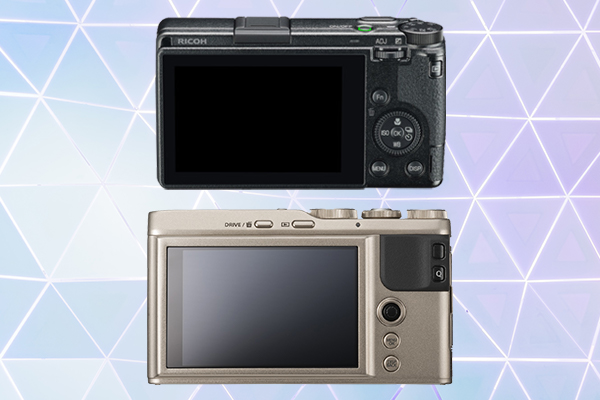
We love sizeable, interchangeable lens cameras and all of the flexibility they provide. However, they aren’t always the most convenient option. Point-and-shoots are often preferable as travel and street photography cameras. They’re smaller, lighter, less obvious, and don’t require any additional gear. In this post, we compare two of our favorite point-and-shoot cameras: the Ricoh GR III vs Fujifilm XF10.
These two cameras are remarkably similar when it comes to image quality. They have the same CMOS APS-C sensor, a maximum resolution of 6000 x 4000, and 24 megapixels. Plus, both shoot in RAW if you want that extra detail.
The XF10 does beat the GR III in video quality (4K/15fps vs 1080p/60fps). Neither of these cameras is necessarily built for video, but it’s still an important factor to consider if this is the only camera you’re taking with you on vacation.
All of that said, it’s worth noting that the GR III is equipped with sensor-shift image stabilization. If you’re using the XF10 you’re on your own—there’s no internal image stabilization included with that model.
Fujifilm XF10 | Sample Images
1 of 10
safran83 courtesy of Flickr
herve touron courtesy of Flickr
Monsieur Charles courtesy of Flickr
herve touron courtesy of Flickr
iantaylor2uk courtesy of Flickr
Sven K courtesy of Flickr
herve touron courtesy of Flickr
Scott Shaw courtesy of Flickr
Monsieur Charles courtesy of Flickr
herve touron courtesy of Flickr
Ricoh GR III | Sample Images
1 of 9
WMLR courtesy of Flickr
Tsuneharu Kuwahara courtesy of Flickr
martinspeskops courtesy of Flickr
christian_cross_uk courtesy of Flickr
Shu Hsuan Su courtesy of Flickr
Peter Hodel courtesy of Flickr
Jack-56 courtesy of Flickr
Monitor & Viewfinder
There are several distinctions between these cameras that aren’t necessarily earth-shattering, but make a huge difference when it comes to individual user preference. The viewfinder situation is one of them.
Neither the Ricoh GR III nor the Fujifilm XF10 has a built-in viewfinder. However, you can add a viewfinder onto the GR III. So, how important is it for you to be able to look through a dedicated viewfinder to preview a shot? It totally depends on you and your workflow.
The monitors themselves are comparable. Both are 3” and have almost exactly the same resolution; the GR III has 1,037,000 dots and the XF10 has 1,040,000 dots.
Usability | Ports & Add-Ons
Next in our Ricoh GR III vs Fujifilm XF10 battle are available ports and add-on capabilities. As with the monitor and viewfinder, your choice comes down to how you plan on using your camera.
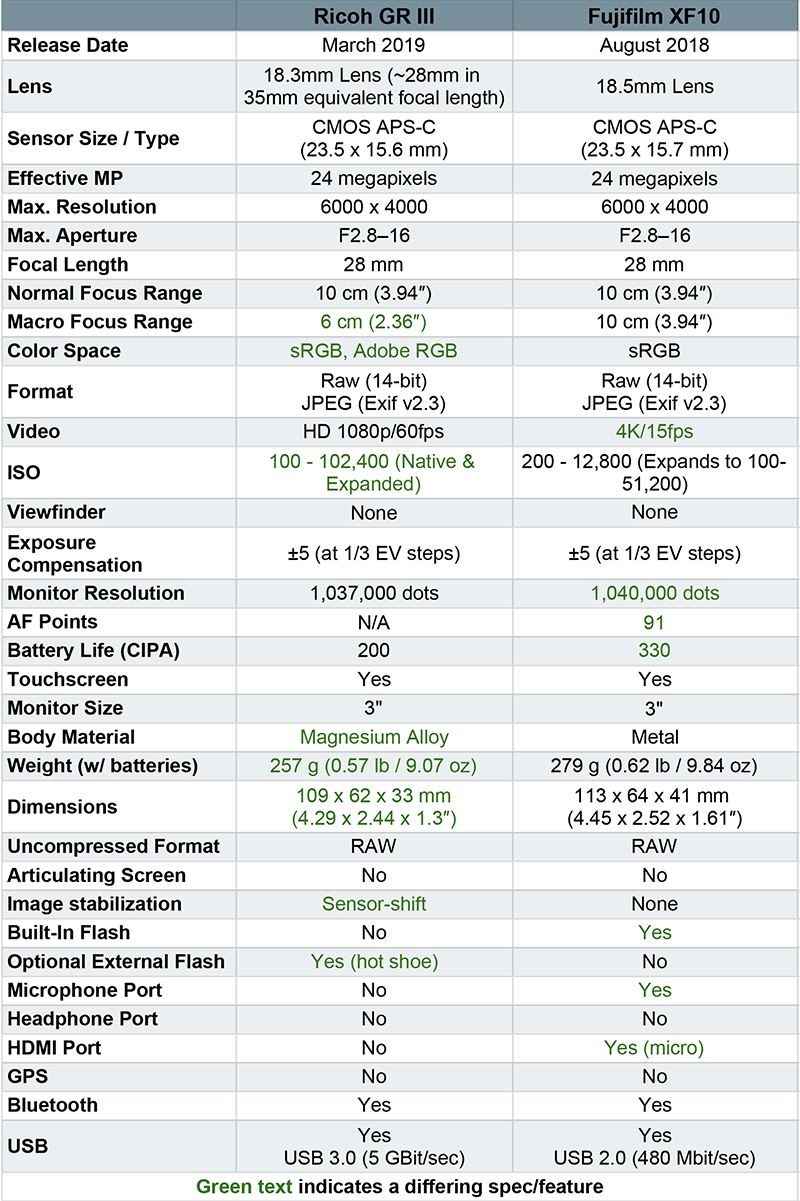
For example, the GR III has a hot shoe; invest in the Ricoh if you have a specific flash you want to use. However, consider the XF10 if you plan on recording video and need a microphone port for additional audio capabilities.
Size & Weight
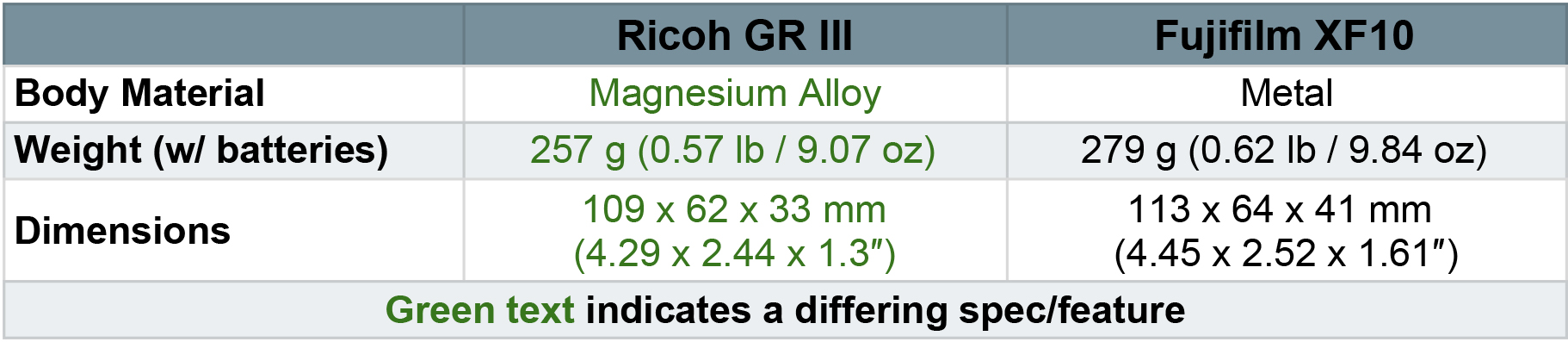
The size and weight of these cameras are comparable but the Ricoh GR III edges out the competition. Thanks to its magnesium alloy body and exclusion of a built-in flash, the GR III is slightly lighter and smaller than the XF10.
This factor shouldn’t scare you away if everything else about the Fujifilm fits your needs. That .10th of a pound difference won’t weigh you down too much.
Final Thoughts | Ricoh GR III vs Fujifilm XF10
Both the GR III and XF10 are incredibly straightforward models with minimal frills and maximum convenience. You can feel safe choosing either model as long as you consider the common use-cases ahead of you.
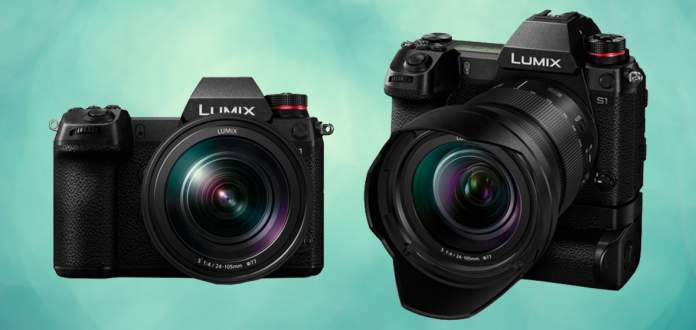
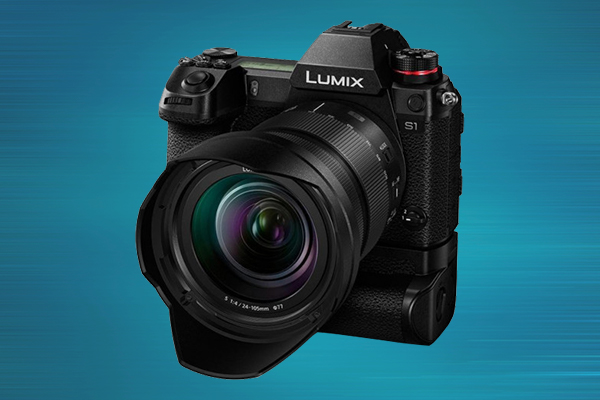
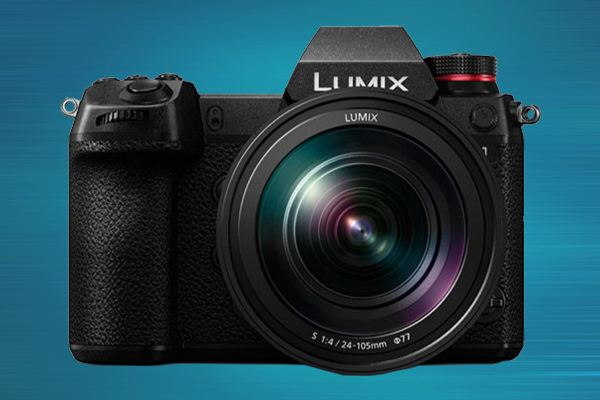
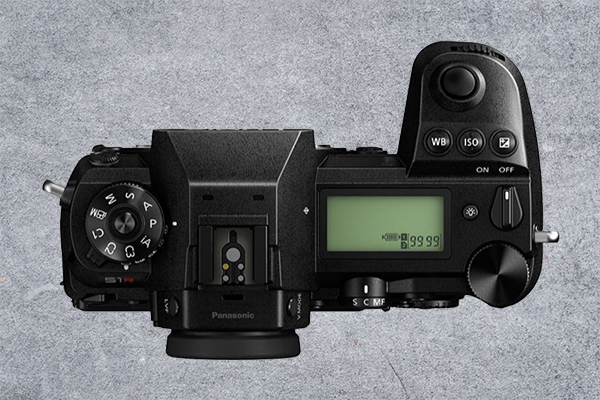
Panasonic launched it’s Lumix S series during Photokina 2018. At that time, it included only two cameras: the Panasonic Lumix S1 and the Panasonic Lumix S1R (they’ve since announced the absurdly powerful Lumix S1H).
The S1 and S1R are similar in a myriad of ways. Both are full-frame mirrorless cameras, they’re roughly the same size, and they have a nearly identical user interface; the list goes on.
In this post, we dive into the specifics of those many similarities as well as the differences that separate these Panasonic cameras into two distinct classes.
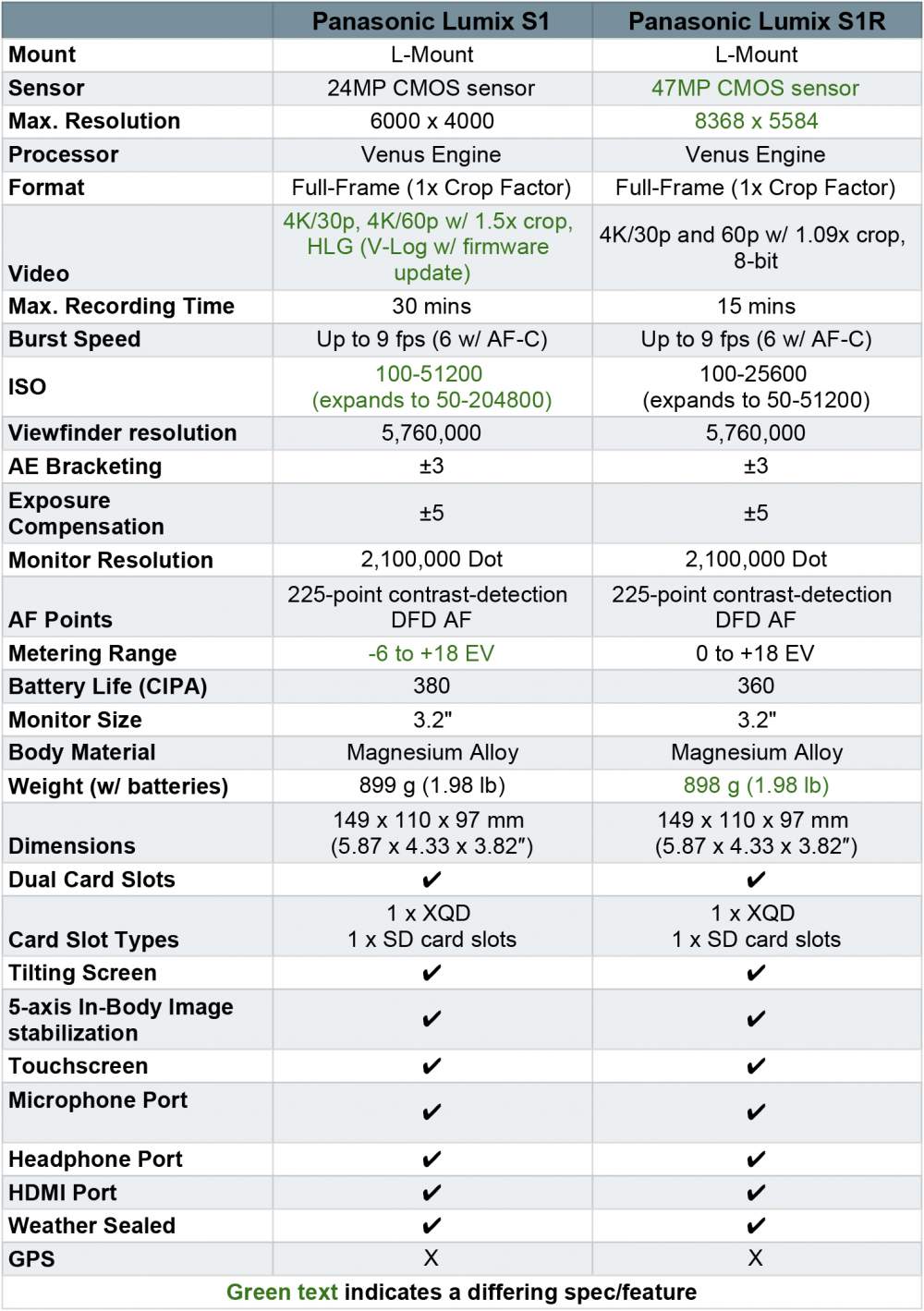
The most glaring difference between the Lumix S1 and Lumix S1R is their sensor size. On the one hand, the Lumix S1 has a 24MP CMOS sensor. On the other, the Lumix S1R has a whopping 47MP CMOS sensor.
Those 47MP come with a higher resolution that maxes out at 8368 x 5584. If that’s not enough for you, the S1R also has a “high-res mode” capable of creating 187-megapixel photos. In our opinion, this alone makes the S1R the clear choice for photographers with extra cash to burn.
S1R Sample Photos
1 of 11
Günter Müller | Flickr
waterman1 | Flickr
gordon-s | Flickr
gordon-s | Flickr
waterman1 | Flickr
Günter Müller | Flickr
waterman1 | Flickr
kazua0213 | Flickr
James Holder | Flickr
gordon-s | Flickr
gordon-s | Flickr
Video
The S1R might have a larger sensor but the Lumix S1 is without a question the better camera for video. First, there’s the basic issue of time. The S1 lets you record up to 30 minutes of video while the S1R limits you to a mere 15.
Both cameras offer 4K and 60p/50p recording and, according to Panasonic, these are the first digital, single-lens, mirrorless cameras to achieve those specs. However, S1R footage is cropped while S1 video is un-cropped and allows for full-pixel readout.
In May 2019, Panasonic released a filmmaker update for the S1 that includes:
4K 60p 4:2:2 10-bit HDMI live output.
4K 30p/24p 4:2:2 10-bit in-camera recording.
V-LOG and V-GAMMUT enable Panasonic original V-Log color profile V-Log + V-Gammut from Varicam cinema cameras (this is about 15 stops of dynamic range).
LUT SUPPORT which enables wave-form monitor and support to view an included LUT. It also gives you the ability to load custom LUTs.
Visit our post here to learn more about the update.
S1 Sample Photos
1 of 9
gordon-s | Flickr
markdbaynham | Flickr
Edmond Terakopian | Flickr
Gordon Laing | Flickr
Emil abu Milad | Flickr
fotois | Flickr
markdbaynham | Flickr
daylife_2010 | Flickr
Image Stabilization
Now, let’s move on to similarities. Both bodies offer an impressive 5-axis sensor-shift stabilization. In conjunction with Panasonic’s optically-stabilized lenses, you can achieve 6 full stops of correction.
This stabilization tech captures and compiles eight separate images to give you a single, high-res photo suitable for landscapes and fine-art shots. The Lumix S1 compiles 96MP images and the S1R gives you a single 187MP RAW image.
Autofocus
Next in our Lumix S1 vs S1R comparison is autofocus. Both the S1 and SR1 have the same 225-zone DFD autofocus system. DFD, or depth from defocus, utilizes contrast detection rather than the more commonly used phase detection. Once your subjects are in range, you can switch between detected faces by pressing the joystick inward or tapping your desired subject on the touchscreen LCD. For all the pet and wildlife lovers out there, both cameras also include optional animal face detection.
While reliable, some users find that DFD results in “breathing” when using continuous autofocus for video recording. In short, that means the AF square will make quick, small, back-and-forth movements rather than smoothly following your subject. This is definitely something to keep in mind if you rely heavily on continuous autofocus.
Lumix User Interface
Weight
These are not small cameras. In fact, their size is even more notable when you consider that they’re full-frame mirrorless bodies. The S1 weighs 899 g while the S1R weighs in at 898 g. According to Panasonic, those extra ounces were added in the name of better in-body image stabilization.
From those stats, it doesn’t come as a surprise that the camera’s bodies are also the same size (5.87 x 4.33 x 3.82″).
Touchscreen & Viewfinder
The Panasonic Lumix S1 and S1R both have 3.2-inch, 2.1-million-dot, tilting touch screen LCDs. While not fully articulating, the screen is incredibly sturdy.
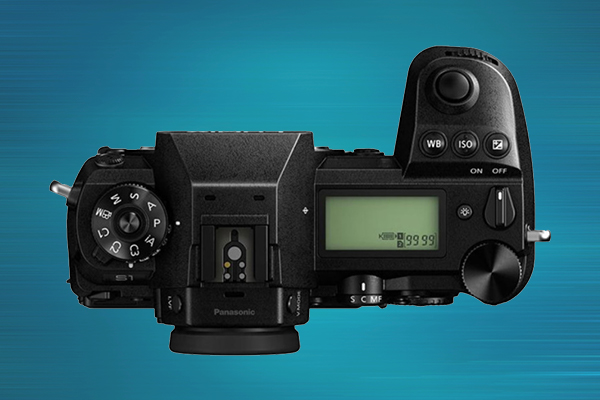
Additionally, there’s an LCD display on the top right of both devices so you can quickly check settings. Both Panasonic mirrorless cameras also have an impressive have 5.76-million-dot OLED viewfinders to help line up your shot before pressing the shutter.
Card Slots
Professionals, rejoice! The S1 and S1R come with two card slots: 1 SD, and 1 XQD. This is especially convenient for people who want to back up our work in real time. For the rest of us, there’s LaCie and G-Tech.
That concludes our Lumix S1 vs S1R comparison! Let us know which one you’d choose in the comments below.
Fujifilm recently announced the Instax Mini LiPlay: the perfect camera for all of your summer adventures. This camera is unique for a few reasons. However, two of its most notable traits are the ability to record sound and its digital/film hybrid interface.
Does an instant photo really need an accompanying sound recording? No, not really. Is it an adorable, optional add-on? Yes, absolutely.
This is arguably the most unique feature of the new Instax Mini LiPlay. After you take a photo, press the dedicated microphone button on the bottom right of the device to record a few seconds of audio. When you print your image it will have a little QR code that, when scanned by your smartphone, will play the recorded sound.
Instax Filters & Frames
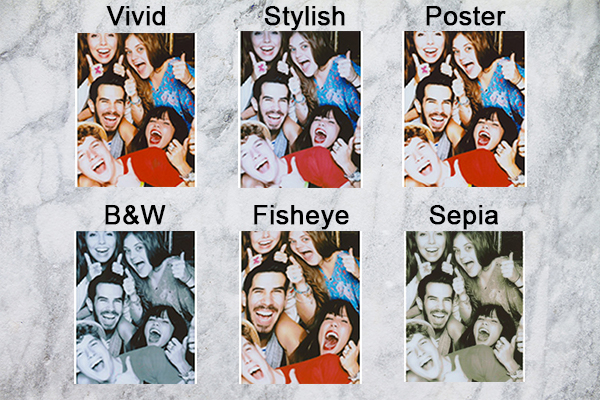
The Fujifilm LiPlay has 6 built-in filters and 30 photo frames (10 of which are new). If that seems a bit overwhelming, the LiPlay also comes equipped with 3 shortcut buttons for quick access to your favorite edits.
Updated App
The LiPlay app makes this instant camera easier to use and provides useful additional features. For example, the app turns the Instax Mini LiPlay into a mobile printer. Once your devices are linked, you can cordlessly print photos from your phone’s camera roll onto the LiPlay’s mini film.
Look & Feel
This camera’s layout is a definite departure from past models. However, it still has all of the reliable stand-bys we’ve grown accustomed to from hybrid Instax cameras.
In addition to the camera’s internal memory of 45 built-in photos, it also has a microSD card slot for extra storage. Plus, it prominently features a front-facing mirror for selfies on it’s elegant black, blush gold, and stone white bodies.
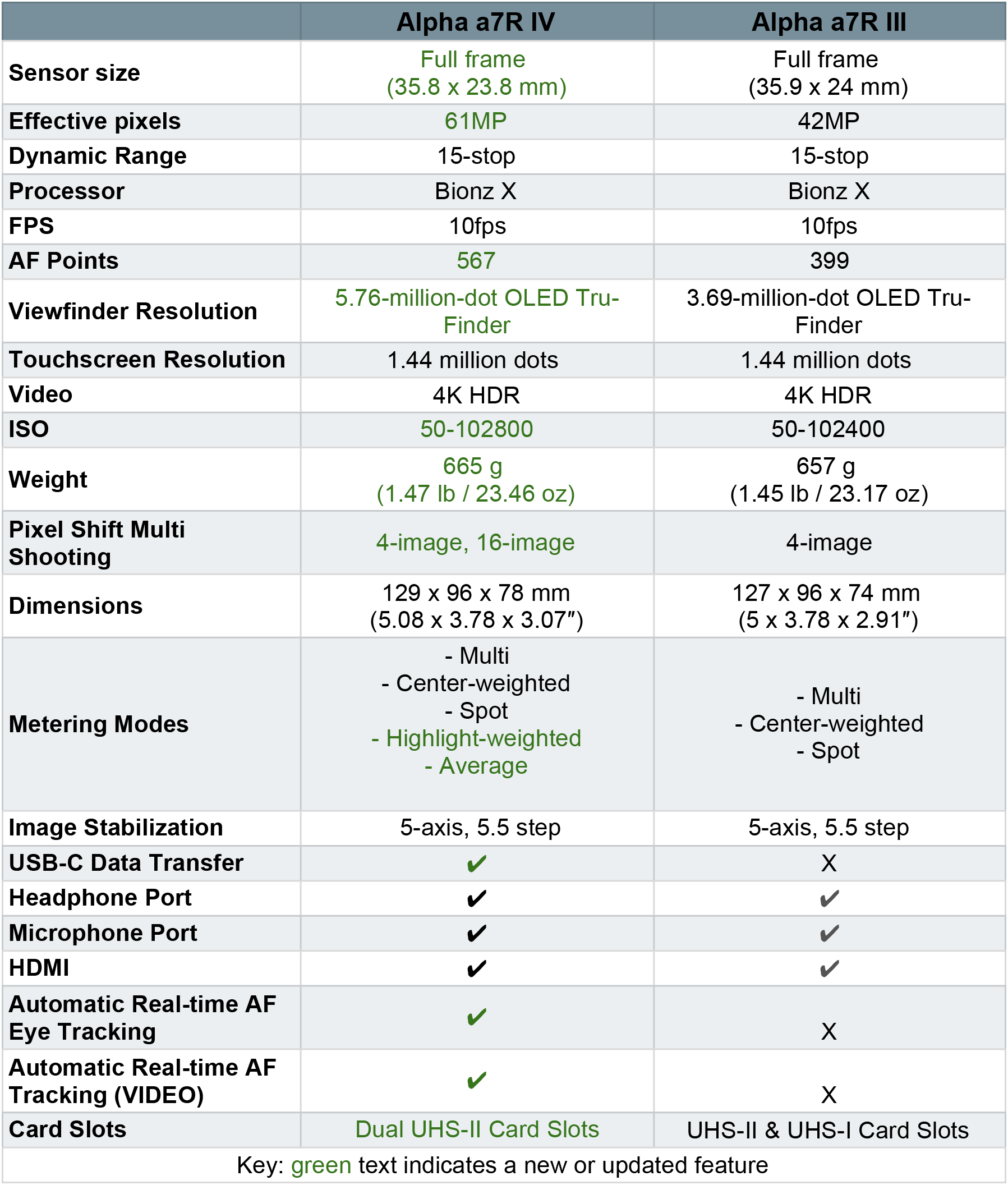
Sony has officially announced the newest addition to its mirrorless family: the Alpha a7R IV. This is a follow-up to the Alpha a7R III released in October 2017. Arguably the megapixel count is the most notable upgrade; the a7r IV boasts the world’s first high-resolution 61MP back-illuminated Exmor R CMOS image sensor. There are also a lot of feature updates we’re excited to see that we get into in breakdown below.
Along with the camera, Sony also released several new accessories which you can find here.
As mentioned above, the Alpha a7R IV features the world’s first 35mm full-frame back-illuminated CMOS image sensor with 61MP effective pixels. From what the sample images show, it delivers the same depth and dimension typically associated with medium-format cameras. That back illumination combined with area-specific noise reduction creates a blend of low noise, high sensitivity, and a whole lot of potential.
BIONZ X Processing Maximizes Sensor Potential
Features like “advanced detail reproduction” and “area-specific noise reduction” are made possible by BIONZ X image processing. It’s been carefully tuned for the Alpha a7R III to maximize sensor performance and provide about 1.5x more resolution than the lauded Alpha 7R III. The result is extremely fine, realistic reproduction of textures and details.
Sony Alpha a7R IV | Sample Images
1 of 9
Animal Eye AF
Low-Vibration Shutter
Sony redesigned this camera shutter to reduce even the slightest movement that may cause blur, a factor that’s especially critical with high-resolution sensors. Engineers added a fast-response coreless motor that cuts down on movement (even at 10fps).
5.76 million-dot UXGA OLED Tru Finder
The Alpha a7R IV boasts a 5.76 million dot UXGA OLED Tru-finder EVF. This is Sony’s highest resolution viewfinder ever. For perspective, it has about 1.6x the resolution of the EVF in the Alpha 7R III.
The goal was to make the view through the viewfinder as true to life as possible. With that in mind, the display quality can be set to ‘Standard’ or ‘High’ mode, and to a 60 fps or 120 fps refresh rate. The result is a smooth viewfinder image with minimum blur.
New Features
4D Focus
Now, let’s get into new features. The Sony Alpha a7R IV’s new image sensor has a whopping 567 phase-detection points in a high-density focal-plane phase-detection AF system. In total, the points cover about 99.7% of the image area vertically and 74.0% horizontally.
The aforementioned high-density focal plane phase-detection works with 425 contrast AF points in a Fast Hybrid AF system. It’s designed to quickly handle massive amounts of data, snapping rapidly into focus with just about any subject and situation. As if that wasn’t enough, tracking performance was also improved despite the significant increase in the camera’s resolution.
16-image Pixel Shift Multi Shooting
When high-res isn’t high enough, there’s Pixel Shift Multi Shooting. This mode takes advantage of the a7R IV’s advanced in-body image stabilization system to capture multiple pixel-shifted images. Then, it combines them into one composite image using Sony’s “Imaging Edge™” desktop app. The result is a remarkable amount of detail in one image, increased resolution, richer color, and better textures.
The Alpha a7R IV produces 16-image composites with approximately 240.8 million pixels from data that is equivalent to approximately 963.2 million pixels. For what it’s worth, it can also make 4-image composites that are less detailed albeit still impressive.
Real-time Autofocus Tracking
Real-time tracking employs artificial intelligence to efficiently track moving subjects when shooting stills or movies. You can specify a target by touching it on the monitor when the “touch tracking” function is turned on.
The system’s advanced subject recognition algorithm uses color, pattern (brightness), and subject distance (depth) data to process spatial information in real time. On the other hand, if the subject is a person, AI detects and keeps track of the subject’s eyes and face for high-precision tracking. The focus area seamlessly changes between face and eye according to the position of the subject.
Real-time Eye AF For Humans & Animals
We don’t often use this phrase, but this feature is a game-changer. The Alpha a7R IV’s real-time eye AF use AI to detect and process eye data from moment to moment with unprecedented precision in both stills and video.
You can quickly turn this feature on using an assigned custom key, pressing the AF-ON button, or half-pressing the shutter button. When used with the real-time tracking function, tracking will continue even if the camera is temporarily unable to locate the subject’s eye. In addition to automatic eye selection when using Eye AF, you can manually preselect the subject’s right or left eye.
Animal Eye AF
Usability & Body Changes
USB-C Sync
In addition to Wi-Fi and wireless PC connectivity, the Alpha a7R IV is equipped with a “SuperSpeed” USB-C port that supports rapid wired data transmission. We raised our eyebrows when we saw the SuperSpeed label. However, it is admittedly pretty super. This addition facilitates almost doubled data transfer speeds with Sony’s Imaging Edge software (compared to the Alpha 7R III).
Improved Grip
One of the main usability complaints about the a7R III is its grip. It’s definitely usable, but it’s not always comfortable to use for long shoots. For the Alpha a7R IV, the grip area was redesigned for greater comfort and a more confident hold. To achieve this, Sony added more room for the pinky finger and middle finger on the overhang.
Dual UHS-II Slots
We are so, so excited to say that the Alpha 7R IV has two media slots. Both of them are compatible with UHS-I and UHS-II SD cards for higher capacity and faster read/write speeds. There are a few options for how you can utilize this extra space. First, is simultaneously recorded to both cards for backup. Second, RAW/JPEG and stills/movies are recorded to different cards. Third, recording is automatically switched to the second card when the first becomes full.
Exposure Compensation Dial Lock
An exposure dial lock release button is newly located at the center of the exposure compensation dial. It can be locked to prevent accidental or unwanted changes or unlocked to allow rapid adjustments in varying light.
Similarly, custom functions can now be assigned to front dials, rear dials, and the control wheel. In total, three sets of custom functions can be assigned for further versatility.
That wraps up our first look at the Sony Alpha a7R IV. Let us know what you think in the comments below!
If you pay even a modicum of attention to the news or pop culture, you’ve heard of podcasting. However, in the event that you haven’t, podcasts are a series of audio recordings documenting a particular story, topic, or theme.
For example, the popular podcast Serialis the story of a real-life murder mystery set in Baltimore, MD. The first season of the show is broken up into 12-episodes that are roughly 45 minutes long.
That little series was downloaded an eye-popping 175 million times as of June 2017. The show’s massive following is positively correlated with a larger trend: podcasting’s overall rise in popularity.
According to the New York Times, more than half the people living in the United States have listened to at least one podcast. Similarly, 40% of people between the ages of 12 and 24 listened to a podcast last month; that’s a 10% jump up from 2018.
However, listeners are only half of the equation.
Today, many people—armed only with an idea—try to start their own podcast with no prior knowledge of sound engineering or audio recording. The result is a lot of (rightfully) perplexed individuals who don’t know what kind of equipment they need or where to start.
The RODE To Knowledge
Microphone and recording juggernaut RODE is one of the companies currently inundated with confused, would-be podcasters interested in putting together a recording setup.
What kind of equipment do I need? Can I have multiple guests?What if I need someone to call in during a recording? What if I want to add music during my show?
To answer the cries of the masses, RODE released the first all-in-one podcast production studio: the RODECaster Pro. It’s simple, highly intuitive, and we can’t believe it took someone this long to make one.
We can not stress enough that this little sound interface is the only thing you need to record and engineer a podcast. Well, this and however many microphones you need for your show.
Now, let’s talk about why.
There’s Room To Grow
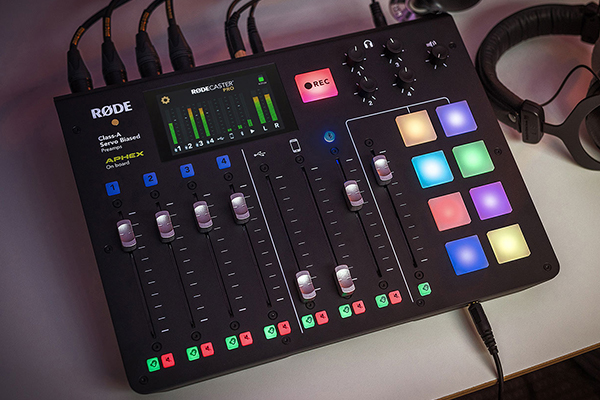
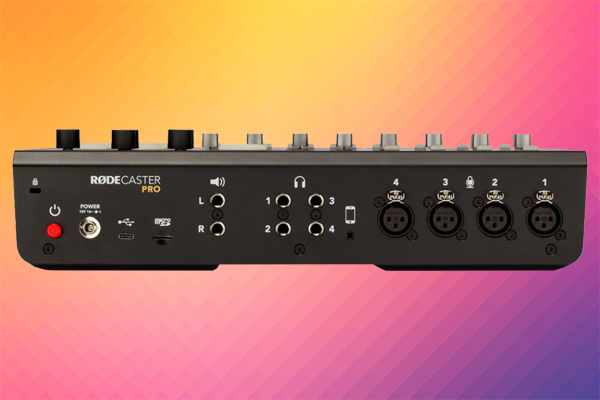
The most impressive thing about this device is how much functionality it fits into one relatively small device. In total, the RODECaster Pro gives you access to:
4 XLR microphone inputs
1 Bluetooth and 1 TRRS connection for mobile devices
4 monitoring headphone outputs
8 programmable MIDI pads
That amount of flexibility allows you to expand the scope of your production, learn more about the ins-and-outs of podcasting, and hone what you want your show to be.
It Has An Absurdly Easy Interface
Right off the bat, this is a nice looking device. It has sleek metal controls and the bottom is made of sturdy plastic with rubber feet. The end result is a professional-looking, light-weight device that looks nice on your desk.
As for the controls themselves, you can choose to adjust individual channels via the buttons labeled 1-4 on the upper left of the board and the touchscreen monitor. Every channel has a dedicated fader and mute button.
That brings us to the screen. The little touchscreen on the top of the board is the key to what makes this device a stand-alone product. It also allows sound engineering newbies and visual learners alike to understand what the heck an aural exciter is and how to turn it on and off.
Adding Calls
Keeping with the convenience theme, adding calls to podcast recordings used to be an involved process; RODE made it easy.
There are two ways to connect your phone with the RODECaster Pro: via Bluetooth and TRRS. Using the TRRS port is as easy as plugging in your phone. Similarly, connecting to this mixer via Bluetooth is like pairing your phone with a speaker—quick, easy, and familiar.
Once a smartphone is connected, you have the same amount of control over that audio as you do with your own microphone. You can also use those two channels to stream music and calls from Skype, Slack, Line, etc.
MIDI Board
Normally, we would not describe using a MIDI board as “simple.” That said, RODE might have achieved the impossible (the built-in screen definitely helps).
To add sound effects to your recordings, tap the touchscreen and navigate to the sound settings. From there you can assign sounds to specific pads, change sound effects, and add songs, intro music, and any other audio you can think of. To play them during a recording, just tap the MIDI pad to which you assigned the sound.
It’s Self-Sustaining & Portable
You don’t need a computer to record. So, as long as you have a power source, you can use this portable podcasting studio just about anywhere. The RODECaster has a MicroSD card input on the back of the device for data storage. Plus, you can see how much available recording time you have on the top right of the device’s screen.
This is especially advantageous if you’re mixing a live podcast in real time. The RODECaster also has two speaker outputs for studio monitors to play your show to an audience.
All of that said, if you want or need a computer connection, there is a bidirectional USB-C connector to simultaneously record to your computer and the MicroSD.
In Conclusion
The RODECaster Pro is the answer to our beginner and semi-pro podcasting hopes and dreams. It’s a one-device audio engineering studio that you can carry around on your back. Plus, it has room for expansion and experimentation to work out both your sound and your narrative.
The Sony Xperia 1 might be our new favorite toy. This is Sony’s latest and most powerful smartphone—it’s a culmination of all the vertices that makes Sony a highly respected tech company (sound, photography, gaming, and digital graphics).
In this post, we delve into the Xperia 1’s industry-first features, camera capabilities, gaming mode, UI, and more.
Attention deal seekers: if you fall in love with the Xperia 1 (and it’s likely you will) Focus Camera is offering a limited time sale. When you pre-order the Xperia 1 with Sony WH-1000XM3 noise-canceling headphones, Focus will give you a $350 discount. That deal ends July 12th so cash in while you can.
Sony Xperia 1 + WH-1000XM3
1 of 2
The Basics
Price & Availability
The Xperia 1 is available for preorder starting on June 28th, 2019 and is officially for sale starting July 12, 2019. It’s on sale for $949.99.
Look & Feel
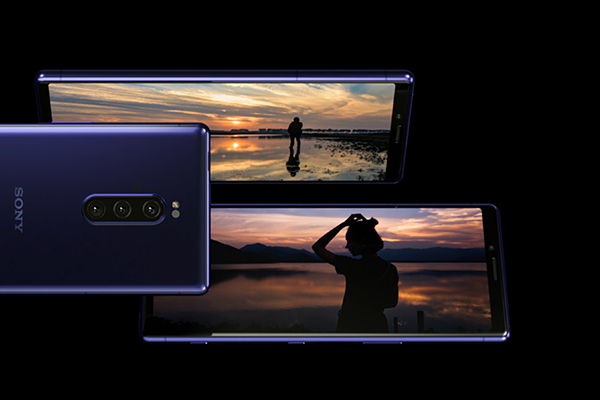
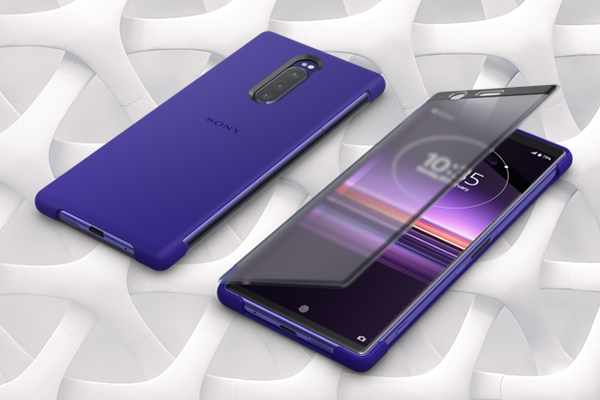
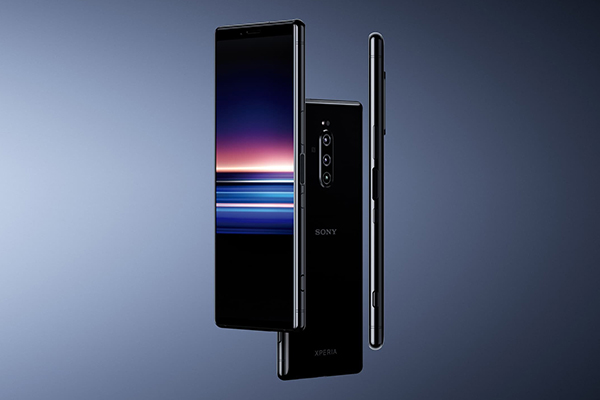
The Sony Xperia 1 is a sleek, thin, professional looking smartphone with a metal frame; the exact dimensions are 6.5 x 2.8 x 0.3 inches. Its combination of metal casing and Durable Corning® Gorilla® Glass make this model shock, dust, and water resistant (IP65/68). Currently, it’s available in two colors: black and purple.
Processing & Memory
This model runs on Android 9.0 (Pie) and comes complete with the Qualcomm® Snapdragon™ 855 Mobile Platform. As a result, the Sony Xperia 1 can easily view multiple apps side by side and trigger split screen in only 3 taps with no lag.
In addition, one of our favorite things about this model is the option for expanded internal memory. The Xperia 1 comes with 6 GB of RAM and can add significantly more via Micro SD.
Battery
This phone has a solid 3330 mAh battery. Sony anticipated the strain that will be put on this device from recording and gaming. So, they added Smart Stamina. In short, this feature predicts how much time your battery has left and gives you different ways to conserve the remaining energy.
While this model doesn’t have QI, it does boast 18W fast charging.
What Makes The Sony Xperia 1 Awesome
Screen & Display
As of today, this is the best smartphone screen in the world: a 21:9 CinemaWide 4K HDR OLED display with ~643ppi.
The 21:9 4K display is getting a lot of hype for a few reasons. First, it’s how a lot of film and TV content is recorded. In fact, Netflix now almost exclusively shoots in that quality and ratio. The resulting viewing experience is undeniably impressive—it makes Stranger Things look stranger and GLOW look… glowier. Sony also pulled from its BRAVIA line to remaster HDR and noticeably boost contrast, color, and clarity.
Second, the screen quality goes hand in hand with the next feature we’re going to talk about: the camera. This huge, high-quality screen allows users to take full advantage of one of the best smartphone cameras now available on the market. Without it, the Xperia’s highly anticipated cinema mode wouldn’t make much sense.
With a high contrast ratio of 1000,000:1, the Xperia 1 shows deeper levels of black and colors appear more natural. The screen also supports professional level reproduction standards like DCI-P3 100%, BT2020 color space, and D65 White Point.
Sony Xperia 1 Camera
It feels like Sony’s photography team sat down with their mobile developers and said, “how many Sony Alpha features can we squeeze into this thing?” The short answer is a lot.
Specs
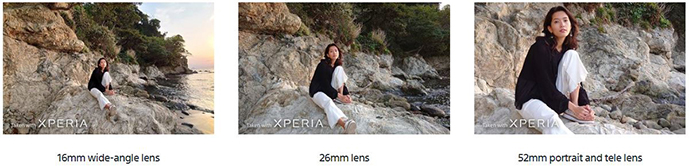
To start, the Xperia 1 has three front-facing lenses. There’s a 16mm super wide-angle lens, a 26mm, and a 52mm lens with 2x optical zoom. The main camera has a 1/2.6” sensor with 1.4μm pixel pitch, an f-stop of f/1.6, optical image stabilization, and RAW noise reduction. The result is exceptional photo and video quality even in low light.
Features
The Xperia 1 is also the first smartphone in the world to have real-time eye autofocus. This feature is taken directly from the 3.0 firmware update Sony put out in April 2019 for the Sony a7 III and Sony a7R IIIxpe.
Keeping with the professional camera theme, this phone gives you full manual control of shutter speed and ISO along with up to a 30-second exposure. This pairs nicely with the Xperia 1’s hybrid system that combines optical image stabilization and electronic image stabilization.
If you’re focusing more on action shots, this phone also shoots up to 10FPS with the help of autofocus and auto exposure.
Courtesy of Sony
Creator Mode & Video
The Xperia 1 has two modes outside of its regular functionality: creator mode and gaming mode—both are toggled on and off in your settings. We’ll get to gaming mode in a moment but for now, let’s focus on creator mode.
According to Sony, this feature is inspired by VENICE, Sony’s digital motion picture camera. It incorporates the different shooting adjustments we mention above (lens options, shutter speed, etc.). However, you can also apply pre-programmed color settings that mirror those used by professional filmmakers.
We kid you not when we say this camera could conceivably shoot b-roll.
The default frame rate is 24FPS. Plus, the 21:9 display combined with the Xperia’s impressive image processing supports wide color space ITU-R BT.2020 and DCI-P3 with Illuminant D65. It also has a 10-bit display (8 bit with 2 bit smoothing). To convert that last spec from nerd to English, colors are displayed and recorded with no perceivable banding.
This isn’t technically part of creator mode. But, it’s worth noting that the Xperia 1 has a card slot for expandable storage. Otherwise, you’d definitely run into issues storing multiple large video files.
Audio
Onward to audio. The Sony Xperia 1’s audio experience was orchestrated from the experts at Dolby Atmos. For those who are unfamiliar, Dolby is responsible for the surround sound tech used in tiny, independent films like Black Panther, A Quiet Place, Bohemian Rhapsody, and A Star Is Born.
Dolby Atmos brought that multi-dimensional audio experience to the Xperia 1. It has built-in stereo speakers for high-resolution audio and DSEE HX. If you prefer to listen via Bluetooth headphones (like the WH-1000XM3), you can still get above-average audio quality thanks to LDAC streaming.
Gaming Mode
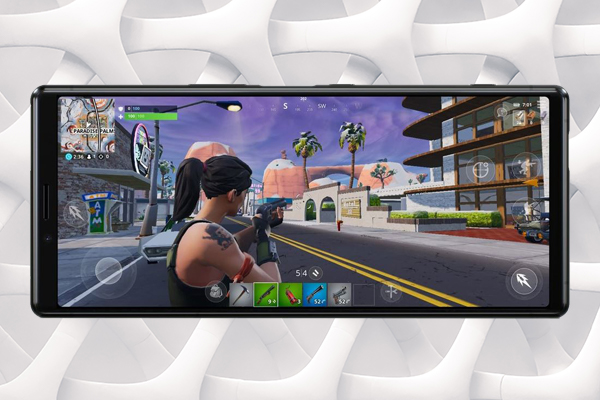
Last but not least, we have gaming mode. The Xperia 1’s Snapdragon 855 processor and 6GB of RAM keep games running smoothly with no jumpiness or lag. You can also take screen recordings of your game and yourself at up to 1080p. All of this is enhanced with the addition of haptic feel. However, if you’d prefer to step up your game, you can move away from touch controls and connect your PlayStation controller to the phone via Bluetooth.
Along with those specialized features, gameplay is improved by many of the factors we reviewed in the sections above. For example, the 4K 21:9 aspect ratio screen upgrades your mobile gaming experience. Similarly, Dolby Atmos surround sound compliments games like Fortnite and PUBG.
Summary
The Xperia 1 takes the best features from all of Sony’s departments and combines them into one super phone. It has an incredible triple lens camera, the world’s first 4K HDR OLED screen, Hollywood-approved creator mode, sound by Dolby, and a dedicated gamer mode. It’s an exciting new addition from Sony and one that we’re very excited about.
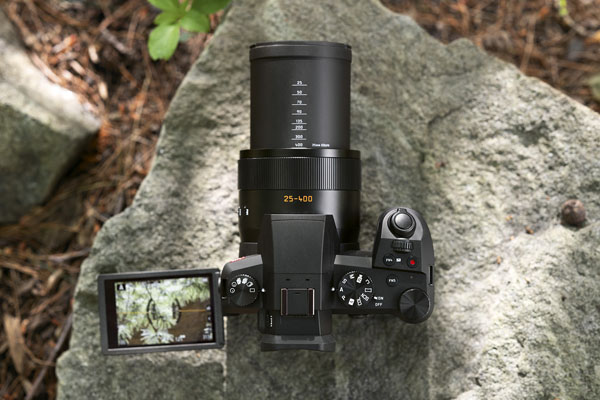
If you’re on the hunt for an intuitive, high-quality bridge camera this is it. The Leica V-Lux 5 is by far the most travel-ready V-Lux to date thanks largely to its relatively small size, 16x zoom, improved autofocus, and updated video quality.
The new V-Lux easily fits into a backpack or large purse to capture any amazing vaca or day-to-day moments. It’s also a bridge camera which means its lens is permanently attached to the body; you don’t have to worry about hauling around extra lenses.
It’s also worth noting that the V-Lux 5 is great for music festivals where you usually can’t take a detachable lens camera.
Leica V-Lux 5 | Product Images
1 of 22
New & Updated Features
Magnification & Video
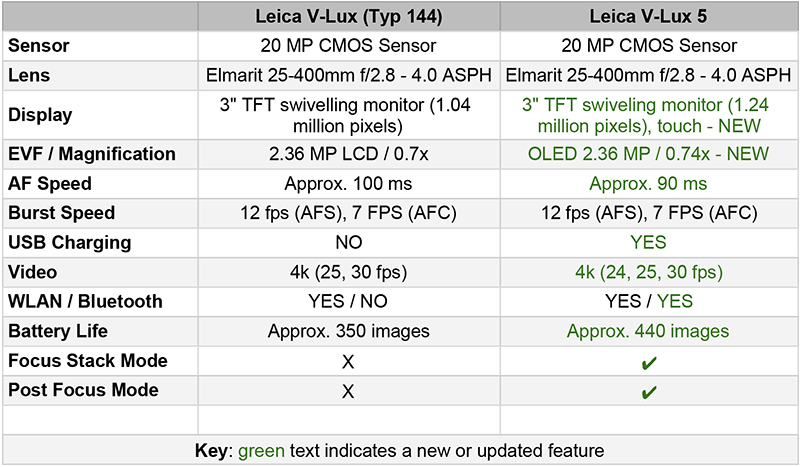
The V-Lux 5 has a 16x zoom range that can get you close to the action without sacrificing your safety or flouting trespassing laws (yay!). Its solid magnification carries over to the V-Lux 5’s 4k video which can be recorded at 24, 25, and 30 frames per second.
Leica does a great job of combining these two features without sacrificing video sharpness.
Monitor
The V-Lux 5’s monitor got a major upgrade. Perhaps the most convenient addition to this camera is its 3″ TFT swiveling touch monitor that boasts 1.24 million pixels. For comparison, the last iteration had a lower-quality 3” screen that was affixed to the camera.
A swiveling screen makes the V-Lux 5 a more viable option for vloggers and selfie lovers interested in stepping up their content’s quality.
Focus
The improved autofocus speed of this camera is about 90 milliseconds. Alternatively, the Leica V-Lux (Typ 144) clocks in at about 100 milliseconds. While that doesn’t look like a big difference on paper, it makes all the difference when you’re out shooting and every moment matters.
Leica’s V-Lux 5 also includes post focus mode and focus stacking mode. We love these features for two main reasons. First, they’re helpful regardless of your level of photography experience. Second, they’re honestly just fun to use.
Burst Speed | 12 fps (AFS) / 7 fps (AFC)
1 of 11
Post Focus Mode
Let’s all take a moment to acknowledge the dozens (if not hundreds) of shots we’ve lost because our focus was just a little off. Post focus mode is all about ensuring that never happens again.
This feature allows you to adjust your focus even after you’re done shooting.
For example, your autofocus locked in on the wrong pooch at the dog park and you now have a picture of a stranger’s pet. When reviewing your photos later, you can easily shift the focus so it’s on the correct dog.
Focus Stacking
Focus stacking combines multiple images shot at different focal lengths. The stacking process significantly enhances the final image’s depth of field by digitallycombing the in-focus portions of multiple exposures.
For example, the left and middle image illustrate the depth of field in a single image. However, the image on the right is a composite of 6 images combined using focus stacking.
By Muhammad Mahdi Karim – Own work, CC BY-SA 3.0, https://commons.wikimedia.org/w/index.php?curid=11023060
That wraps up our first look at the Leica V-Lux 5. All in all, it’s a solid update to the Leica V-Lux (Typ 144) and a worthwhile investment for anyone looking for a vacation or day-to-day camera.
We live in an age where high-quality lenses (and cameras) have never been more accessible. As a result, we have dozens of lens options from both camera manufacturers and third-party brands alike. In this post, we help you narrow down those choices and list the 5 best lenses for the Sony a6400. We focus on reliability, compatibility, and (of course) image quality.
The Sony Alpha a6400 is a mirrorless E-mount camera released in February 2019. After its release, it quickly gained traction as one of the brand’s most popular entry to mid-level cameras.
It has quite a few features that make it a stand-out option including 4K video, an external microphone jack, and a 180-degree fully tiltable LCD touch screen. These features in conjunction with the a6400’s AF speed and sensor make this camera a vlogger’s dream. You can see all of our first thoughts about the a6400 here or in the video below.
This G Lens is great for photographers on-the-go looking for flexibility. It offers 6x power zoom and delivers crystal clear stills and video at any magnification. As for physical features, a lever and ring on the lens barrel allow zoom speed to be easily adjusted without fumbling with the grip.
This prime Sigma lens thrives in indoor and low-light situations. If you’re big on bokeh, its wide aperture allows for very shallow depth of field and gives your images the artfully blurred background you’re looking for. That said, this 30mm lens captures sharp videos and images with the help of its quick and quiet autofocus.
This cost-effective, manual 7artisans lens offers a 46° field of view and a minimum object distance of 35cm (1.15in). Its small, all-metal body includes a de-clicked focusing ring that’s smooth and comfortable to use. It doesn’t necessarily provide the sharpness that some of its more expensive counterparts offer. However, it makes up for it with its portability, ease-of-use, and gorgeous bokeh.
Sample Images | Tamron Di III RXD 28-75mm f/2.8 Lens
1 of 4
Ivan Josua | Flickr
Bigfan | Flickr
Simon Chan | Flickr
Price: $879.00
Highlights:
Focal Length: 28-75mm
Aperture Range: f/2.8 to f/22
Format: Full-frame, APS-C
This Tamron high-speed zoom lens is great for portraits, street photography, and nature shots. One of our favorite things about this lens is its f/2.8 maximum aperture which allows for consistent brightness throughout the entire zoom range. Plus, its XLD (extra-low dispersion) and LD (low dispersion) elements reduce color fringing and chromatic aberrations for exceptional sharpness and tonal accuracy.
The final item on our list of the 5 best lenses for Sony a6400 cameras is the Rokinon AF 24mm f/2.8. This lens has an advantage against other third-party, wide-angle options because it was specifically designed for Sony mirrorless cameras. In terms of physical features, it’s made up of seven glass elements in seven groups which are arranged to facilitate both portability and high-quality, corner-to-corner resolution. Rokinon also does a great job utilizing lens coating techniques to reduce chromatic aberrations and unnecessary light dispersion.
If you want to do more research on Rokinon, we recommend checking out this video on the relationship between Rokinon and its parent company Samyang.
That wraps up our guide of the 5 best lenses for Sony a6400 cameras. If you have any questions or additions to this list, let us know in the comments below.
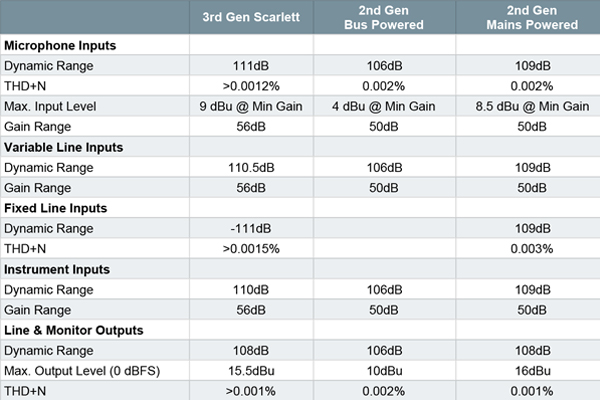
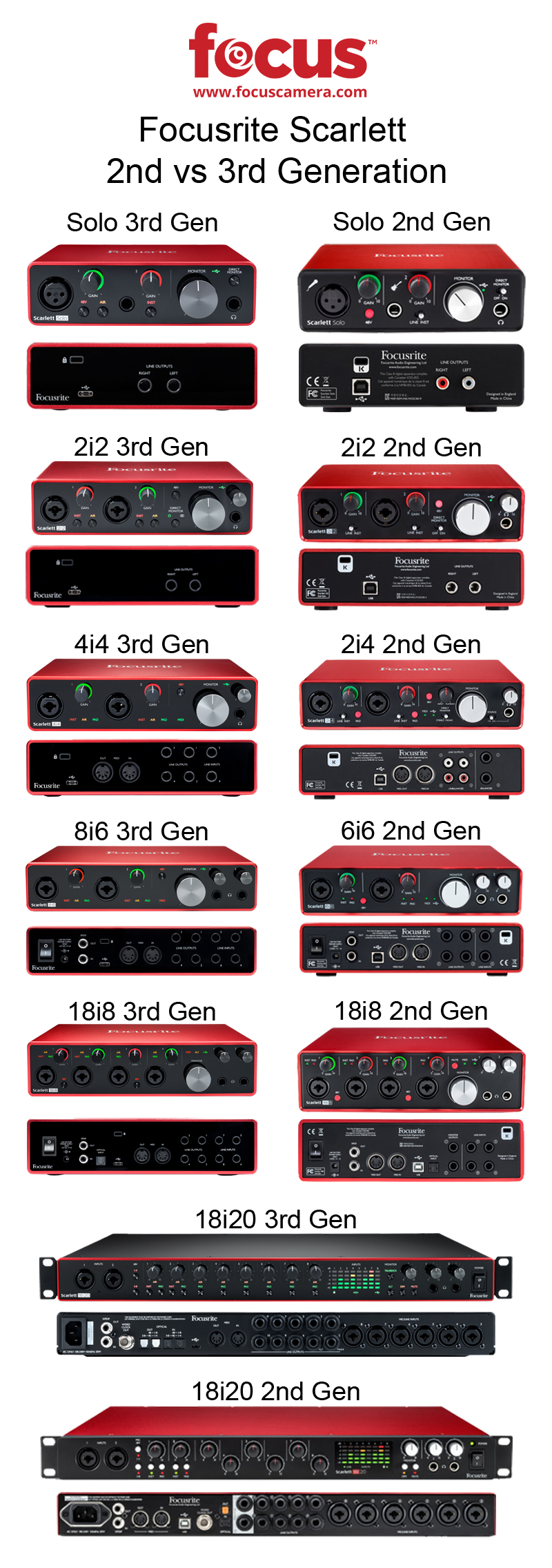
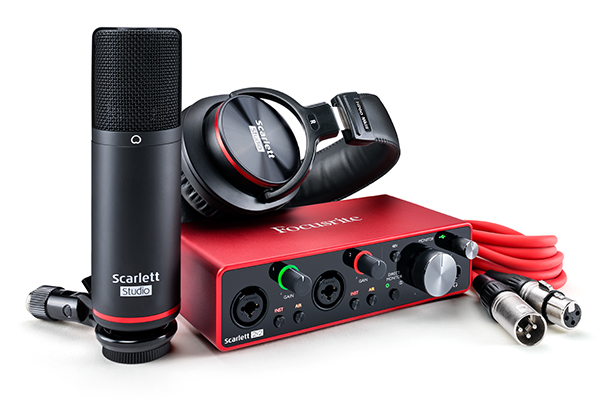
It’s been three years since Focusrite released the Scarlett 2nd generation range of audio interfaces. Today, they officially announced the Focusrite Scarlett 3rd Gen and needless to say we’re very excited. The new models include almost everything we wanted to see in this update.
Before we jump into features, let’s take a look at an overview of the specification updates.
We first went over this in our review of the Focusrite 6i6 2nd Gen. However, a recap is called for.
Think of an audio interface as a technologically advanced adapter. For example, you can’t plug your guitar directly into your computer. Instead, you plug it into an audio interface that can connect and communicate with recording software on your Mac or PC. The interface is the middle man. The same applies to studio monitors which also plug into an audio interface.
As a point of clarification, people often confuse interfaces with mixers but they’re two completely different things. While you plug instruments and microphones into both, mixers are used more for live performances and don’t have extra connections like USB, XLR, or MIDI ports. On the other hand, a digital interface usually does have those ports and is used in a studio setting to connect your computer with your instruments.
After 30 years of perfecting their products, Focusrite’s 3rd Gen mic preamp is the best Scarlett has ever created. The 24-bit/192kHz converters give your recordings clarity. Plus, its Air mode adds an extra edge to vocals and provides unique, high-end detail.
Look & Feel
Companies often have a terrible impulse when updating a product or product line. They get overeager and overhaul things that simply don’t need to be changed. In short, they tweak things for the sake of the press release. It’s frustrating and unnecessary.
Focusrite did not fall into this trap.
They made minor aesthetic changes and stuck with the classic look and feel that makes Focusrite Scarlett one of the industry’s most recognizable audio interface brands. There’s some streamlining, but the signature brushed red aluminum finish and simple interface remain intact. Every device in the Focusrite Scarlett 3rd Gen line looks great on your desk.
Focusrite tweaked their headroom with the 3rd generation models. Instrument inputs now have an impressive amount of headroom and additional line-level inputs for your unique recording setup. Plus, its balanced TRS outputs eliminate speaker hum.
USB-C
The USB-C takeover continues. All of the Scarlett 3rd generation models have a USB-C port. Just connect your device of choice with your laptop using the supplied USB-C to USB-A cable whenever and wherever you want to record. This connection upgrade is not only more convenient it also boosts device speeds and makes latency virtually unperceivable.
Easier Setup
Focusrite products have always been blissfully easy to set up. However, their team made the process even easier with Scarlett 3rd generation models—this is about as close to plug-and-play you can get with tech this advanced. They call their new onboarding sequence the “Focusrite Quick Start” tool.
Connect the unit to your computer, go through the pop-up installation prompts, then you’re automatically redirected to a webpage for customized installation (the model’s serial number is automatically entered).
Included Software
Focusrite does an incredible job pairing its equipment with intuitive, cutting edge software. Plus, they offer a two-year warranty and membership to the Focusrite Plug-In Collective, offering regular free software downloads and generous discounts.
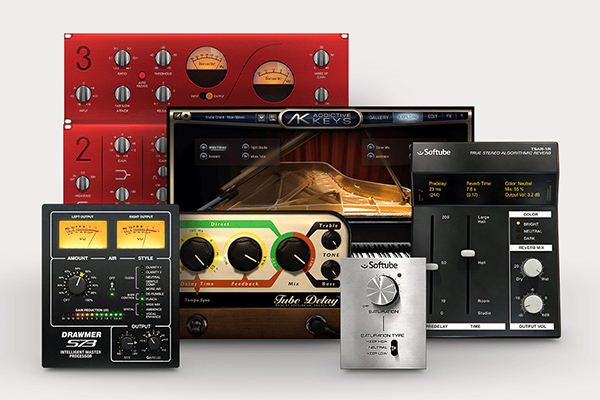
All in all, buying a Scarlett Gen 3 device gets you Ableton® Live Lite™, Pro Tools® | First Focusrite Creative Pack, a free three-month Splice Sounds subscription, XLN Audio Addictive Keys, Focusrite Red Plug-in Suite, and Softube Time & Tone Bundle.
Ableton Live Lite
This program is a DAW (digital audio workstation) primarily utilized for track creation and live performances onMIDI pads.Ableton Live Lite, which—while lacking some of the functionality provided by paid versions of Ableton Live—does an amazing job. This is especially true if you’re just starting out in electronic music.
Splice Sounds
Scarlett models come with a three-month subscription to Splice Sounds which offers users millions of audio samples, loops, FX, and presets. It has a super easy interface that allows you to drag and drop content directly into your DAW for editing.
Avid Pro Tools | First Focusrite Creative Pack
The First Focusrite Creative Pack is an entry-level music-making bundle for novice producers, instrumentalists, and singer-songwriters. It includes Pro Tools First, Eleven Lite, Black Op Distortion, Gray Compressor, Five-band Graphic EQ, Flanger, Vibe Phaser, Roto Speaker, Sci-Fi, Studio Reverb, Tape Echo, and InTune.
Focusrite Red Plug-in Suite
TheRed Plug-in Suite replicates the functionality of Focusrite’s Red range equalizer and compressor. This suite gives you detailed, dynamic and tonal control of your mix without buying the additional hardware.
Softube Time and Tone bundle
TheSoftube Time and Tone bundle is made up of four plug-ins: a reverb, a delay, a mastering tool, and distortion. Use these plug-ins with the other software that accompanies the Scarlett 6i6 to bring a new layer of professionalism to your mixes.
XLN Audio Addictive Keys
The average piano keyboard usually has a few different profiles like electric, grand piano, and synth. On the other hand,Addictive Keys connects with your digital keyboard and offers dozens of piano profiles and a seemingly endless list of granular adjustments to your sound.
Which generation wins in the Scarlett 3rd Gen vs 2nd Gen comparison? Let us know in the comments below.
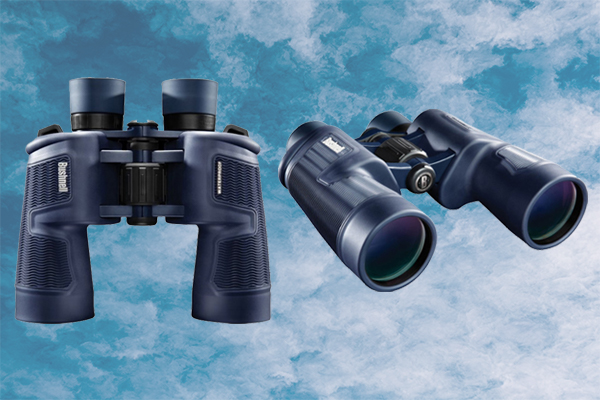
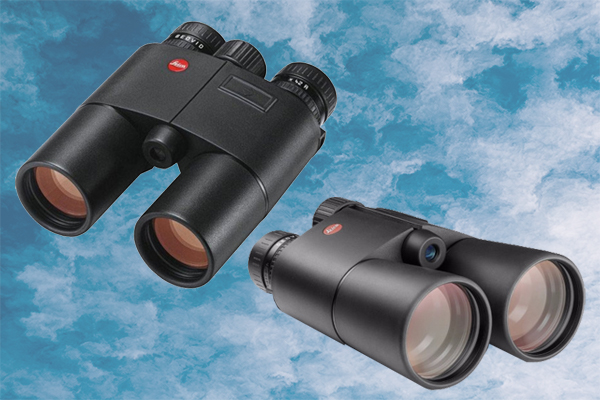
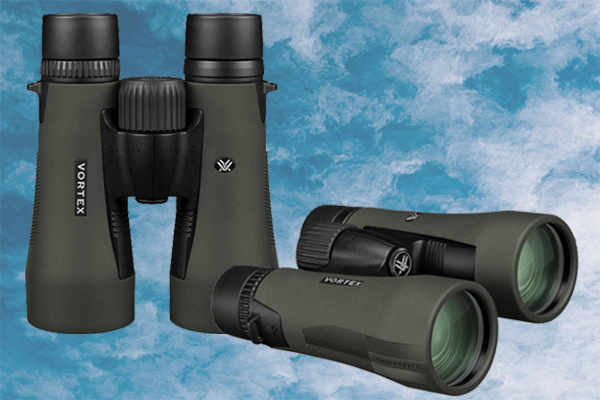
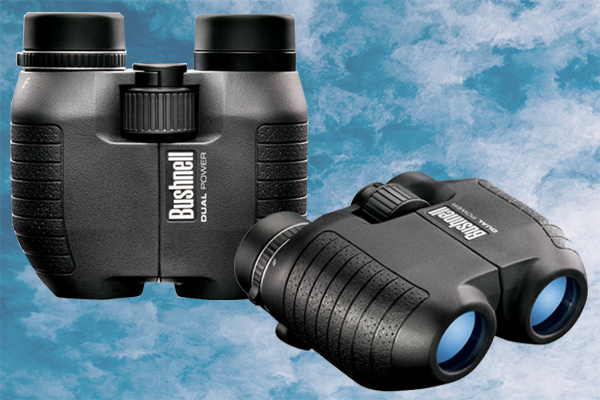
There are a surprising number of factors to consider when buying a pair of binoculars. The good news is, once you know the basics it’s actually very easy to choose one that fits your needs. In this binoculars buying guide, we define and explain everything on the list below:
Terminology
Magnification
Objective Diameter
Field of View (Real Field of View)
Eye Relief
Twilight Factor
Relative Brightness & Exit Pupil Diameter
Interpupillary distance
What are binoculars and how do they work?
Types of Binoculars
Porro Prism
Roof Prism
Fixed-Power Binoculars / Focus-Free Binoculars
Zoom Binoculars / Center Focus Binoculars
Compact Binoculars
Wide-angle Binoculars
Waterproof Binoculars / Water Resistant Binoculars
Individual Eyepiece Binoculars / Single Diopter Adjustment Binoculars
Invariably, a pair of binoculars’ description will include numbers like 10×24 or 7×50. The magnification is represented by the first number in that set (10x24 / 7x50).
This indicates the magnifying power of binoculars and is often expressed in diameters. For example, binoculars denoted as 10×24 have a magnification factor of 10; they produce an image that is ten times bigger than the one you see from a distance. Similarly, 7×50 means that the object is 7 times larger, etc. As you research binoculars you want to buy, you’ll probably find that hand-held models have a range of about 7x to 10x. Any higher and you should consider using a tripod.
Objective Diameter
Objective lens diameter is the size of the front lens in millimeters. It is the second number in the sequence mentioned above (10x24 / 7x50). This indicates the resolution or sharpness of the image as dictated by the amount of light collected. In other words, the higher that second number, the sharper and brighter an image will be.
Field of View (Real Field of View)
Field of view is the angle of the visible field as seen without moving the binoculars. A wide field of view is advantageous because it takes in more area and is great for viewing fast-moving subjects like birds and athletes.
Measure field of view in feet or degrees.
Apparent Field of View vs Real Field of View
Apparent field of view is the result of multiplying the real field of view by the binoculars’ magnification. It indicates the angle of the magnified field when you look through your binoculars.
Eye Relief
Eye relief is an important concept that is especially relevant for glasses wearers. The technical definition of eye relief is how far away your eye can be from the eyepiece and still see the full viewing angle. If the viewer’s eye is outside that distance, their field of view will be cropped. The rule to remember is that the larger the intended field-of-view, the shorter the eye relief.
Twilight Factor
A mathematical formula that determines binoculars’ ability to show detail in low light situations; it factors in the size of the objective diameter and the magnification.
Relative Brightness & Exit Pupil Diameter
It’s impossible to talk about relative brightness without also bringing up exit pupil diameter.
Exit pupil diameter measures low-light performance; it refers to the diameter (or size) of the beam of light that is transmitted to your eye through the binoculars. The higher the relative brightness number, the brighter and more detailed your view will be.
As mentioned above, Porro binoculars are inherently brighter because of the way light travels through the internal prism.
Interpupillary distance
This is the distance between your ocular pupils. To get the most out of your binoculars, center the left and right eyepieces directly in front of the pupil of your left and right eyes. The interpupillary distance can usually be adjusted by bending both halves of the binoculars outwards or inwards.
2. What are binoculars and how do they work?
At their most basic level, binoculars are two telescopes attached side-by-side that allow the viewer to see distant objects. They come in various sizes, weights, and magnification from industrial military models to delicate opera glasses. In this guide, we review the main types of binoculars, usage, key terms, and lens types.
3. Types of Binoculars
Main Groups: There is a prism inside every pair of binoculars. Not unlike an SLR camera, if you look through binoculars that don’t have a reflective system inside them everything appears upside down. The internal prism reflects the light entering the binoculars and corrects the view’s orientation. With that in mind, there are two types of prisms used in binoculars: roof prisms and Porro prisms.
It’s easy to identify Porro binoculars because the eyepieces and the objective lenses are offset to accommodate for the shape of the prism.
Pros
Porro prisms’ objective lenses are further apart than those of roof prisms. As a result, they have better stereoscopic imaging. In other words, the depth and dimensions of distant objects are clearer—it renders more of a “3D” effect.
If you have a pair of Porro prism binoculars and a pair of roof prism binoculars with the same specs, the Porro prism binoculars will inherently produce a brighter image. This is a result of how light reflects and refracts through the prism.
It is often less expensive to invest in high-quality Porro prism binoculars than it is to get the same tier of roof prism binoculars. This doesn’t reflect a difference in quality, but rather a less expensive manufacturing process.
Cons
While their design does offer some advantages, it also makes them bulkier and less compact than prism binoculars.
These prisms are arranged in a straight line. As a result, the body is often more streamlined and easier to carry.
Pros
Because of the prism’s design, this model is sleek, compact, and great for travel.
As you can see from the photo above, the roof prism is less complicated than the Porro; it has less internal moving parts which not only makes it easier to waterproof but also removes more elements that might break.
Cons
As mentioned above, Porro prisms allow for inherently clearer visuals. The image quality of roof prism binoculars can be a bit inhibited because of how the elements align. That said, if you’re willing to pay for top-of-the-line roof prism binoculars, you can have exceptional quality and the advantageous small size.
A binocular with a single magnification is called a “fixed-power” binocular. As the name suggests, there is one designated magnification number like 24×25 or 22×50.
Zoom binoculars’ magnification can adjust to move closer or further from a subject. Each pair of binoculars falls within a specific range (for example 8-24×25 or 10-22×50). The numbers before and after the hyphen indicate the magnification range.
Compact binoculars are often pocket-sized and utilized for outdoor activities. They are easy to travel with and are often found at 7x to 10x magnification ranges.
If you have shaky hands or use your binoculars in a non-stable environment (like a moving car, boat, raft, etc.) it will be difficult to use binoculars that are 10X+ without the help of a monopod or tripod.
There is a lot of crossover between water and condensation related activities/hobbies and binocular use. Having waterproof or water resistant binoculars is advantageous for marine use, hunting, and birdwatching; all of these activities involve damp, foggy, or humid conditions. Having built-in water protection eliminates issues with fogging moisture-related damage.
9. Single Diopter Adjustment Binoculars
Most binoculars have a center focus and change the zoom equally in both lenses. However, with individual (or single diopter) binoculars both sides of the individual eyepiece binoculars can be adjusted independently to account for visual impairments.
10. Binocular Lenses & Binocular Lens Types
One of the most important and overlooked elements when considering binoculars is the lenses’ optical coating. The goal is to maximize the amount of light entering the objective lens and reaching the eye. However, light gets lost during the transference process. As a result, binocular optics are coated with special chemicals to help facilitate light transmission.
Binocular lenses can be coated, fully coated, multi-coated, and fully multi-coated. The more coatings there are, the higher the contrast and the better the resolution.
Coated – one layer on at minimum one lens surface.
Fully Coated – one full layer on all exposed glass surfaces.
Multi-Coated – several layers on at minimum one lens surface.
Multi-Coated – several layers on all exposed glass surfaces.
Achieves almost 95% light transmission. That means that 95% of all light coming through the objective lens reaches the eye.
11. Recommended Accessories
Keep in mind that there is also a wide range of accessories that further enhance binocular use. In fact, focuscamera.com has pre-bundled kits for every use case from pro hunters and fishermen to more casual hobbyists.
Cases and covers protect your gear from the elements and anything that might cause damage at the bottom of your backpack. This ranges from simple lens covers and hard cases to no-zip hunting bags with built-in hydration packs.
Whether you’re hunting, hiking, or boating there are few things more irritating than a thin strap digging into your skin. Focus Camera offers thick, padded binocular straps for around your neck or over your shoulder.
Focus also has a wide array of binocular harnesses for added security and to keep your gear from swinging around and scaring animals.
If you’re a boating enthusiast, we recommend floating straps that are both comfortable and useful if you accidentally lose your binoculars off the side of your vessel.
Sometimes even the steadiest hands need a little help. Our tripods, monopods, and tripod adapters help you get more out of your binoculars on-the-go and in the comfort of your home.
Cleaning Kits
Maintaining the quality of your binoculars relies heavily on regular upkeep of the individual elements. Investing in a cleaning kit ensures great results for you and for generations to come.
Eye Shades
The last items on our binoculars buying guide are eye shades. Binocular eye shades do more than just block the sun. They keep out elements like rain, wind, dirt, and whatever else nature throws your way. Focus recommends this accessory for outdoor enthusiasts and glasses wearers; eye shades make even compact binoculars with small eye cups comfortable for our four-eyed friends.
That concludes Focus Camera’s binoculars buying guide. Please let us know if you have any questions in the comment section below.