Home Blog Page 45

Going South to Photograph the Great American Solar Eclipse

I’ve been working in New York as a designer and photographer for a year and a half now, but the Great American Solar Eclipse was a great excuse to go south again. My family and I (originally from North Carolina and Texas) decided to set up camp in Gatlinburg, Tennessee. The “path of totality” crossed near Gatlinburg, so it was just about worth the 11 hour drive (18 on the way back) with two children under the age of five.

We wanted the option to drive 100 miles in either direction to get the right shot, depending on the weather, and felt confident that Gatlinburg would give us enough wiggle room. We used Sunday as our practice day and drove to Cherokee, North Carolina, where the skies were supposed to stay at least partially sunny. Focusing on the sun isn’t the easiest thing to do, so we spent a chunk of our practice just figuring out how to perfect it. Once we got the sun in focus, I taped down the focus ring to hold it steady. Then, we practiced tracking the path of the eclipse (I used the Sun Surveyor app to predict, but there were a ton of other apps available).

We woke up the next morning to a mostly cloudy forecast in Cherokee. So, we drove an hour and a half to Vonore, Tennessee, which has a big recreational area to watch from. More importantly, it had nearly clear skies. We hauled all of our equipment up there, and I used two cameras to shoot: one with a wide angle lens and another with a telephoto. It’s great to get the eclipse from a few different perspectives. My wide angle camera was a Sony a7sII on the time lapse Syrp Genie, which shoots pictures in intervals of five seconds. My main camera was the Sony a7 RII with a 24-240mm lens, which I chose for its superior resolution (and the fact that it was a full frame camera). I wanted to keep the option to crop out quite a lot if I needed to.

My composite image of the eclipse.

One of the nice parts of shooting in the recreational area was that total strangers walked up to introduce themselves. There was a lot of “ya’ll come down to watch the eclipse?” It was tons of camo, boots and pickup trucks. I’d been away for so long that I forgot what it was like to be down here. When totality hit, both of my kids freaked out. My daughter, who is just under two, was pretty scared. My son kept screaming “oh my gosh,” and told me that it looked like someone had taken a bite out of the sun.

If there’s one thing that I could do over, it would be to practice changing the settings on my camera more. When totality hits, there’s so much excitement that you kind of lose your mind. It was hard to stay focused and bracket my shots. I’d heard this on podcasts, and figured that I had the settings down, but I was not prepared. When I saw the sun’s corona my brain just shut down. It was amazing. In the future, I’d like to automate as much of the process as possible so that I can enjoy the eclipse in the moment. Hopefully, there will be more tools to choose from in 2024.

5 Apps For Photographers

What a time to be a photographer. Digital gives you more options than ever , and social media lets you share you craft widely, And apps! – oh, the apps. If you’re a photographer who doesn’t use apps, then you are missing out. (Apple wasn’t kidding when they said, “there’s an app for that.”) There’s an app for almost anything you might need as a photographer, from posing guides to editing software. While the well of photography apps is deep, we definitely have our share of favorites. Check out five of our picks below!

VSCO

This editing app is a community favorite. VSCO is an all-in-one camera, editing, and sharing app with advanced manual controls, filters, and adjustment tools. The user interface is super straightforward, and many tools appear as simple little icons.  It’s a great way to edit pictures well and quickly, before you throw them up on social media. Like Instagram, it features an Explore option to view other users’ work, as well as a library with any photos you’ve taken or imported.

Arguably, the best part of VSCO is its control over your camera phone. You can use the VSCO camera to manually adjust ISO, shutter speed, white balance and focus like a point and shoot!

Sun Surveyor

Sun Surveyor is a user friendly app that predicts where the sun and the moon will be in the sky on any given date and time. It’s great for eclipse and astrophotography, but also useful for general planning. If you want to know when to shoot golden or blue hour, this is an easy way to figure it out. There are other similar apps, like Photographer’s Ephemeris, but Sun Surveyor lets you see the projected sun directly on your phone rather than providing degrees and calculations.

Posing App

Consider this your cheat sheet! Especially useful for weddings, ‘Posing’ lives up to its name. It’s a posing reference guide for photographers and models that can help you avoid any awkwardness or lapse in staging ideas during a shoot. You can use it for couples, kids, groups, weddings, and more. Plus, there are written tips in the guide for how to get the pose right.

Scene Scout

Ever wander across a really beautiful spot and think, oh, I wish I had my camera? Scene Scout lets you record it on a map with geotags, so that you remember to come back through! It also gives you the option to scout areas that you’re unfamiliar with to plan your next shoot with an interactive map – complete with feed and photo view.  Other photographers share their favorite locations too, so you get an ‘in’ on the best spots in your area.

Pocket Light Meter

If you don’t already have a light meter, then this app is a great tool. Light meters traditionally help photographers calculate exposure, and this handy little app does exactly that. It measures the light in a room or outdoors by using your phone’s camera, and lets you adjust ISO, aperture, and shutter speed to predict how it affects your image. Accurate and straightforward, it’s an easy fix to get your shots just right.

There are literally so many photography apps to choose from, so don’t get discouraged if none of these strike your fancy! It’s a good idea to keep an editing app on your phone for quick fixes, but what you use is up to you.

Beginners Guide to Aerial Drone Photography

First things first: if you’re thinking of flying your drone into New York City (or the surrounding Burroughs), then be careful! Almost all of New York City is a no-fly zone. You can get in serious trouble if you fly your drone in a no-fly zone. Even if you’re in a rural area, check that you’re not close to any military bases. (Any drones caught over a U.S. military base can be shot down.) Do your research before you get airborne, and then we can talk drone photography.

Table of Contents

Laws

The rules of drone photography are pretty strict. You need to get your license, and then register your drone. In addition to military bases, you cannot fly within a 5 mile radius of any airport. In New York State, you’re allowed to fly your drone in some designated public areas like parks – so check beforehand. Different states have different rules, and it’s best brush up on them before you fly.

Practice

Beginner aerial photography is a bit of a misnomer, since you should really know something about drones before you send your quadcopter to shoot landscapes. If you’re coming to this article with zero drone experience, then spend the next month figuring out how to pilot, including the ins and outs of modes and preselected movements. Even if you have clearance to fly near your house, start in open areas. Begin by hovering and landing, and transition into yaw, pitch, and roll on days when the wind is light and the sky is clear.drone photography

We also recommend starting with inexpensive drones. Most aerial drones come with cameras nowadays, so you don’t have to worry about whether or not you can take pictures with a non-pricey model. You’re likely to crash at least a few times before you really get off the ground, so best to practice with something that didn’t cost an arm and a leg.

Composition

Next, consider how you want to organize your images. Drones offer a unique perspective – use it! Try to capture things that you normally couldn’t with a regular Mirrorless or DSLR.  Find symmetry from a birds eye view, like a centered shot of an Island or a marina with equal numbers of piers. Or the clearing of a forest with equal amounts of brush on either side. To tell a story with your drone, use leading lines (roads, paths, etc.) to take your viewer on a visual journey through the image. Drone photographs can look overly flat, and leading lines help counterbalance the deep depth of field.drone photography

Drones are still in their infancy, and drone photography even more so. There’s a lot of red tape between you and aerial drone images, but if you keep to the rules and practice, there’s a totally new perspective to capture!


How to Get Started with Light Painting Photography

light painting

Light painting is making a comeback! From LED tubes to simple flashlights, photographers are experimenting with different techniques and tools to highlight their subjects.

Believe it or not, this art form is not new. Quite the opposite! Light painting has a long, if under-sung, history. Georges Demeny created the first known light photograph in 1889 with incandescent bulbs attached to the joints of his assistant. Years later, Gjon Mili made some of the most famous light paintings when he attached small lights to ice skaters’ skates. Even Pablo Picasso got in on the action with the 1949 “Picasso Draws a Centaur.” But don’t let that intimidate you! With a regular DSLR or Mirrorless and some basic gear, it’s easy to make your mark on this re-purposed trend.

Equipment

Yes, you’re going to need a tripod. This is light we’re talking about! You’re going to need a steady base to avoid blurs and unwanted light movement. While you’re at it, get a wireless remote so that you don’t create any vibrations when you take the shot. (You can also use a built-in timer.) As for the light paintings tools themselves, it’s really up to you! You can use flashlights (even smartphone flashlights) to highlight certain areas in the image – a flashgun is better for large swaths. Try glow sticks or sparklers for delicate trails of movement through the image.painting with light photography

Settings

Light painting requires long exposure times. First, set your camera to ‘Bulb.’ This setting gives you full control over exposure times, as it keeps the shutter open as long as the button is depressed. You usually want a long shutter speed, especially when trying to capture the light trails of glow sticks or sparklers. If you don’t have to worry about ambient light (i.e. if you’re out in the country at night or in a dark room), then ten seconds is a great place to start. But honestly, you can go up to 100 seconds or more! If you DO need to worry about ambient light, then you have to pick a quicker shutter speed – experiment! For ISO, you want something quite low to guard against ‘noise.’ (There’s nothing worse than a grainy light image.) When it comes to aperture, you have a lot of wiggle room. Stop up or down to fit your fancy. Just make sure that the object or subject is in focus.

painting with light photography

If you haven’t caught on yet, light painting is a lot about experimenting! Thank goodness for digital cameras and large memory cards, right?

Getting Started

If this is your first lighting painting experiment ever, then we recommend picking one object in a very dark room. Like, as little ambient light as possible. Your object could be anything, but keep it simple in the beginning. Think toys or flowers, or even a bowl of fruit. Take a test shot at ten seconds in the dark to see what comes up in your image. You’ll be surprised at how much ambient light can sneak in. Next, pick your light source. When you start, it’s easy just to stick with a flashlight. Set your timer or use the wireless remote to snap your image while you’re moving the flashlight around your object. Keep it moving! You don’t want any overly bright spots to spoil you photograph. You can stay simple with just an outline of the object, or, especially with longer exposure times, draw a story out of it. Stay close for a more controlled beam, or draw out for some cross light and texture.

painting with light photography

Once you get the hang of light photography, the possibilities are really endless. As we said earlier, experimentation is key. Expect to spend a long time adjusting your exposure times to lock down the perfect photograph, especially in the beginning. But if you keep at it, then you can make something magical.

Beginners Guide to Turntables

crosley record player

The good: vinyl is making a comeback. The bad: there is a whole generation out there with no idea how to use or pick a turntable. The ugly: there’s so much information about turntables on the internet that it’s hard to know where to begin. So, we’ve divided our favorite turntables up by brand to give you a better sense of what we offer.

Audio-Technica audio technica turntable

Audio-Technica offers a huge range of turntables. From USB connectivity to totally old school analog machines, Audio-Technica delivers an affordable catalog to choose from. The downside, however, is that they aren’t the most fashionable looking. Sure, there are a few stand-outs like the AT-LP60 series (Urban Outfitters carries them, for goodness sake). But for the most part, these machines are what-you-see-is-what-you-get.

However, Audio-Technica also offers some of the best beginner turntables – in particular, the AT-LP120-USB. The Wirecutter listed it ‘Best Turntable for Casual Listening,’ thanks to its easy set up and built-in phono preamp. You can even digitize your collection with a USB port!

TEACvinyl player

TEAC turntables have a very mid-century modern aesthetic. The TN-300 series is especially good, complete with USB outputs for digitizing music and both phono and line outputs for your amplifier. The platter is belt-driven by a high-torque DC motor, which ensures accurate and stable rotations. It’s a solid option, especially for the aesthetically minded.

Crosley

crosley record player

While they also sell regular turntables, Crosley offers a unique line of mini portable turntables that morph into handy briefcases. They come with built-in stereo speakers, belt-drive mechanism, and a manual return tone arm. They’re cute, retro, and beginner friendly. Plus, you look like you’re on your way to a sock hop carrying one.  In general, Crosley turntables are well sized and highly portable, even if they don’t fold into briefcases. Something like the direct-drive C200A series comes with an Audio-Technica cartridge, but features a lovely sleek lines and a built-in preamp for immediate playing.

If you’ve never bought a turntable, then your options can feel overwhelming. But don’t despair! Crosley is great if you want a little retro machine, while TEAC makes a better fit for someone with a particular modern aesthetic. Audio-Technica has lots of options for beginners, and the AT-LP120-USB is particularly good. So, the new question is: how many records can you fit in your living room?


How to Get Great Vacation Photos

If you haven’t gone on vacation yet this summer, then there’s still time! Cruises, beaches, far off places – they’re yours for the taking, and photographing. Even just a quick jaunt to your local watering hole can yield great ‘vacation’ shots with just a few quick tricks. In fact, great vacation photos are less about exotic locals and more about framing, focus, and the right light. So, throw down a beach towel and grab your nearest point and shoot or DSLR.

Focus on Faces

This tip is extra relevant if you’re a professional or enthusiast photographer. Amateur photographers typically understand that the whole point of vacation photography is to capture memories. Scenery is beautiful, but unless you’re trying to sell your pictures, then you can probably find an equivalent shot on Google. Instead, focus on the people – family, friends, even that goofy German guy in the hostel. Take pictures that you and your travel companions can laugh about in ten years. For intimate shots of faces and expressions, work with a wide aperture (shallower depth of field) and a 50mm to 85mm lens.vacation photo

Consider Quality of Light

When you’re visiting a new place, it’s easy to get so wrapped up in your surroundings that you forget to consider light quality. But harsh shadows and washed out images won’t communicate the splendor of your vacation. Instead, enjoy that time to just be! If you’re out and about for lunch, focus on spending quality time with your fellow travelers. Be present. Work on building those special memories outside the lens.vacation photo

However, if you want to capture lush atmospheric shots, then set aside some shooting time during golden and blue hours to work with magic light. Take notes in a journal (or on your phone) while you’re out during the day. Then, when your pals are resting, take another loop around the city with your camera to revisit the spots you liked.

Take a Disposable Camera

Everyone has a Smartphone these days, if not a Point and Shoot, Mirrorless, or DSLR. Sharing our shots is the easiest it’s ever been – on Facebook, Twitter, Instagram, etc. Everybody loves to see and share vacations from around the world. However, consider taking shots that are just for you and your family. Bring a disposable camera – or an instant camera like Impossible, Fujifilm Instax or Leica Sofort. If you have kids, let them take charge of it. Disposable or instant cameras force the viewer to select their happy moments with care, rather than snap shots rapid fire at every second turn. Choosing film can also help strike balance between ‘behind the lens’ and ‘in the moment.’vacation photo

Keep an Eye Out for Animals

Another secret to capturing the mood and ambiance of a place is to focus on its fauna. Funny little Italian street dogs, stray Israeli cats, wandering geckos all over Latin America, horses in Mongolia, donkeys in northern Africa – they’re all fair game! The best way to shoot wild animals is typically with a zoom lens, but you can get a lot closer to domesticated animals with just a regular prime. After all, zoom lenses are expensive, and frankly, you can find a picture of a tiger on the internet.vacation photo

Ultimately, you don’t go on vacation to take pictures. You go to relax and spend time with your family and friends. You don’t have to make photography your number one priority to get some great shots in! Carve out some ‘just for photography’ time to focus your eye without driving everybody else crazy. Make the memories while they happen. And frankly, as long as you go beyond the staged family vacation pose, then you’re going to end up with some interesting photographs.

How to Shoot Underwater Photography

It’s snorkeling season. If you’re ready to take your experience to the next level, then you might want to consider underwater photography with a diving camera. Thanks to readily available housings and underwater photography equipment, it’s easier than ever to take your artistic eye below sea level. Of course, you should already be a good diver (certified and all) before you add a camera. But if you’re eager to take underwater pictures, then swim through our tutorial.

Etiquette

You wouldn’t just stroll into your neighbor’s house and start poking around, would you? Well, the ocean is kind of like your neighbor’s house. Treat it with care, and its inhabitants with respect. Injuring an animal isn’t worth one great shot – even a string of great shots! Since it’s all but impossible to capture full spectrum light underwater without strobes, you need to get super close to creatures to take their picture. But not too close! Relax your breath, and swim in calmly. scuba diving cameraWe also recommend using a ‘muck stick’ to navigate the sea floor. You can use your stick to maneuver around tight areas and stabilize your body. Just poke it into the ground as you go. That way, you don’t slam into anybody in pursuit of the perfect image. It’s also important to remember that there are plenty of camouflaged creatures that sting and bite. Using a muck stuck to keep you above the fray is as important for the fish as it is for you.

And be careful not to chimp! ‘Chimping’ refers to hitting an animal as you scroll through your shots. It’s easy to get excited about underwater photography, but it’s important to consider your surroundings at all times. There’s nothing worse than smacking a flounder with you camera seconds after you photograph it.

Light

Ambient light (sunlight) is blue/green underwater. If you want to use majority sunlight to enhance your your images, then most of your photos will lack color and contrast. Instead, we recommend using strobes with short shutter speeds to provide continuous light and enhance color. Tray and lighting systems stabilize the mounted camera and manipulate strobes – two handed systems work best. Most systems give you the option to oscillate between manual or TTL EV strobe control for lighting. For manual, you adjust the strobe per shot, traditionally in direct relation to the aperture (ex: f/8 on the strobe and f/8 on the camera). This gives you better control, but TTL EV lets you focus more on the content of the image, since you’re never fumbling around with dials. underwater video camera

Exposure Settings

For the rest of your exposure settings, you need to balance ambient light with strobe light. Short shutter speeds are key to limiting sunlight. If you need a brighter image but you’ve already dialed up your strobe to full power, then we recommend dialing up ISO instead. Meanwhile, a very small aperture keeps the background mostly in focus, while a larger one blurs the background. If you want to capture a picture of the ocean floor in all its splendor, then you want a small aperture. If you want a single subject with beautiful bokeh, then try a larger one. Also, be sure your strobes are bright and you’re close to the subject when using a small aperture!scuba diving cameraUnderwater photography is a whole new world of wonder. You’re going to shoot a lot. Like, a lot a lot – especially in the beginning. Taking pictures underwater means experimenting more than you would with regular photography. You’ll easily shoot hundreds of images per outing! Remember to be courteous, aim upwards for depth, and shoot in RAW files.

And if all else fails, just keep swimming.

How to Take Pictures of the Great American Solar Eclipse

great american solar eclipse

You’ve heard the news. The Great American Solar Eclipse is the biggest solar event to hit North America in decades. If you’re in the line of a fire (a 70-mile stretch between North Carolina and Oregon), then you are in for almost three minute of totality. That’s total darkness, man!

For photographers, preparation is key to capturing stellar celestial images during the eclipse. Even if you’re not in the direct line of fire, most places in the United States are set to view at least partial darkness. Wherever you shoot, show up a day early to take a good look at your surroundings. Follow the path of the sun for practice, and take a look at these tips.

Filters

Before we delve into the specifics, we need to talk sun protection. We wrote a whole article about it here, but safety bears repeating. Even the perfect shot isn’t worth damaging your retinas. If you’re looking for astrophotography-level detail, then Celestron and Meade make several sun-safe telescopes with solar filters. If you want something a little less heavy, then regular solar filters are fine. You might even get a pair of solar-safe sunglasses to enjoy the eclipse without a camera, too.great american solar eclipse

Other Gear

At the risk of sounding like a broken record, you need a tripod. (Hint for future tutorials: you almost always need a tripod.)  If you’re using a regular DSLR without a telescope, then consider getting a telephoto lens with a teleconverter – we’re talking like 300 to 500mm. If you don’t want to blow all your savings on a telephoto lens, then try renting one. You’ll need to mount the telephoto lens on a tripod and point it upward like a telescope. You might also want to use a wide angle lens with a second shooter to capture the eclipse to capture the whole landscape.

Preparation

Arrive a day early. Really. Three minutes isn’t a lot of time, and it’s even less when you’ve got a bag full of lenses and no experience. Plan your shot using the Photographer’s Ephemeris, a map-centric sun and moon calculator. The PE lets you predict where the sun will be in the sky during the eclipse, based on your coordinates. On the day of the eclipse, you can also use the Sun Surveyer app an hour or so beforehand to confirm. Use the Live Camera View in your exact spot to see where the sun will fall into eclipse at your position.

Settings

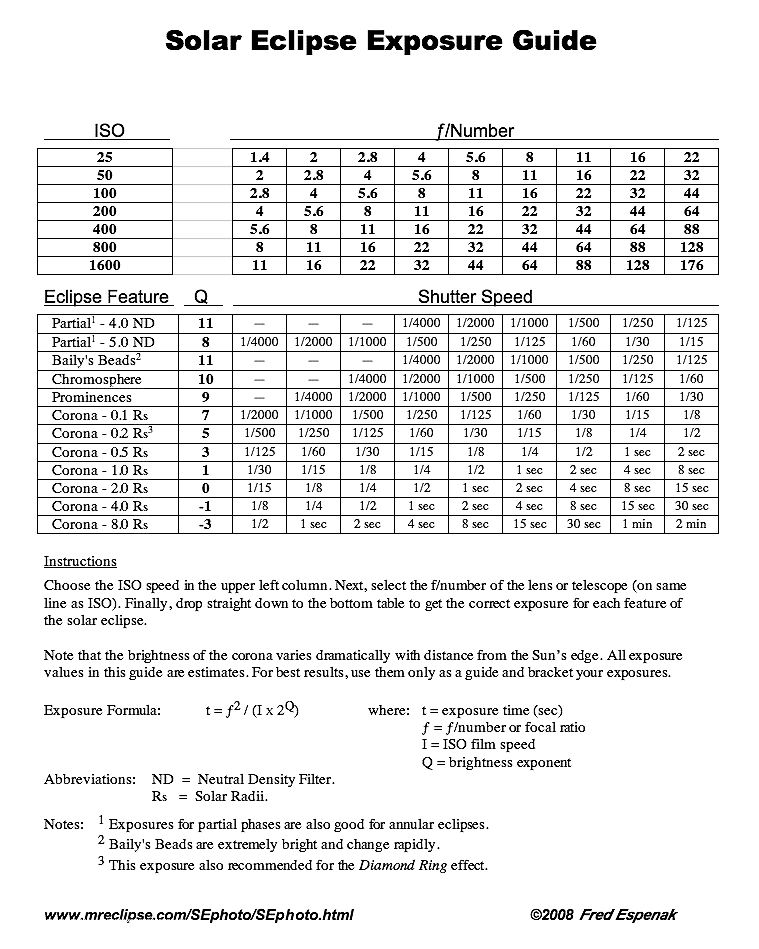
Turn off your image stabilizer and set your focus to infinity. During partial eclipse, use short exposure times since the sun is still visible. However, when the eclipse goes into totality, then change your settings to resemble night photography. Since no specific exposure can capture the full spectrum of the corona, you should try bracketing your image with shutter speeds from 1/1000 second to 1 second.

Once you hit full eclipse, remember to remove all solar filters to capture the faint corona!  Then, stand back and witness a once in a lifetime shot. It’s easy to get wrapped up in the technicality of a perfect picture, but it’s equally important to enjoy the whole eclipse experience.


Types of Camera Bags to Protect Your Gear

best camera bag

Listen up, photographers. It’s summer, and it’s time to take your camera out on lots of great adventures. Beach? Yes. Lake house? Absolutely. Underground sewer colony?  Whatever floats your boat.  To protect your gear, you’ll need a bag. And not just any bag, but the right bag. Here’s a rundown of some of your options.

Pouches

Camera pouches come in lots of different shapes. Some fit snugly to the shape of the camera, while others are quite boxy. Some bags have a strap or pockets, but baseline pouches are typically just a small bag with a bit of padding to protect your DSLR or point and shoot. If you’re lucky, you might also fit one or two lenses. However, if all you want is a quick and safe way to transport your camera, then camera pouches work nicely.

Messenger Bags

Messenger bags are perhaps the most fashionable camera bag, but be careful lugging a lot of equipment around with one! Shoulder straps can really mess with your back, so we only recommend them with a couple of light accessories. These bags blend in better than backpacks or pouches, so they’re especially suited for street photographers and casual photographers who want to work incognito. Some folks also use them to tote around laptops, chargers, water bottles, etc.dslr camera bag

Backpacks

Backpacks are the big guns of camera bags. If you’re carrying around a backpack, then there’s no hiding your intentions. Tripods, filters, multiple lenses, more than one camera body – you’ve probably got half your studio on your back. Backpacks usually come with additional goodies like a trolley connector (for travel), rain protectors, flexi dividers, and extra padding. If you’re carrying a lot of gear, or even a little gear for a long distance, then a backpack is the way to go. Your shoulders will thank you.best camera bag

There are as many kinds of camera bags as the day is long, so don’t get discouraged if none of these types are to your liking! The best camera bag is often in the eye of the beholder.

How to Adjust the White Balance on Your Camera

white balance

Man, human eyes are so impressive. Light shifts around them all the time, from cool blue to sunny orange depending on the time of day, naturalness of the light source, etc. Our human eyes adjust automatically to changing light, so we don’t usually notice the difference in light color (also called ‘temperature’). However, your digital camera just can’t compete with the biological splendor of human eyes. Instead, you’ll need a few tricks to help your camera see the light – er, correctly.

Table of Contents

Presets

If you’re new to photography, or if you’re just not in the mood to toggle, then feel free to use the white balance modes built into your digital camera. While the details may change, most digital cameras feature some form of the following:

  • AWB: Auto White Balance puts the camera in control on a shot by shot basis. It’s a good starting place, but you can get a better image with more nuanced modes.
  • Daylight: This setting creates a very subtle warming effect to counteract any blue light. Not all cameras feature it since sunlight is considered ‘normal’ within white balance settings.
  • Fluorescent: Like mid-day sun, fluorescent light is very cool. This setting warms it up.
  • Tungsten: Tungsten refers to bulb and incandescent light, which is typically warm. The tungsten setting is for shooting indoors, and cools down the colors.
  • Shade and Cloudy: Both of these settings counteract cooler light from the blocked sun.
  • Flash: Flash also produces a pop of blue light, and this setting warms up your image.

white color adjsutment

Manual

If you can’t get what you need from presets, then it’s time to giddy up into manual country. Not all digital cameras let you manually adjust the white balance, but for those that do, there’s a pretty easy trick to get what you need.

First, set the camera to manual white balance. Then, get a white or grey card, and take a picture of it. The idea is to show your camera what ‘normal’ white looks like. Shooting the white card in your current light will set it as the reference point for white balance. That’s it! Your next shots will show a much truer color contrast than the first image.

See, that wasn’t so bad. Digital settings are intimidating, but once you figure out your options, then the payoff is huge!