Home Blog Page 35

Over Coffee: Mariana Quevedo, Fashion Photographer

We met with Mariana Quevedo at Sumner Cafe in Bed-Stuy to discuss building a portfolio, vulnerability in fashion photography, and saying goodbye to business school. 

Mariana Quevedo dropped out of business school at the Ohio University during her first week. “They asked us to do a mock networking event – but you had to dress up, wear professional clothing. And I was like, no thanks.” Now a fashion photographer, Quevedo traded business casual for vogue. “It’s the storytelling aspect, the visual aesthetics that I’m drawn to,” she says. “How I can make a pretty picture. Fashion lends itself to that.”

There’s also the indescribable feeling she gets from fashion photography. For her final undergraduate project, Quevedo planned and executed a fashion photoshoot at a friend’s aunt’s house in Athens, Ohio, the foothills of Appalachia. “Literally, something in my brain was like, ping. You should be doing this. It was very powerful.”fashion photographerThe daughter of a writer and an engineer, Quevedo combines an artistic lens with the sheer tenacity to make something work. “I don’t mind the small budget,” she says. “I can [put together a shoot] with natural light and a reflector. Often, people get tied into what camera they have or what lens.” (She herself shoots with a Canon 5D Mark III.) For Quevedo, it’s more about the challenge.

Success from struggle is one of the ways she was able to make it to New York four years ago. “I never wanted to live in New York. It’s expensive. I don’t like the subway,” says Quevedo, who stayed three and a half years at home after college, building her portfolio. However, she had friends who lived in New York. She made a point to visit, contacting agents to ask if they had any models for testing. “That’s how you do it. I would come two or three times [a year] and sleep on my friend’s floor.” Finally, she landed a seasonal portraiture position in Brooklyn and eventually transitioned into freelancing. “My freelance has been a mixture of things. A little bit of school portraiture. I was doing a little bit of second shooting for weddings.”fashion photographer
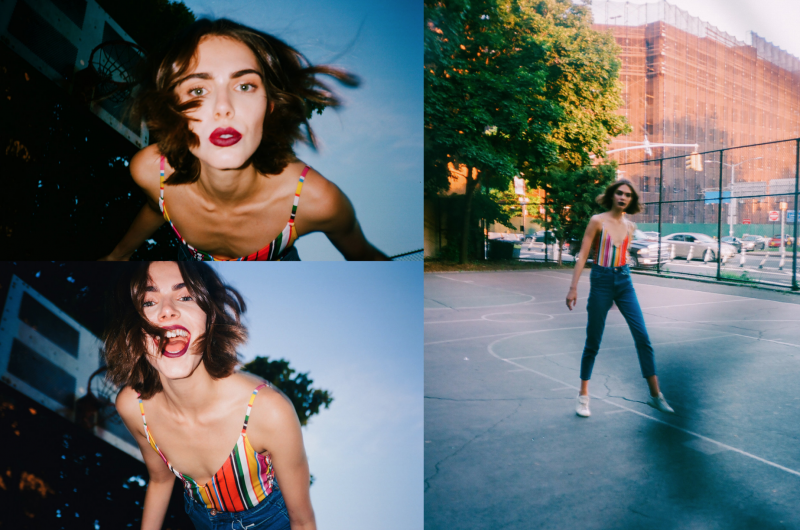
Fashion, however, remains the focus of her personal portfolio. She shoots five times a month “just for myself.” While elegant and professional, there’s also a vulnerability to her work that stands out amongst fashion photography. “I would say it comes from a couple of different spots in me,” she says. Part of it is the fantasy of imagining. “I don’t always get to wear the sized clothing that I want to wear, so I get to dress these beautifully figured women in whatever I want. I end up picking things that I would wear myself.”

At the same time, many of the models that Quevedo works with are ‘new faces.’ “They need the exposure. They need the direction.” They’re a little less sure of themselves. Quevedo hones in on that, and creates a captivating tenderness within the image.

Indeed, Quevedo has packed a lot into her years as a fashion photographer, but is unsure how much longer she can maintain it. “I don’t know how long I can physically hold a camera. Irving Penn was basically blind by the end, and people would tell him what was happening.” Aware of the potential for burnout, she hopes to transition into art direction, which she already dabbles in with low budget shoots. “There are ten different aspects that I have to keep in mind with photography that isn’t just directing,” she says. “I have a camera. I have a set. I have lighting. I have my hair and makeup.” And she does it on a dime.

Our 4 Fav Nikon Bundles

Focus Camera is known for putting together quality bundles that save you money on camera bodies plus lenses and other accessories. For Nikon fans, we’ve compiled a list of our four favorite Nikon bundles!

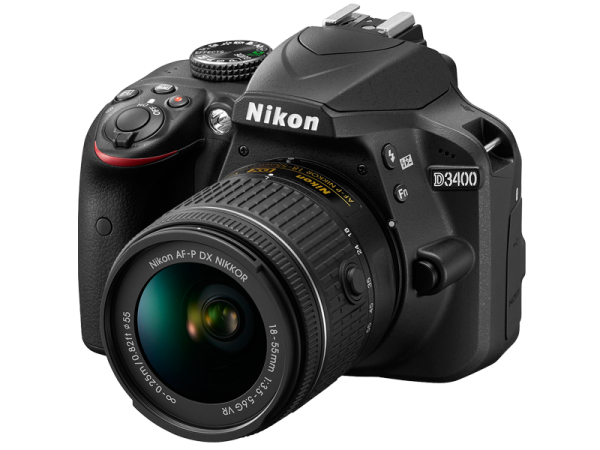
Nikon D3400 DSLR Camera w/ 18-55 Lens & 3-Piece Filter Kit & 64GB BundleNikon Bundles

Built around the same 24.2 MP APS-C CMOS sensor as the D3300, the Nikon D3400 is a good beginner DSLR with an EXPEED 4 image processor. At a few years old, it’s still popular thanks to its lightweight body and ease of use.  With an 11-point phase detect autofocus system, it’s on par with the Pentax K70 and better than the Canon T6 – which came out around the same time. It doesn’t come with WiFi, but utilizes Bluetooth for image transfer. This kit features some solid starter gear, including three lenses (the versatile 18-55mm NIKKOR, 55mm .43 wide angle, 55mm 2.2 telephoto), a soft shell gadget bag, two Sony 32GB memory cards, a SF-3000 Digital Slave flash and Universal Wireless shutter release.

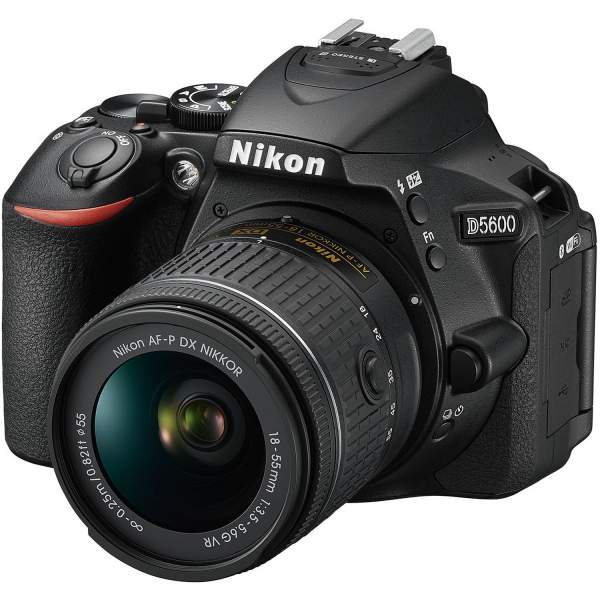
Nikon D5600 DSLR Camera w/ 18-55 & 70-300mm Lenses Bundle

For the next step up, we recommend this Nikon D5600 bundle. Like the D3400, the D5600 delivers excellent quality and sports a 24MP CMOS sensor with EXPEED 4 image processor. Unlike the D3400, it features 39-AF points and 5fps burst shooting. Suitable for a range of lighting conditions, the ISO extends from 100 to 25,600. While it doesn’t offer 4K (just 1080p), the D5600 does provide timelapse movies captured in-camera.  The kit comes with four lenses: 55mm .43 wide angle, 55mm 2.2 telephoto, AF-P DX NIKKOR 18-55mm f/3.5-5.6G VR, and AF-P DX NIKKOR 70-300mm f/4.5-6.3G ED. There’s also a strap, Digital Slave flash, wireless shutter remote control, SanDisk 64GB memory card, and more.

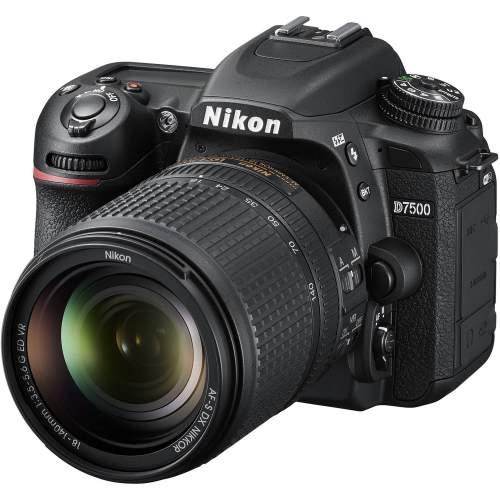
Nikon D7500 DSLR Camera Body with Nikon Bag w/ 64GB Card & Battery Bundle

With a brilliant 20.9MP sensor, EXPEED 5 imaging processor, 51-point AF, and 8fps burst shooting, the Nikon D7500 is a great enthusiast camera.  It offers excellent ISO sensitivity with a range of 100-51,200, plus an extra stop of flexibility. Video lovers will appreciate the 4K option, along with in-camera timelapse. The body itself is compact and ergonomic. Overall, it’s a great upgrade to the step just before professional level cameras. The bundle features a Nikon camera gadget bag, SanDisk 64GB memory card, Universal Wireless shutter release, professional wrist grip strap, cleaning and accessory kit, tripod, and various effects kits for post-production.

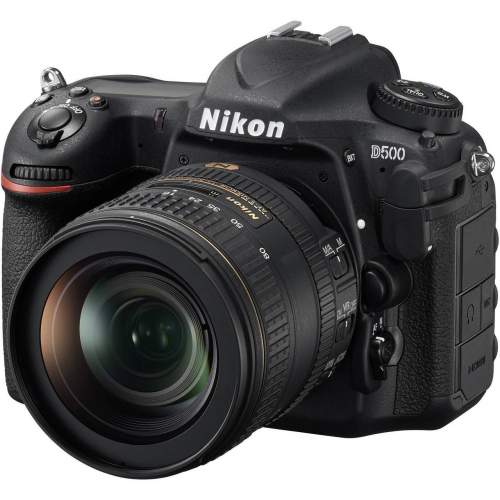
Nikon D500 DX-Format DSLR Camera (Body) w/ Backpack & 64GB Card Accessory Bundle

For professional photographers, especially sports and action photographers, the Nikon D500 is an enticing package. It features a system taken from the high-end D5. The 20.7MP APS-C (DX-format) sensor enables superior lowlight performances thanks to bigger photosites, while the EXPEED 5 processor permits 10 frames per second burst shooting. The D500 offers 4K for up to almost half an hour, as well as a touch sensitive 3.2-inch 2,359,000-dot screen. There’s both Bluetooth and WiFi connectivity. With the bundle, you also get a backpack, Nikon strap, memory card wallet, Universal Wireless shutter release, SanDisk 64GB memory card, and more.

So, whether it’s a starter DSLR like the Nikon D3400 or a more professional D500, there are Nikon bundles for every level of user. If you don’t see what you’re looking for here, keep searching! Focus Camera offers a wide variety of Nikon bundles to suit diverse needs.

5 Tips to Get Started with Fashion Photography

Learning the ropes of a fashion photoshoot may feel daunting, but fashion photographers all started somewhere. Whether it’s figuring out the difference between light modifiers, researching fashion terminology, or making friends with models, there are a few key points to keep in mind.

Put Together a Portfolio

Especially for beginners without an established reputation, a fashion photography portfolio is crucial. While maintaining only a website cuts down on costs, many fashion professionals still want to see a book. It’s a smart idea to have both available. For the book, good quality 8 x 10 prints with a few tear-sheets (pages torn from a magazine in which you were published) should suffice.fashion photography

Do Your Research

Research entails both the academic and aesthetic. On the one hand, it’s important to learn the history of fashion, which includes everything from fashion terminologies to different periods and eras. On the other hand, it’s also necessary to read contemporary fashion or photography magazines to understand different designers, icons, and trends. Learn which magazines prefer what, too. It’s much easier to create a portfolio for a specific editor when you understand what he or she tends to publish.fashion photography

Learn Your Light Modifiers

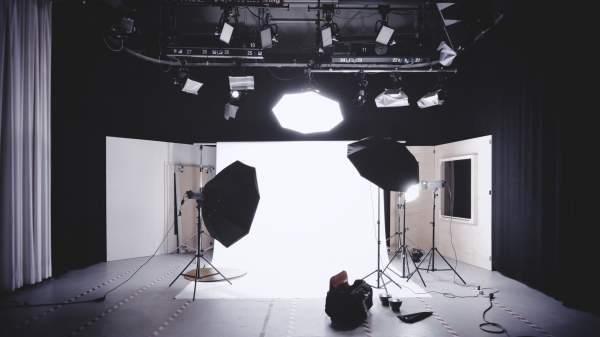
Fashion photography utilizes light modifiers, and it’s in your interest to practice with as many as possible.  To start, the beauty dish is a quintessential beauty accessory. By attaching it to a light source, this shallow parabolic disk delivers light softer than a regular flash but harder light than a softbox. The semi-hard light is great for sculpting features. A softbox does what it sounds like: diffuses for a pleasing, soft light. It reduces harsh shadows, and mimics window light.how to fashion photography

Meanwhile, a giant parabolic umbrella works wonders for full-length fashion and commercial photography because it provides so much light. It keeps colors consistent throughout the whole image, unlike smaller modifiers that force tonal shifts in lower portions of the frame. For versatility, the octabank is a solid choice. It’s sturdier than an extra-large umbrella, and provides more exact light control – almost like a combination of umbrella, softbox, and beauty dish. Since the shape is rounded, it creates a natural catch light in the model’s eyes.

Respect Your Models

Male or female, please please don’t touch the models without permission – even if it’s totally innocent! Treat them with the same respect you would a coworker. It’s important to give positive feedback, too (and limit the negative). You don’t want to crush the model’s confidence.fashion photography

Build a Creative Team

Fashion photography is more collaborative than some other genres. You need a makeup artist, hairstylist, and – obviously – a wardrobe stylist.  You can also use a prop stylist, creative director, and retoucher. When you’re just starting out, paying professionals might not be in the cards. However, this is a great opportunity to utilize other beginners. Like you, lots of creatives need an opportunity to hone their skills. Put out a call to your friends and their communities for talent.fashion photography

“Anything is art if you do it at the level of an art,” says American photographer Richard Avedon, and this is particularly true of fashion photography! A picture of a model in a dress is just another picture of a model in a dress without your vision. So while it’s useful to keep these tips in mind, remember that honing your eye is the most important skill of all.

Livestream is Professional Streaming Made Easy

From makeup tutorials to church services and college classes, streaming is everywhere these days. Yet most streaming services fall woefully behind traditional broadcasting in terms of quality and content. Livestream offers a solution to improve live streaming for all. We spoke with Mark Chessler, Director of Channel Management for the Livestream Studio products over at Vimeo, about what it is, what it’s for, and where it’s going.

What It Is

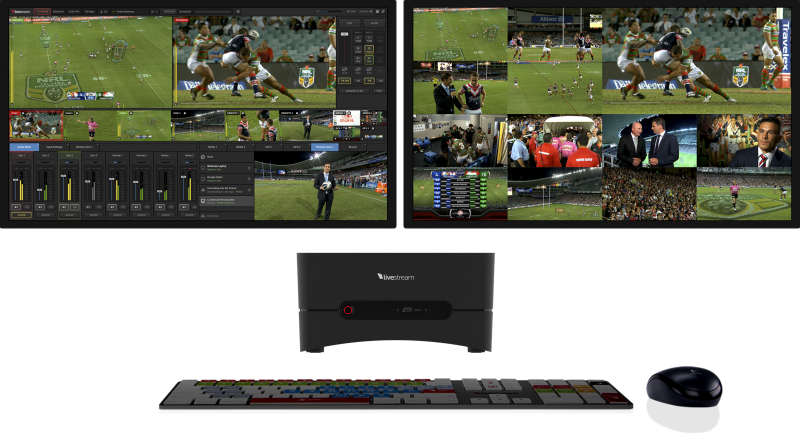
Livestream provides professional streaming hardware and software to record and distribute high-quality video across social channels like Facebook, YouTube, Twitch, Periscope, and YouStream, as well as over apps, websites, and Livestream’s own platform. The software allows users to switch between cameras for a traditional and polished broadcasting experience. Livestream also offers streaming staples like real-time interactive chat, graphics, chroma key (green screen), secure viewership technology, and valuable insights with cross-platform analytics via the subscription service. (Though the subscription itself is totally optional. While it allows you to stream onto your personal or corporate website, the software and hardware still stream to Facebook, Youtube, Twitch, and more without it.)

livestream

The hardware, meanwhile, is designed to work in conjunction with Livestream software for optimal broadcasting. It comes in three unit options: Studio One, HD51, and HD550. The Studio One, which launches Monday, is the entrypoint of the marketplace. “If you’re a church with a video switcher and sound mixing boards, you may not have a lot of room for another streaming device. This takes up a very small footprint. It’s 11 inches wide, but it’s a lot of power,” says Chessler. Pre-installed with Livestream Studio software, the Studio One streams up to 4K resolution with two 4K inputs — or four HDMI or SDI inputs for HD. It offers 20 hours of broadcast quality recording, ten remote cameras, three graphics tracks, and more.

The HD51, meanwhile, comes with five HD-SDI or HDMI inputs in either 4K or HD. Along with Studio One features, the HD51 streams on up to two screens and is mountable to a rack. The higher end HD550 is exactly like the HD51, but portable. “That is our most popular seller,” says Chessler. “It’s just convenient. It gives you a lot more flexibility.”

Who It’s For

While anyone can use Livestream, it’s particularly suitable for for houses of worship, education (both K-12 and university), and corporate communications — i.e. places with some degree of lecture or presentation. Moreover, since the software is flexible but not overly complicated, it’s adaptable for both experienced streamers and total novices. “I see beginners using it more for the very basic features, like putting a few cameras in and basic effects,” says Chessler. More advanced users, on the other hand, might utilize third party hardware like MTI or PTZ cameras. They can also add third party graphics or “some green screen effects.”

Where It’s Going

Nowadays, everybody live streams. “I get so many pings [on my phone],” says Chessler. Whether it’s Facebook or Instagram, our friends and followers communicate via streaming technology. Livestream is dedicated to providing content creators tools that allows them to produce and distribute those live streams to their designated audiences. “We’re trying to democratize professional level video production,” says Chessler.

Fujifilm Instax SQ6 vs. Polaroid One Step 2 VF

We compare two brand new instant cameras that just hit the market. The Fujifilm Instax SQ6 and Polaroid One Step 2 Viewfinder.

Shop: https://www.focuscamera.com

Fujifilm Instax SQ6: https://www.focuscamera.com/fujifilm-instax-square-sq6-instant-camera-pearl-white.html

Polaroid One Step 2 VF: https://www.focuscamera.com/polaroid-originals-onestep2-viewfinder-i-type-camera-white.html

The Gold Review: Sony 24-70 F2.8 GM

Along with the Sony A7RIII and Sony RX100 V, Dan Gold tested the Sony 24-70 F2.8 GM lens on his trip through Europe. The 24mm functions as a wide angle for landscape and cityscape, while the 70mm acts as a mild portraiture lens. It works for a variety of scenarios, which is especially useful while traveling with a full frame camera.  “You can shoot wide angle and somewhat telephoto in the same lens, and it’s really nice,” says Gold.

There’s a lot to like about this lens. First, it’s super sharp, even at its widest setting. “It’s a G Master, so it’s really high quality,” says Gold. It’s also a bright, fast f/2.8, which “really saves on a couple stops of light. You can shoot in darker conditions, and drop your ISO about two stops.”  There’s a circular 9-blade aperture for beautiful defocus effects, as well as a Direct Drive SSM for highly precise and quiet lens control. Moreover, it comes with a focus hold button. “So if you’re shooting a long time lapse with a fixed focal length, it won’t do any lens creep or move around.”

Sony 24-70 F2.8 GM

However, keep in mind that this is a very heavy lens. “You could buy three primes and it would be smaller, lighter, and cheaper than this one lens – but you would have to shuffle between three lenses.” With the Sony, it’s certainly not inconspicuous either. “If you’re trying to enter into a space with no professional photography, and you have this lens, it looks professional. It’s possible that you would have issues gaining entry.” Lastly, there’s no image stabilization. However, most Sony cameras feature in-body image stabilization, so it’s not a problem.

The Sony 24-70 F2.8 GM is undoubtedly a great lens. It’s sharp, quiet, and good in low light. It’s also heavy, and you can buy prime lenses for cheaper. Where this lens really shines, however, is with versatility. If you’re looking for ease of use, you can’t beat it.

5 Beginner Music Photography Tips

So, you want to become a music photographer? Sure, you love music and photography – combining the two seems natural. But music photography takes some serious practice and a unique set of skills. If you’re ready to hold office hours between 8pm and 2am, then scroll down our list below.

Travel Light

Leave the extra gear at home! Some music photographers like to travel with a flash (which the band will probably hate), more than one camera body, and several lenses. This is going to make you a lot less aerodynamic as you move around the crowd – or it means that you’ll need a place to stash all your extra gear. Instead, a workhorse 24-70 F/2.8 provides enough versatility. If you feel daring, you could also go for a 50mm prime.

Watch YouTube Videos

This is just to say: do the research. Watch YouTube videos of the band you’re going to shoot. Learn what kind of moves which members of the band like to pull. If the guitarist is known for their amazing solos, for example, then don’t just focus in on the lead singer.

music photography

Choose High ISO and Quick Shutter Speeds

To freeze the movements of musicians jumping from one side of the stage to the other, pick a quick shutter speed.  (You don’t want blurred photos!) However, fast shutter speeds let in less light. In dark music venues, this might be a problem. So, boost up the ISO. Figure out what level noise becomes a problem (usually around ISO 3200 or 6400) and crank it to the limit. If it’s super dark, then you might even consider risking a noisy image to edit later in post-production.

Use Continuous Autofocus

For live music, continuous autofocus is best. Musicians are usually moving subjects, after all.  Focusing with AF-S, on the other hand, really only works when the subject takes a break from running around.

music photography

Keep Your Cool

Don’t panic. With live music, not everything goes as planned. You might not get the shots you were hoping for, but quick thinking is worth more than a perfect shot list. If you’re willing to go with the flow, then you might end up with something even better than what you expected.

If you’re just starting out, remember to travel light with just a workhorse lens to maneuver through crowds. Do your research with YouTube videos, and keep your cool (i.e. expect the unexpected). Ramp up ISO to compensate for quick shutter speeds, and use continuous autofocus.

The Gold Review: Sony A7RIII

As the inheritor of a lot of A9 technology, the Sony A7RIII comes packed with a fast autofocus and high quality imaging. It also shoots 4K, 10 shots per second, and features 15 stops of dynamic range — according to Sony. In short, it’s garnered a lot of attention. Photographer Dan Gold took it on tour with him through Europe to test if it lived up to all the hype.

Design and Controls

While it’s the same size as the A7RII, the A7RIII includes the battery found in the Sony A9 as well as its deeper, more ergonomic grip. The A7RIII also features the large and detailed 1280 x 960 pixel viewfinder and two SD card ports. Like the A9, it has touch control on its LCD screen.

Sony also added a joystick, which makes it quicker and easier to specify AF points. Gold himself is a bigger fan of the joystick than touch control, though he did find it practical in particular cases. “When you set the Sony A7RIII on a tripod and find what you want to focus on, you can change the focus foreground into a background by touching the screen.”Sony A7RIIIPlus, the camera is weather sealed and sturdy. “I had confidence that if there was a little drizzle it would be sealed off more properly than other cameras I’ve used in the past,” says Gold.

Image Quality, Dynamic Range, and ISO

The 42.4-megapixel, full-frame BSI CMOS sensor, while the same chip as the A7RII, produces higher image quality thanks to its new circuitry and redesigned BIONZ X image processor. “Even if you’re zoomed 1:1, you still get a really high quality level of detail, which I wasn’t expecting,” says Gold. “You can shoot a subject from really far away, and the subject looks the same quality that I was getting from my A7 Mark II. I did a lot of zooming and cropping on some architecture style photographs and street style. You can crop in so much.”

Meanwhile, the noise reduction is also impressive with an ISO range of 100-32,000. “There was one time when I shot a concert, and the venue was really dark,” says Gold. “My ISO was getting close 10,000, and there was noise but the noise pattern was really nice. The photos were still very usable. Same thing with shadow recovery, even at that ISO I was able to raise the exposure a little bit. If you zoom in 1:1 you can tell there’s noise, but for Instagram and even small prints, the photograph that came out of the camera in those lighting conditions was really incredible.”Sony A7RIIIDynamic range, too, is excellent at 15 stops. Often, shooting in shadow and then editing to pull those shadows up in post-production appears fake. Here, that’s not the case. “You can pull up a shadow so much more than anything I’ve tried. You can have the confidence to shoot something in shadow. There were no limitations.”

Autofocus

With processing power inherited from the A9, the Sony A7RIII shines when it comes to autofocus. Although it features the same on-sensor phase-detect AF points as the A7RII with 399, there are also 425 contrast-detect points. Phase-detect points cover approximately 47% of the sensor area, and almost 68% when combined with contrast-detect. “It was almost weird how it was always in focus,” says Gold. “It was really quick and really good.”Sony A7RIIIThe A7RIII comes with six AF area modes (Wide, Zone, center, Flexible Spot, Expanded Flexible Spot, and Lock On area modes) with three additional AF functions (Face Priority in AF, Eye AF, Center Lock-on AF). Face Priority keys in on the face, while Eye AF focuses on the nearest eye. “It helps having an eye always in focus when you’re shooting a portrait,” says Gold. Center Lock-on AF, meanwhile, tracks in Wide area mode.

Video

Video has also improved with the Sony A7RIII. “I tested video with the A7II, and there’s a lot of problems,” says Gold. “In a lot of shooting scenarios, it doesn’t do a very good job.” However, the A7RIII features improved 4K and 1080p capture, as well as play back at either 24p or 30p for slow motion. “When I was shooting video with this camera, I saw a noticeable difference when comparing to my Sony A7II. It felt like a good, solid video camera.” Plus, while not as smooth as some competitor cameras, the in-body image stabilization reduces camera shake.

However, Gold recommends programming shooting settings into one of the memory recall to switch between between stills and video. “I do video very specifically. I change white balance. I change the picture profile to S log. I change the exposure to manual exposure. So back and forth between photo and video took a lot of time.” The memory recall, however, is an easy fix.

Battery Life

The improved battery life is no small thing either. “I used the camera almost all day and the battery almost lasted the entire day,” says Gold. “I was really impressed with how long it was able to last. A big benefit is that you can charge the camera with the external battery while you’re using it. This is not the case with some of the older Sony cameras — like the a6000 and A7II. There was a scenario where I was at 1% and the external battery was used as the battery. It also takes a USB-C charging cable, which is nice for me because I have a Google Pixel.”Sony A7RIII

With improved ergonomics, higher image quality, faster autofocus, better video and battery life, the Sony A7RIII is hands down worth the upgrade from the A7RII. Aimed at professionals, the A7RIII is also, well, fun. While it’s a bit more camera than most people need, it’s also one of the best on the market.

Our 5 Fav Canon Bundles

Focus Camera is known for putting together quality bundles that save you money on camera bodies plus lenses and other accessories. For Canon fans, we’ve compiled a list of our four favorite Canon bundles!

Canon Powershot SX530 HS Camera with 32GB Deluxe Accessory Bundle

This compact beginner point and shoot comes with 50x zoom ratio, an easy to use control layout, a framing assist function, and Canon’s Creative Shot mode, which automatically applies special effects and recomposes the shot to emphasize the subject. The 16-megapixel CMOS image sensor is powerful enough for beginners, and supports 1080p video capture. There’s no electronic viewfinder, but the price is very agreeable. In addition to the Powershot, this bundle comes with a SanDisk Ultra 32GB SD Card along with a Mini HDMI Cable. It also features a Lithium-ion replacement battery, charger, and 5 piece accessory kit with cleaning gear, a tripod, and more.

Canon PowerShot G7X Mark II Digital Camera with Corel Software and 64GB Bundle

With good photo quality for its class, the Canon PowerShot G7X Mark II doesn’t come with a lot of frills – but its solid where it has to be.  While suitable for beginners, it also works as a travel camera for owners of larger DSLRs or mirrorless alternatives. Like the Powershot, there’s no viewfinder and only a modest zoom.  However, it features a large (for its size) sensor at 20.1 megapixels with Full HD 60p video recording, a Digic 7 processor, RAW shooting, and Wi-Fi connectivity. The bundle also includes Sandisk Ultra SDXC 64GB Memory Card, as well as a Mini HDMI Cable, a spider tripod, and a Corel Software Kit. It also comes with a Focus Camera Accessory Bundle specially designed for large point and shoot cameras.

Canon EOS Rebel T7i DSLR Camera w/18-55mm lens & 32GB Premium Accessory Bundle

As a step up from point and shoots to a real DSLR, the Canon EOS Rebel T7i is a Canon favorite with solid video and still quality and respectable performance. With the same body as its predecessor, the T7i incorporates advancements like the Digic 7 image-processing engine and Canon’s 24MP Dual Pixel CMOS sensor. It also features 45 autofocus points and an intuitive interface system. Some reviewers consider it the best Rebel of a dependable line of Canon DSLRs. The Rebel bundle comes complete with an 18-55mm kit lens, which transitions from wide angle to street and snapshot. There’s also a SanDisk Ultra 32GB SD Card, a gadget bag, battery charger, strap, spider tripod, and more.

Canon EOS 6D Mark II DSLR Camera Body with BG-E21 Battery Grip and 64GB Bundle

Featuring high ISO performance, 6.5 fps continuous shooting, Dual Pixel Autofocus in live view, quick 45-point viewfinder autofocus, and an articulating touchscreen, the Canon EOS 65 Mark II is a good full-frame enthusiast camera for photographers who aren’t quite up for the professional 5D series. Its water resistant body holds a 26.2MP sensor, which is 6MP more than its predecessor. There’s also a remarkable 40,000 maximum ISO, which is expandable up to 102,400. Plus, the bundle comes with a battery grip, battery charger, and camera gadget bag, as well as a 64GB memory card. While the EOS 6D Mark II might not have made many waves when it was first released, the bundle renders it much more appealing.

Canon EOS 5D Mark IV DSLR Camera (Body Only) with Battery Grip and 64GB Bundle

A very well rounded DSLR, the Canon EOS 5D Mark IV features 7 fps burst shooting, Live View AF performance, an advanced AF system, and responsive touch screen. Built around the 30.4MP full-frame sensor, it also features 4K video shooting. While designed for professionals, experienced enthusiast photographers might also find it worth the upgrade. Meanwhile, the bundle comes with a Canon battery grip, backpack, lightweight monopod, battery charger, and ​SanDisk 64GB Extreme Pro Compact Flash Memory Card.

So, whether it’s the beginner Powershot SX530 or the professional 5D Mark IV, there are Canon bundles for every level of user. If you don’t see what you’re looking for here, keep searching! Focus Camera offers a wide variety of bundles to suit diverse needs.

Sony in the City: Sony RX100 V vs. Sony RX100 VI

In our first installment of ‘Sony in the City’ we take out the super-compact Sony RX100 V and its successor the RX100 VI to Times Square and test out the image quality, video quality, and battery life.

Sony RX100 VI vs RX100 V Comparison Chart

Sony RX100 V Sony RX100 VI
Pixels (Effective) Approx. 20.1 Megapixels Approx. 20.1 Megapixels
Sensor Exmor RS® CMOS sensor Exmor RS® CMOS sensor
Image Processor BIONZ X BIONZ X
Lens ZEISS Vario-Sonnar T 24-70mm F/1.8-2.8 ZEISS Vario-Sonnar T 24–200mm F/2.8–4.5 lens
Optical Zoom 2.9x 8.0x
Focal Length f = 8.8-25.7mm f = 9.0-72 mm
Video 4k 4k HDR
FPS Continuous Shooting 24fps 24fps
AF Speed 0.05 sec 0.03 sec
Dimensions (W x H x D) 4 x 2 3/8 x 1 5/8 inches 4 x 2 3/8 x 1 11/16 inches
Screen Size 7.5cm 7.5cm
Weight Approx. 10.5 oz Approx. 10.7 oz
Battery Life (Stills) Approx. 220 photos/ Approx. 110 min. Approx. 240 photos/ Approx. 120 min.
Battery Life (Movies Actual Shooting) Approx. 35 min. Approx. 40 min.
Battery Life (Movies Continuous Shooting) Approx. 65min Approx. 75 min
Slow Motion Shooting
960fps

960fps
Eye Autofocus
Built-in Image Stabilization x
180° Tilting LCD Screen
WiFi / Bluetooth®
Micro HDMI Port
NFC
Touchscreen Interface x

Notable Updates

Built-in Lens

Both of these lenses are great for street photography and documenting your everyday life. The Sony RX100 VI’s impressive 24-200mm focal length makes it a standard telephoto lens. However, with this upgrade, you do lose that great f/1.8-2.8 aperture range. What you decide to prioritize is up to what you plan on shooting.

User Interface Updates

Pop-out Diopter

The RX100 VI helps optimize one-handed shooting with its upgraded viewfinder diopter. When you use the VI’s viewfinder, the diopter automatically pops out and is instantly ready for use. Alternatively, the RX100 V’s requires that you manually pull the diopter out to use the viewfinder. This is a win for the VI.

Screen Versatility

Once again, this point goes to the RX100 VI. The newest iteration’s screen is able to tilt at 90º so you can quickly and easily take photos at an angle. This is especially advantageous for food photography.