Home Blog Page 20

What’s In Your Bag? | Sigma Pro Liam Doran

Sigma Pro Liam Doran shares his camera bag essentials including safety gear, lenses, and (of course) his camera.

I have a few different photo bag setups for myriad shooting situations but right now we are in the heart of winter so I’m going to cover what’s in my ski photo pack. It’s quite a bit.

The thing about ski photography is that you need way more than camera gear and photo skills to safely capture athletes moving through deep snow in the often dangerous backcountry locations.

Liam Doran 6

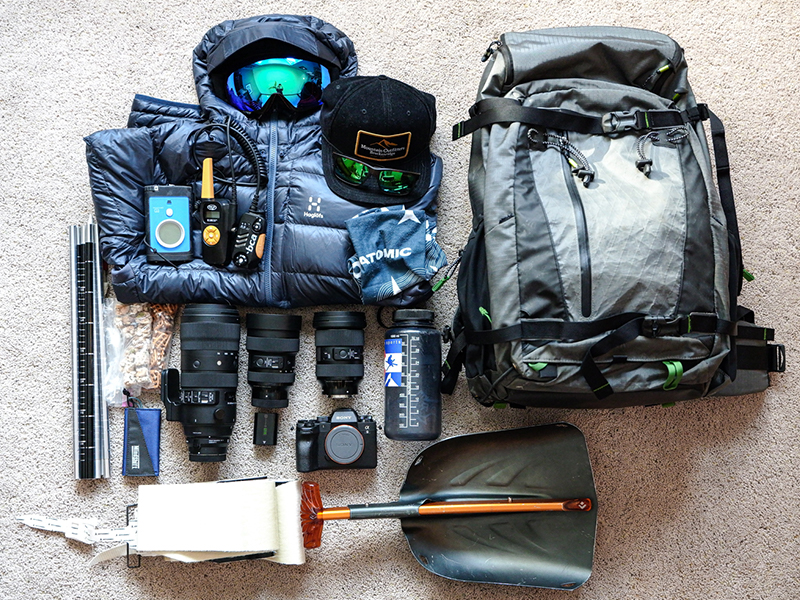
Safety first. A few critical pieces of gear that are in my pack every day are my avalanche probe, beacon, and shovel. Well, actually the beacon is worn on my person and is used to help me find (or be found) in case an avalanche buries someone. But we do everything we can to avoid this situation.

Another important piece of gear is my two-way radio. The other athletes in my group have these as well and we use them to communicate both for photography and safety reasons.

Ok now for the good stuff…camera gear.

whats in your bag liam doran sigma pro 1

Sony a9II

I just bought this camera (at Focus!) and have only gotten it into the field a few times. This camera has the fastest frame rate and the best autofocus system out there making it the perfect camera for shooting skiers at high speeds. It is also very well weather sealed which is perfect for shooting during a raging snowstorm. I also dig the fact that the AF points cover almost the entire viewfinder!  I’m really looking forward to putting this game-changing camera through the paces.

Liam Doran 4

Sigma 14-24 f/2.8 DG DN A

This is Sigma’s super-wide-angle lens for Sony E mount. It is lighter and smaller than the original DSLR version. This is a great storytelling or scene-setting lens.

Sigma 24-70 f/2.8 DG DN A

The mirrorless standard zoom has been completely redesigned from its DSLR counterpart. It is both lighter and smaller than its original version and the zoom and focus rings have been switched putting the zoom ring exactly where I want it.

Taken by Liam with the Sigma 70-200 f/2.8 S

Sigma 70-200 f/2.8 S

This is my thoroughbred lens. It is super fast and ultra-sharp. Currently, I am using it with the MC-11 converter but I would not be surprised to see this lens in mirrorless mounts sooner than later.

Other gear you will find in my pack includes, water, snacks, sunscreen, extra battery, extra memory cards, lens cloth, extra layer, goggles, and climbing skins. The skis attach to the bottom of my skis and, using specialized bindings, allow me to walk uphill in the snow.  All of this gear is carried very well by my Think Tank Backlight Elite 45 L photo pack. This pack is incredibly well suited to outdoor shooting.

Liam Doran | Sigma Pro Photographer | @liam_doran_outdoors | www.liamdoranphotography.com

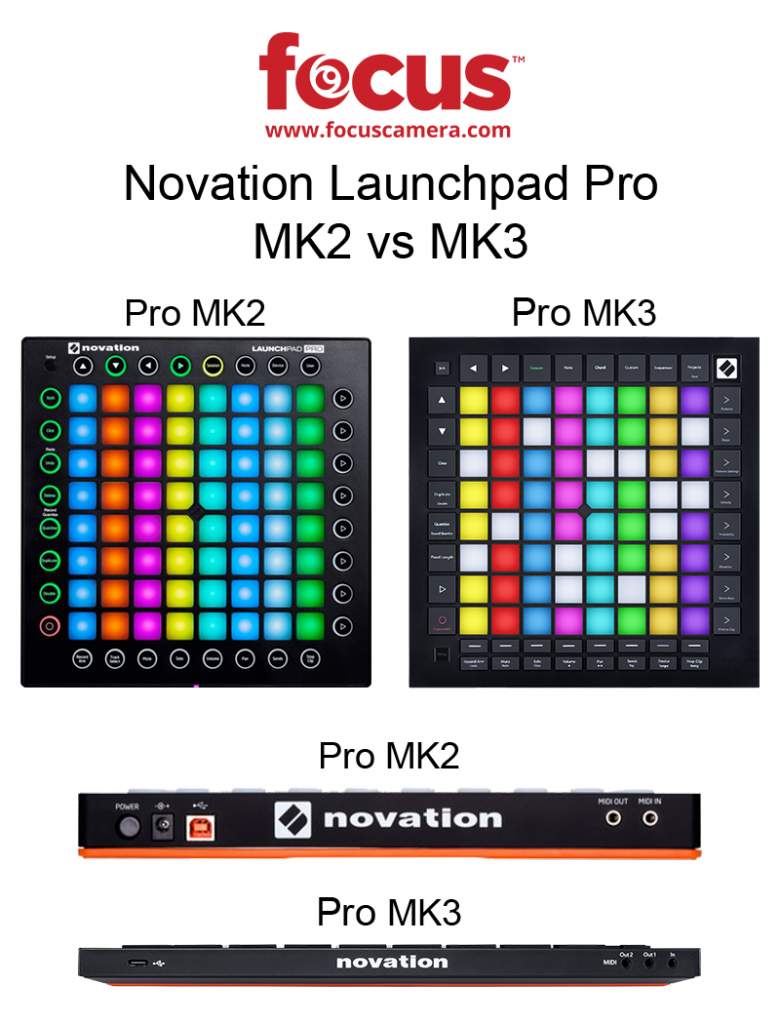
Novation Launchpad Pro MK3 vs MK2

Launchpad Pro MK3 vs MK2 Feature 1

Novation has slowly but surely been rolling out their newly designed MIDI boards. They started with the Launchpad Mini and X in late 2019. Now, they’ve moved on to one of the most-loved MIDI boards on the market: the Novation Launchpad Pro. The new Launchpad Pro MK3 boasts a host of new features along with a sleek new look and feel.

In this post, we take a look at those newly-added features and see how the Pro MK2 stands up to the new MK3.

Are you looking for a different comparison in the Novation or Focusrite family? If so, we also think you should also check out:

Key Differences | Launchpad Pro MK3 vs MK2

What is a MIDI controller?

If you’re considering a Launchpad Pro, it’s likely that you already know your way around a MIDI board. However, we want to provide a brief overview for those just entering the world of MIDI controllers.

With that in mind, a MIDI controller is a standard piece of hardware often found in the electronic music scene. When “played” it triggers sounds assigned to the device’s individual touchpads by the user.

In essence, a MIDI a large remote control; it is useless without the device it interacts with. It’s akin to having a TV remote and no television. To make music, a MIDI controller must be connected to your computer and synced with your choice of music editing software.

You can also record your own music and assign it to MIDI pads with the help of a MIDI keyboard.

Look & Feel

Launchpad Pro MK3 vs MK2

Layout & Buttons

Novation made some solid design updates to the Mini MK3 and X in late 2019. We’re happy to see that those changes were also carried over to the Pro MK3.

The MK2’s rounded edges and circular command buttons give it an almost toy-like appearance. Alternatively, the MK3’s sharp corners from end-to-end make it look more like the professional instrument that it is. Plus, the new design makes the midi pads just a bit bigger which is always helpful during a set. Similarly, the icons on the individual buttons were simplified and the only hint that this is a Novation product can be found in the top right corner in the form of a logo. Frankly, it looks incredibly cool.

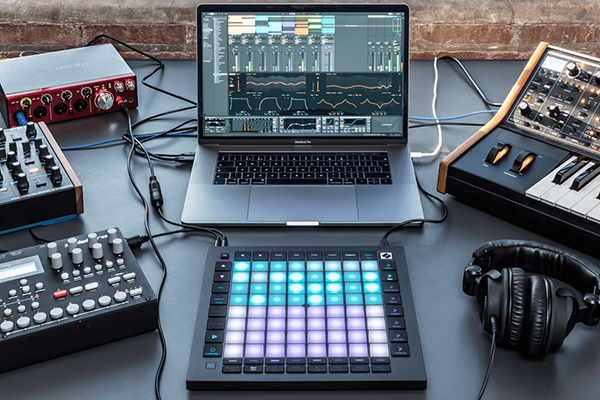
Novation Launchpad Pro MK3 Complete Setup
Courtesy of Novation/Focusrite

Size & Weight

The Pro MK3 doesn’t just look sleeker, it is, in fact, smaller and lighter than its predecessor (even with a new row of buttons). Is it a dramatic difference? No, not quite. But there’s a difference nonetheless.

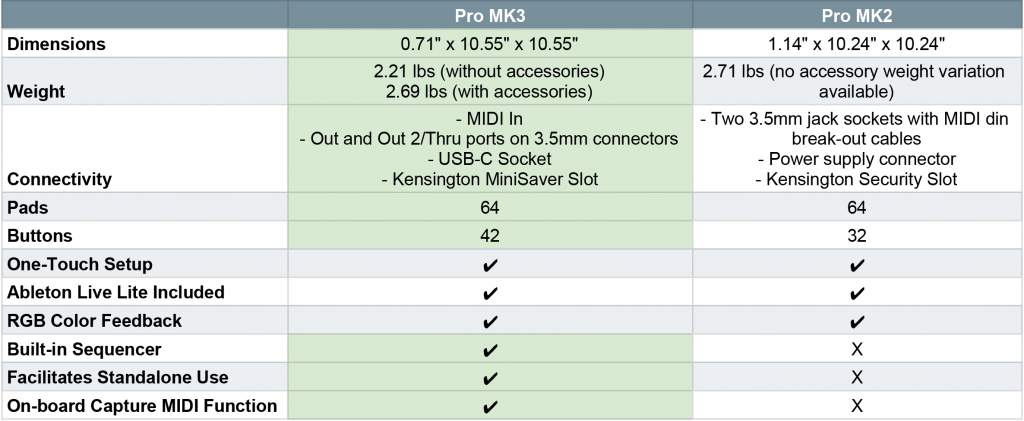
The Pro MK3 weighs 2.21 lbs without accessories and 2.69 lbs with accessories included. Alternatively, the Pro MK2 weighs in at 2.71 lbs. Sadly, there is no accessory weight variation available for the MK2. However, it’s clear that the MK3 is the lighter option overall.

Again, the MK3’s dimensions are also slightly smaller. It measures 0.71″ x 10.55″ x 10.55″ compared to the MK2’s 1.14″ x 10.24″ x 10.24.”

Functionality

New Buttons Facilitate Standalone Use

Novation is doing their best to streamline your workflow with their new models. Their new Mini MK3 arrived complete with new custom mode buttons (“Drums”, “Keys”, and “User”). Now, the Launchpad Pro MK3 is getting the same treatment.

There is an entirely new row of 8 buttons at the bottom of the Pro MK3. According to Novation, these new additions can “launch clips and scenes, access mixer, device, and transport controls, and quantise, duplicate and double, all without touching your mouse.”

Novation Launchpad Pro MK3 Buttons Large
A close-up look at the Launchpad Pro MK3’s new row of buttons.

USB-C Compatible

You’ll notice that the old power input you’re accustomed to was replaced by a new USB-C port. This update allowed for the Launchpad Pro MK3’s slimmer look and is further evidence that Novation is looking to the future with its new products.

Add-Ons

Novation does a great job providing a ton of value-added software features to its hardware offerings. Below is a list of all the resources that come with your Launchpad Pro MK3. While this isn’t technically news (these are offered with every board), it’s still important to know your options:

  • Ableton Live Lite – quickly organize and arrange your sounds and start making tracks with this staple electronic-music-making software.
  • Two months Splice Sounds membership – offering millions of high-quality, royalty-free one-shots, loops, and presets, with new releases daily.
  • AAS Session Bundle – Three synths for music makers, providing staple sounds for your tracks.
  • XLN Addictive Keys – Access one of four virtual keyboards when you register your first piece of Novation hardware.
  • Klevgrand R0Verb and DAW Cassette – High-quality reverb and tape deck emulation plug-ins, to add some space or take your sound back to the golden age of cassette tapes.
  • Softube Time and Tone bundle – made up of four of Softube’s world-class plug-ins: reverb, delay, and easy-to-use mastering tool and distortion.
  • Sound Collective – bringing Novation hardware owners a new free plug-in every couple of months

That wraps up our overview of the Novation Launchpad Pro MK3. Do you think it’s worth the upgrade? Let us know in the comments below.

CES 2020 Coverage | Sony, Insta360 & More

CES 2020 Featured 1

Happy CES week, everyone. It’s that special time of year when tech enthusiasts come from far and wide to converge upon Las Vegas and transform it from Sin City to Nerd City. It is truly one of our favorite weeks of the year. In this CES 2020 coverage roundup, we’re going to go over some of the bigger announcements made from a few of our favorite brands including Insta360, Sony, JBL, and Nikon.

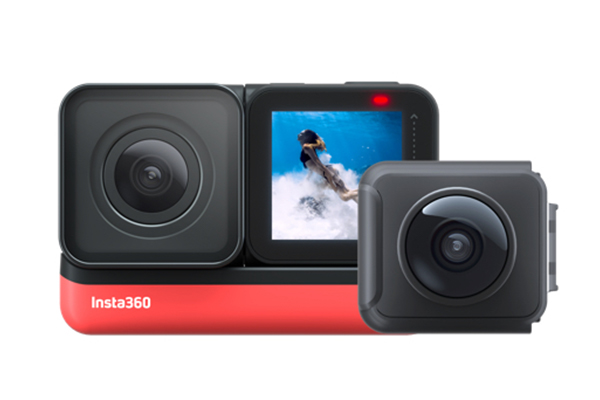
Insta360 Twin CES 2020
Courtesy of Insta360

Insta360

Insta360 ONE R

Action cameras’ user interface is something that even the biggest names in the industry have struggled with since their appearance in 2002. The Insta360 ONE R is perhaps the first logical, comprehensive approach to a built-in action cam interface that we’ve seen thus far.

The solution? It’s modular.

You can transform the ONE R on-the-go from a 360° camera to a 4K 60fps wide-angle model. It gives you more control than ever over your recording experience and features a sizable, built-in monitor. Regardless of which camera you’re using, the different modules lock into one, bright-red charging dock that keeps you powered up whether you’re scuba diving or jumping out of a plane in the alps.

In addition to this awesome new hardware, you also get Insta360’s in-camera flow-state stabilization, invisible selfie stick feature, and voice control editing. We can’t wait to test this one out. 

JBL

Dolby Atmos Soundbar

Media-loving consumers have obsessed over their in-home entertainment systems since the phonograph was the hottest thing on the market. Today, as we roll into yet another year of the golden age of TV, there is a greater emphasis on home theaters than ever before. 

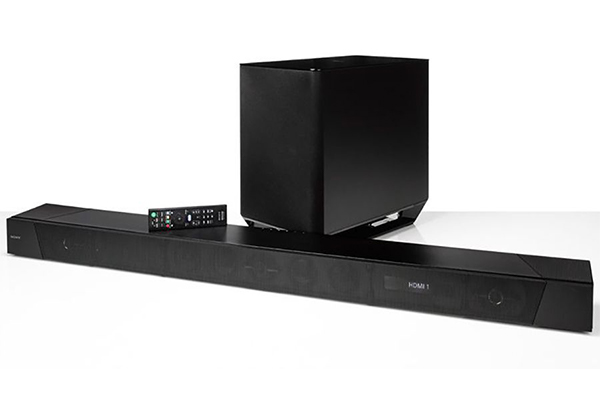
Enter the JBL Dolby Atmos Soundbar—the first soundbar the company has released in conjunction with the surround-sound

experts.

Dolby Atmos Soundbar CES 2020
Dolby Atmos Soundbar | Courtesy of JBL

According to JBL’s press release, this soundbar attempts to mimic the immersive, 3D audio experience you get in the cinema:

“Listeners will almost feel the helicopters circling over their favorite action star thanks to four upward-facing Dolby Atmos drivers. These custom drivers literally take sound to new heights by using room reflections to bounce audio from all angles, while the two battery-powered detachable, wireless rear speakers shoot sound off to the ceiling and back down, creating a 3D listening experience like no other. With 820 watts of total system power, listeners will enjoy every Oscar-worthy performance through powerful, crystal-clear audio. To round out the Bar 9.1 System, an included 10-inch powered subwoofer delivers pulse-pounding bass.”

That’s right, everyone. We can now experience our 10th binge-watch of The Office in an entirely new way.

Nikon 

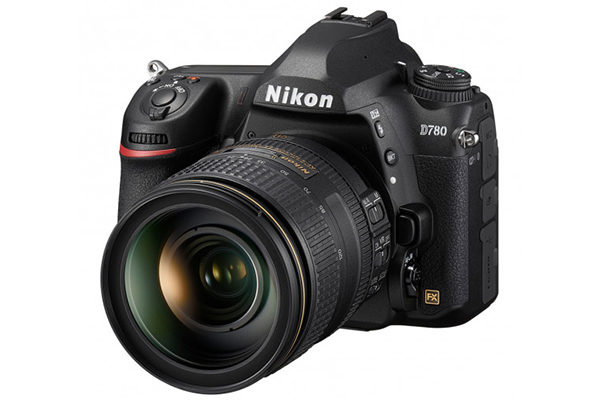
Now, let’s get into a little camera news, shall we? Nikon released two new cameras—one professional and one bridge—along with two beautiful new telephoto lenses: the AF-S NIKKOR 120-300mm f/2.8E FL ED SR VR and NIKKOR Z 70-200mm f/2.8 VR S

D780

Nikon just announced its newest full-frame camera: the Nikon D780. Perhaps the biggest upgrades from its predecessor are its 24.5MP, back-illuminated sensor, 4K UHD 30P footage capabilities, and its 180K-pixel advanced scene recognition system. It also boasts an EXPEED 6 image processor and an incredible AF system. 

P950

This Nikon P950 isn’t your average bridge camera. It has a 16 MP CMOS sensor and can shoot RAW (which is respectable) but really wows when it comes to zoom. It has a whopping 83x optical zoom with a 24mm-2,00mm focal length. As if this isn’t already more than enough, it also has an enhanced digital zoom that doubles the camera’s reach to 4,000mm which makes it an ideal choice for travel, nature, and portrait photography. Plus, for all you video enthusiasts and vloggers out there, it also shoots 4K UHD/30P.

Sony

Sony Vision-S Concept Car

Arguably the biggest news that came from CES 2020 is the announcement of the Sony Vision-S concept car. Before you get too excited, this vehicle has no release date, pricing information, or production timeline.

So why is everyone so enamored with it? Well… it’s just really cool. Sony took the best tech from every department (audio, visual, gaming, music/video media production) and put it into one jaw-droppingly sleek car.

This is not the first time Sony has played to all of its strengths for the sake of a single product. In 2019 they announced the Sony Xperia 1 which managed to find a home for everything great about sony from its camera tech to their gaming expertise.

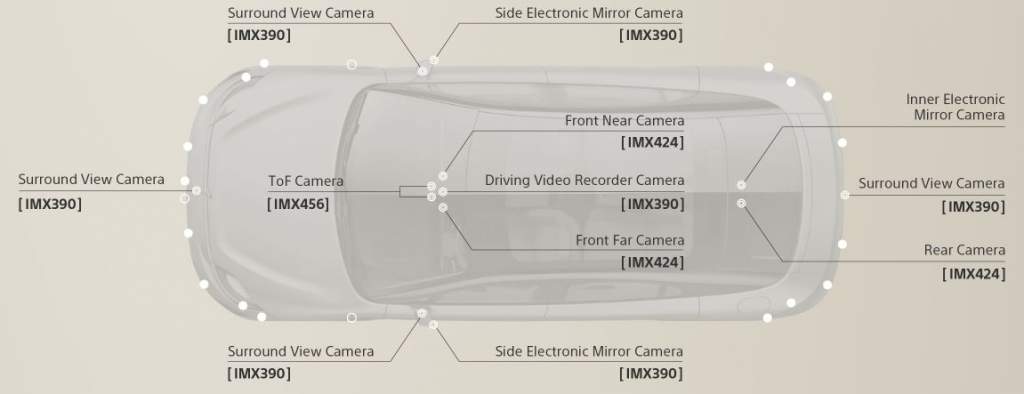
The Vision-S has a panoramic screen on the dash, 360 Reality Audio, and is 5G enabled. It also comes pre-stocked with Sony’s extensive collection of music and movie collaborations. However, some of the more interesting non-entertainment related highlights are tied to safety. 

For example, there are a total of 33 vehicle-grade sensors strategically placed on the inside and outside of the car. Together, they form something that Sony has dubbed “oval sensing.” This “cacoon-like layout” monitors the safety of the vehicle (and the people inside of it) from potential external vehicular threats.

Oval Sensing | Courtesy of Sony

The sensors also aid in level-2 autonomous driving which includes breaking, steering, and accelerations. However, the driver still needs to be in the car actively monitoring its operation. 

Keep an eye on this post as we continue to update with new CES 2020 coverage! Have you been keeping an eye on the new CES products? Leave us a message with your favorite new items in the comments below.

11 Incredible Elopement Photographers & Guides

Planning a wedding stresses out even the most relaxed couples. One minute you’re confidently adding people to your guest list and the next you’re debating whose childhood friends are more important to have at the reception. These conversations combined with the average price tag of a wedding in the United States (close to $44,000) often lead to the same “joke” between couples: maybe we should just elope.

While we do love a traditional engagement shoot, this new attitude has led to a rise in elopements and, as a result, an increase in specialized wedding photographers. In this post, we list 11 of our favorite elopement photographers and guides (some of whom eloped themselves). Some are thrill-seekers while others specialize in intimate gatherings. However, all of these experts will give you an amazing wedding experience on your special day.

Elopement Photographers & Guides

1. More Van Anything

More Van Anything is one of the cuter teams on our list—Ryan and Jaclyn are a couple who met on a road-trip. Together, they base their lives in love, travel, exploration, and photography. The natural next step? Becoming elopement photographers (and recently videographers)! While they’re big proponents of keeping things laid back, they also pride themselves in their pre-wedding planning process. This includes making a personalized portal to house recommendations on vendors, accommodations, hikes, timelines, and more.

“We don’t believe in a ton of posing. It’s more like a double date on the trail, which can help both of you stay relaxed. It also helps your friends and family connect with us better. Whether we’re cracking silly jokes, drinking beer around a campfire, or just getting to know each other on the trail–we know how to help you feel relaxed and capture those raw moments.” – More Van Anything’s Website


View this post on Instagram


A post shared by Elopement Photographer (@morevananything) on

2. Vows and Peaks

Sean, the owner of Vows and Peaks, eloped to Northern Ireland with his wife and had an unforgettable experience. Now, he wants to give that gift back to other couples by helping them find a “home” for their vows. He boasts 24/7 planning support and his specialties include destination elopements, backpacking adventures, and even putting together an intimate wedding day for the couple and a select group of 10 friends and family.

“When you think back about your great day 20 years from now, I want to be part of your story. Let’s embrace the real moments together. The love, laughter, hugs, kisses, sweat, mud, snow, and rain. I will be there with you every step of the way, but eloping is meant to be all about you and your partner, so I want to help make it the most fun and adventurous day of your lives!” – Vows and Peaks Website


View this post on Instagram


A post shared by Elopement Photographer (@vows_and_peaks) on

3. The Hearnes

Our next dream team of elopement photographers is Abbi and Callen Hearne who run The Hearnes. If there’s one thing we can say about these two it’s that they practice what they preach. They know the best cliff-side shooting locations because they’ve already scaled the surrounding rockface (a few times). Abbi and Callen are available for both US and international shoots and will fearlessly capture your breathless, fairytale moments.

“We are a husband and wife adventure wedding + elopement photography team with an emphasis on epic landscapes and grand adventure. Our photography style is adventurous, full of stoke, and centered around telling a true story. We strive to capture your wedding day in an authentic way, creating photos filled with emotion and beauty. We are outdoor enthusiasts (and advocates!) inspired by windy mountain tops, rocky deserts, icy glaciers, and red dirt (oh how we loooove that red dirt!). We believe there is no such thing as bad weather if you have the right attitude. Our couples prefer a peaceful, relaxed wedding day with an emphasis on their love for each other and for the outdoors. We capture the landscape AND the couple, and don’t believe one must be less than the other.” – The Hearnes Website


View this post on Instagram


A post shared by Abbi + Callen Hearne (@thehearnes) on

4. Adventure Instead

Adventure Instead was early to the elopement game. The company was founded over ten years ago and has since been featured by the likes of the Travel Channel, InStyle Weddings, Brides magazine, and more. A dream team of three elopement photographers runs Adventure Instead. Together, they’ve collectively photographed and helped organize over 300 elopements all over the world!

“When you hire us—you’re getting so much more than just a photographer. We are your wedding planner who helps you find the most epic spot to get married, your adventure partner, tour guide, and the person who helps you haul your essentials up a mountain. We’re your best friend and cheerleader who will zip up your dress & tell you that you look amazing (because you do).” – Adventure Instead Website


View this post on Instagram


A post shared by ELOPEMENT PHOTOGS & GUIDES (@adventureinstead) on

5. WhiskeySage

Through WhiskeySage, Lauren and Allen Cope offer gorgeous visuals and a refreshingly candid attitude toward wedding photography. The pair canceled their own big, traditional wedding in lieu of an elopement and vowed to help others ditch the same stressful, expensive trappings. Since then, they’ve coordinated and shot weddings for grateful couples all over the world from Tulum to Sedona.

“We’re on a personal mission to fuel adventurous, fun and fulfilling elopement weddings and encourage more couples to ditch the stress, pressure and norms of traditional weddings. We’re all about saying “no” to what doesn’t feel good to you and saying “yes” to the values that fuel your love as a couple. We love couples like you; embracing your story of your journey together & choosing a wedding adventure that’s symbolic and meaningful to you. If you’re wanting to get wild, adventure and get your dress a little (or a LOT) dirty, you’re in the right spot.” – WhiskeySage Website


View this post on Instagram


A post shared by Lauren & Allen (@whiskeysagephoto) on

6. Narrow Leaf Photography

Narrow Leaf Photography is a Wisconsin-based company that documents elopements all over the world. Cassandra, a photographer and nature-lover extraordinaire, founded the operation in 2014. Her work is rooted in two things: the idea that photography should never make you feel awkward and her deep dislike of “boring, stuffy, artificially-posed-and-obviously-fake photos.”

“…I specialize in crafting unique experiences that go beyond standard traditions & strict societal ideas of how your wedding “should” be… Inspiring you to make new traditions, while celebrating your commitment to each other in a way that reflects you.” – Narrow Leaf Photography Website


View this post on Instagram


A post shared by Adventure Elopements ↟ Wedding (@narrowleafphotography) on

7. Amy Bluestar Photography

Amy Bluestar is one of our favorite artists on this list of elopement photographers and her work speaks for itself. However, she also has a long list of endorsements from Cosmo, Junebug Weddings, The Knot and more to back up her skills. Whether you’re interested in hiking with your partner or having a small gathering in a remote valley, Amy has your back.

“Elopements are about you and your partner. Do what makes you happy. Breathe in your love. Everything else is just background noise.” – Amy Bluestar Website


View this post on Instagram


A post shared by Elopements+Adventure Weddings (@amybluestarphotography) on

8. The Wayfarers

Alexander, the man behind The Wayfarers, is a North Carolina-based wedding photographer who specializes in all kinds of weddings from elopements to fully-fledged, traditional nuptials. His romantic vision delivers both precious memories and a complete look at the adventure, love, and laughter that go into shaping your wedding day.

“I’ve experienced a generous serving of human circumstances that have made me laugh (the loud kind), cry (the ugly kind), and wonder how fortunate I am to have come upon such a wild and strange life. I’m deeply fascinated by how we live: the peculiar relationships we each share with one another, the weird glances between lovers. In between hiking, camping, and discussing which bourbon is best (there is no best bourbon), you’ll find me photographing a story somewhere in the world. For me, it’s less about what things look like, and more how things feel. If you’re into that, we’re probably kindred spirits :)” – The Wayfarers


View this post on Instagram


A post shared by Alexander Lefler (@the_wayfarers) on

9. The Foxes Photography

The Foxes Photography was founded by a (very adorable) couple named Gabi and Brandon. Their journey began when they gutted a 1972 Airstream and started touring the United States. They quickly fell in love with traveling, photography, and the idea of elopement shoots. Since then, they’ve put together their “Foxpack” of photographers and coordinators who help turn your elopement fantasy into a reality.

“Between everyone in the pack, we have a wealth of knowledge and expertise in traveling and documenting adventures all over the world. When you work with a member of the Foxpack for your elopement, you aren’t just working with that photographer; you’re working with an entire team of elopement experts who are dedicated to crafting and capturing unforgettable adventures.” – The Foxes Photography


View this post on Instagram


A post shared by Gabi + Brandon Fox (@thefoxes) on

10. Charleton Churchill

Photographer Charleton Churchill has an Ansel Adams-esk eye that delivers equal-parts wedding photography and frame-worthy landscape shots. He is perhaps best known for his showstopping Mount Everest adventure wedding shoot in 2017. That was the gig that gained him international attention. However, his collection of work shows that he’s much more than just an Instagram sensation.

“I love photographing people. It’s not only because of the epic photographs we capture on mountain tops (though that is exciting). It’s not because of the real life candid and documentary approach we use to grab those moments of real emotion. For me, it’s about the experience and adventure of doing it together. I enjoy challenging and encouraging my couples to get the best out of them. We are a team and we work together while having fun.” – Charleton Churchill Website


View this post on Instagram


A post shared by Charleton Churchill (@charletonchurchill) on

11. Colby and Jess

Last but not least, Colby and Jess are elopement photographers who have spent the last 8 years photographing over 250 weddings. They specialize in environmental portraiture and appreciate any couple willing to hike a mountain to get the perfect shot. We recommend them to anyone interested in awe-inspiring landscapes and spectacular results.

“Intimate weddings in epic outdoor locations with the focus on celebrating two people in love are our favorite stories to tell. We’ve been trusted by over 300 couples to document their unions. With our plentiful wedding experience we’re there not only to take photos but to help make your day stress-free, allowing you to focus on being fully present during this amazing time in your life.  From the planning stages until your photos are delivered, we’ve got your back.” – Colby and Jess Website


View this post on Instagram


A post shared by Colby & Jess (@colbyandjess) on

That concludes our roundup of amazing elopement photographers! Lovebirds, which would you rather have—an elopement or traditional wedding?


Canon EOS-1D X III vs. 1D X II vs. 1D X (Comparison Chart & Photos)

Canon EOS-1D X Mark III Featured 2

Great news, Canon pros. The much-anticipated Canon EOS-1D X Mark III is officially available for preorder. This new addition to the EOS-1D X line comes a full four years after its predecessor, the Mark II. Luckily for us, this update was definitely worth the wait. Among other things, Canon updated this model’s sensor, processor, ISO range, autofocus, video and made it easier to connect with your clients or coworkers.

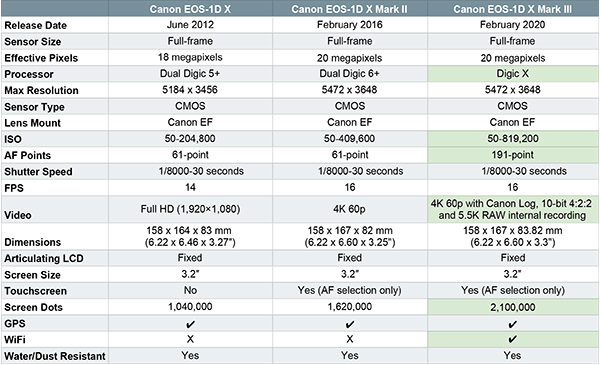
In this post, we compare all three models in the EOS-1D line and provide an overview of the Mark III’s updated features.

Canon EOS-1D X III vs. EOS-1D X II vs. EOS-1D X

Canon EOS-1D X Mark III Chart

Updates | EOS-1D X Mark III

CMOS Sensor

The megapixel count is the same for both the EOS-1D X Mark II and Mark III. However, the new Mark III’s full-frame CMOS sensor is combined with a new low-pass filter. “Low-pass filter” is too often used as a buzz phrase with no explanation. So, let’s take a moment to talk about why this is important.

In short, a low pass filter (aka an “anti-aliasing filter” or “blur filter”) is used to reduce the effects of moiré

Even if you don’t know this keyword, you’ve definitely seen its effect. Moiré occurs when you photograph tight patterns. This phenomenon is arguably most common when photographing fabric and even high-quality sensors have a tough time registering minuscule, recurring details. So, some camera companies include a low pass filter on their sensor that acts as a smoothing agent to help photographers avoid a moiré-filled fate.

Image Processor & ISO Range

The EOS-1D X Mark III gets a speed and low-light boost with its new DIGIC X processor. Its normal range is 100-102,4000 ISO. However, that can be expanded to 50-819,200 ISO. In terms of agility, the Mark II shoots a respectable 16 fps and up to 20 fps in live view with AF/AE tracking. At that rate, it can hit a maximum burst rate of 1,000 images or more in JPEG or RAW with the help of the Mark III’s dual CFexpress card slots.

AF System

Canon stepped up every aspect of their autofocus system for the EOS-1D X Mark III. Its new 191-point AF system is capable of tracking your subject’s head and face using Canon’s “Deep Learning Technology.”

Plus, it’s new dual-pixel CMOS AF shoots quickly and accurately using a whopping 3,869 manual AF positions and up to 525 automatic positions. It’s also now easier than ever to control those points with the help of a built-in touchscreen.

Connectivity

Canon users, rejoice! The EOS-1D X Mark III finally gives Canon pro users the ability to take advantage of WiFi connectivity in addition to Bluetooth and GPS. This new feature gives photographers an opportunity to quickly and easily share photos with their clients, coworkers and family.

There’s so much more to learn about the Canon EOS-1D X Mark III! Keep an eye on this post for updates. In the meantime, let us know if you’re ready to upgrade from the Mark II.

7 Easy Flat Lay Tips For New Photographers

Flat lays are taking over product photography and with good reason. They’re an incredible way to show off your favorite items, define brand aesthetic, and they’re a lot of fun to put together! In this post, we take the guesswork out of creating your own perfect shot with 7 flat lay tips for new (and experienced) photographers.

What Is Flat Lay Photography?

For those who are unfamiliar, flat lay photography—also known as knolling—is the art of arranging like products in an aesthetically pleasing way. Over the past few years, it has become an increasingly popular practice for both personal and public brands.

Flat Lay Photography Buying Guide | Flat Lay Tips

  • Sony a6000 (or another beginner camera)
  • Fujifilm XF 50mm f/2-f/11
  • Koah Aphelion Professional 6 ft Tripod (must have a transverse center column)
  • Softboxes (provide additional light)
  • V-flat (reflects light to reduce shadow and evenly illuminate your shot)

Flat lay tips photography example 1

Seven Easy Flat Lay Photography Tips

1. Establish A Focal Point And Theme

What is the theme of your flat lay? Are you photographing camera equipment, beauty supplies, books? Whatever you choose, make sure every item in the shot consists of complementary colors and makes sense in a group. For example:

  • What you want: red roses, lipstick, red velvet cookie, pink purse
  • What you don’t want: narwhal tusk, quiche, hot pink/fuzzy pens, roll of film

Adding multiple textures is also great for drawing a viewer into your shot. It keeps your visuals interesting and adds an additional dimension to your flat lay.

2. Choose An Appropriate Background

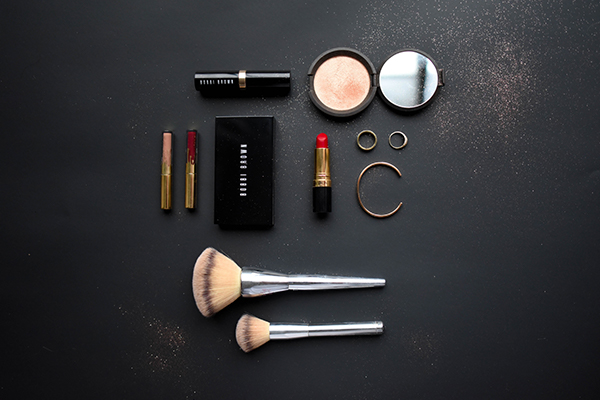
The good news is that most flat lays look great on a simple white or wooden table. However, if you branch out, be sure to choose a background that contrasts with the items included in your flat lay—the goal is to make their colors pop.

On the other end of the spectrum, don’t choose a surface with a distracting pattern. There’s no point in arranging the perfect assortment of items if you can’t see what they are.

Another important factor is whether or not your items will leave a residue. For example, let’s say you’re planning on using a yellow paper surface for a breakfast-food themed scene. If you put a fresh muffin on that paper, the butter on the bottom will leave a permanent mark. 

This isn’t a big deal if you’re planning on editing out imperfections in Lightroom. However, if you’re interested in quickly taking and posting a photo it will cause some issues.

3. How To Arrange Your Items

Once you have somewhere to put your things, it’s time to arrange them. Some objects are more flat-lay friendly than others. For example, flower petals, drinks, and doughnuts will all remain perfectly flat and stationary during the arranging/shooting process.

For everything else, use double-sided tape, glue dots, museum wax, and rubber bands to keep things from rolling, flopping, and falling. Keep in mind you can also use cardboard to prop things up if you aren’t getting the angle you want.

This is perhaps the most important tip we will give you today: your first flat lay will not look perfect. Think of the flat-lay process like a puzzle. The photos you see on Instagram are a result of extensive arranging and rearranging. So, try not to get frustrated or upset if your scene doesn’t immediately look perfect (or looks off through your camera lens).

Types Of Flat Lays

Symmetrical flat lay

Symmetrical

This is perhaps the most traditional form of flat lay. The goal is to create perfect symmetry with a collection of like, non-symmetrical items. Most often, the items are arranged in a rectangle. However, they can exist in whatever shape you’d like (as long as it’s balanced).


View this post on Instagram


A post shared by Kasia Cieślik – Kolankowska (@pannalemoniada) on

Organized Chaos

These meticulously arranged flat lays give the illusion of haphazard beauty—they’re the shots you take when you’re (seemingly) consumed with some other task. Chaos radiates from one specific focal point outward.

To use the above example, the plate acts as the focal point while the other odds and ends draw the eye out towards the edge of the image. Presumably, that aesthetically pleasing miscellany continues out indefinitely. In reality, it probably ends a few inches away.

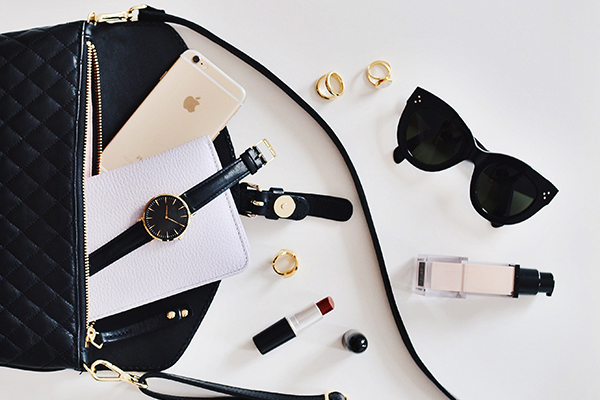
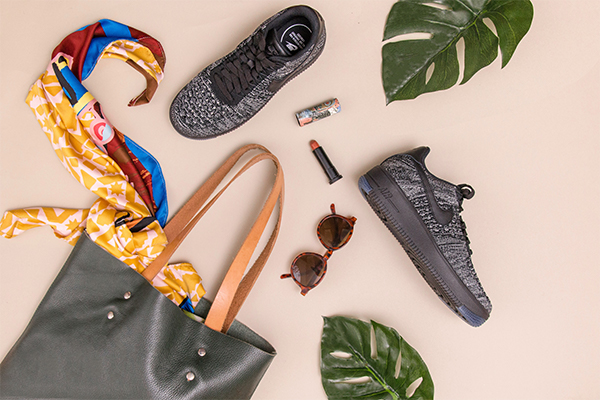
Bag dump flat lay

Bag Dump

We love a bag dump flat lay for its premise alone. The concept is that you simply threw your purse or bag on a table and a collection of perfectly coordinated items fell out. Not only are they tonally and thematically connected but also evenly spaced.

“Oh no, my meticulously curated possessions have fallen out onto this contrasting surface! Heavens, how embarrassing.” 

This particular (gorgeous) layout is a favorite among beauty and lifestyle bloggers who regularly accumulate vibrant makeup samples.

Courtesy of Sharon Holland Photography

4. How Do I Set Up My Shot?

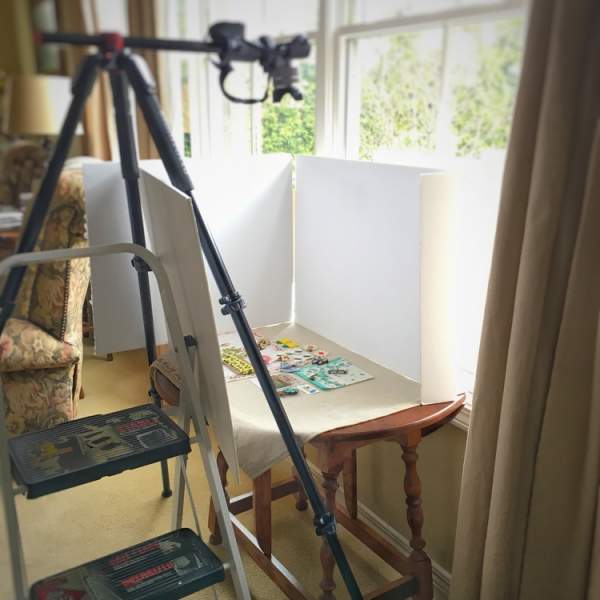
This is how your gear should be arranged starting with the gear closest to you and moving outward. There are certainly other solutions but this is a tried and true standby.

Directly in front of you is your flat lay with your carefully arranged items. On the left and right, there are two reflectors on an angle. In the back there is a large light source that is enhanced by the two reflectors flanking your flat lay.

Similarly, you can also replace those reflectors with additional light sources (if your budget allows). However, regardless of where your light is coming from, make sure that your setup is arranged so you’re not standing between your shot and your light source! Otherwise, your shadow will always end up in your photos.

Courtesy of Sharon Holland Photography

5. Handheld vs Tripod Shooting

Handheld Shooting

This is the best way to quickly get a lot of varied photos and experiment with different angles. To get that bird’s eye view, set up your flat lay on a low surface or be prepared to stand on a chair or ladder to get above your subject matter. 

It’s also important to note that you want a fast shutter speed at around ISO 100-200—your shots will look blurry if your shutter speed is too long. We recommend you read our blog post about the exposure triangle for more information!

Tripod Shooting

A tripod gives you significantly more control over your shots. Including them in a flat lay shoot makes it easier to make incremental changes in the moment (and even create gifs). They take up a little more room in a cramped shooting setup, but they’re certainly worth it.

6. Lighting Your Flat Lay

The goal of flat lay lighting isn’t to create a spotlight—it’s to create a consistent glow. However, the light you choose to illuminate your flat lay really depends on what style you’re trying to achieve.

Many photographers avoid shadows at all costs. Others incorporate them as an element in every photo. The decision is entirely up to you!

Flat Lay No Shadow 1
Flat lay without shadows

No Shadows Please

If the shadows in your flat lay are too dark (or your shadow keeps ending up in the shot) there are a few easy workarounds.

  1. Don’t block your light source (a simple tip that is often overlooked).
    1. If you’re exclusively using overhead lighting when shooting a flat lay, your shadow will always end up in the shot. Instead, use natural light when possible and make sure you’re not standing between the window and the surface you’re shooting.
  2. Use multiple light sources.
    1. Unless you live inside of a lightbulb, you will need several light sources to eliminate shadow. You’re going to want at least one additional source of continuous light like a softbox.
  3. Incorporate reflectors.
    1. A few light sources can go a long way with the help of reflectors and v-flats. Essentially, these tools help you extend your existing light onto parts of a shot that would otherwise be cast in darkness. To use them, arrange the reflective surface at an angled position opposite of your light to fill in the shadows.
Flat lay with shadows

What’s Wrong With Shadows? Shadows Are Fine.

Your job is a little easier if you don’t mind a few shadows in your shot. Just make sure that you’re using strong natural light and nothing in your setup is so dark that you can’t determine what it is. In fact, we would recommend investing in a few reflectors or v-flats just in case.

It’s also worth noting that if you only have overhead lighting and can’t rely on natural light, you will still need a softbox. Otherwise, your shadow will be in every photo.

How Do I Eliminate Glare?

Glare is a common and unfortunate problem when shooting a flat lay. If you run into this issue, try moving your light source back away from your shooting area or adjusting where the lights are placed around your items.

flat lay tips contrasting surface

7. What Lens Should I Use?

Last on our list of flat lay tips is how to choose the correct lens. This is arguably more important than having “the best” camera. Luckily, there are very few requirements for the ideal flat lay lens and most kit lenses (the one that comes with your camera) should get the job done.

There are two main elements to keep in mind: f-stop and focal length.

Your f-stop should be anywhere from f/4-f/11. That should be a wide enough depth of field that all of your objects, regardless of their height, will be in focus.

In terms of focal length, we recommend choosing something around a 50mm lens because it’s close to what we perceive through the human eye. Anything significantly lower (14mm-35mm) will show too much of your shooting surface. On the other end of the spectrum, a longer focal length (65mm+) will give you a zoomed-in effect that makes it difficult to take in the whole flat lay.

A Note About “Lens Creeping”

Lens creep” is a phenomenon that occurs when you shoot straight down towards the ground with a zoom lens—gravity pulls lens down and changes the angle of view. As you might imagine, this is a common issue when shooting flat lays.

To prevent this from happening, use a thick rubber band or lens band to hold the elements in place.

That concludes our list of 7 easy flat lay tips. If you have any additional pointers be sure to mention them in the comments below!

Best Vlogging Cameras | Camcorder vs Cameras vs Smartphones

Vloggers are taking over our social media feeds. From Instagram and Facebook to YouTube, an incredible number of people are seeking (and securing) fame and acclaim from their video personas. In fact, over the past year, the number of YouTube channels annually earning more than six figures grew by more than 40%. Similarly, the number of channels with more than one million subscribers grew by more than 65%.

It would appear that there’s room for a whole lot of people at the top. The lesson? It’s time to record your first video.

In this post, we weigh the pros and cons of camcorders, cameras, and smartphones for vlogging (or just regularly recording videos for yourself). Then, if you’re more of a numbers person, we break down the correct options for everyone’s varied budgets.

The Basics | Pros and Cons

Camcorders

So many of us associate camcorders with the uber-lame, cumbersome devices people hauled around in the 80s and 90s. Since then, we’re happy to say that camcorders have gotten a major visual upgrade and remain one of the top choices for people who need to record long, high-quality videos.

Pros
  • An All-In-One Solution – if you invest in a high-quality camcorder, it should have both notable video quality and a decent microphone for you to get started. Both of our other options require an additional microphone add on.
  • Recording Time – most mirrorless cameras and DSLRs limit your continuous video recording time. If you plan on recording nonstop for hours then this is the correct choice for your needs.
  • Easy To Use – there’s basically no learning curve required to use a camcorder. You hit record, stop, and zoom in and out—that’s honestly about it. Think of it as a high-quality, video-centric point-and-shoot.
Cons
  • Limited Options – you can’t change the lens on a camcorder to get a specific field of view and manual shooting options are limited or nonexistent.
  • Price To Value Ratio – camcorders are not intended to take stills. You can certainly use them for this purpose, but the results are often less than ideal. Thus, you’re paying roughly as much for a camcorder as you would be for an interchangeable lens camera and getting half the functionality.
  • Size – camcorders’ size and weight limit your shooting options. You can’t strap a camcorder to a selfie stick (well you can but we don’t recommend it). Similarly, some models come with built-in gimbals but external camcorder gimbals are tough to find.

DSLR and Mirrorless Digital Cameras

Digital cameras are the most popular long-term choice for vloggers. Luckily for us, our favorite brands are in a constant race to create the best, lightest, and most accessible introductory camera. They’re great for in-studio setups and travel vlogging.

Pros
  • Highly Customizable – creating a specific visual tone in your videos starts during the recording process. This is one of the many reasons why having access to manual shooting mode is so important—it offers the level of granular customization you need to start establishing the aesthetic your viewers will come to know and love! Similarly, the ability to change your video’s field of view with interchangeable lenses is a huge plus and something camcorders and smartphones don’t offer.
  • Grows With Your Skill Level – you get what you get when shooting with a smartphone or camcorder—they’re very straightforward devices. However, you can vastly improve the quality of your shots and footage over time as you invest in different lenses and learn the ins and outs of your digital camera.
  • Transferable Equipment – you can continue using the lenses and camera accessories you carefully curated if you choose a new camera with the same mount as the original.
Cons
  • Limited Recording Time – if you’re planning on recording uninterrupted hours of footage this might not be the right option for you. Even our favorite introductory digital cameras like the Fujifilm X-T100 can only shoot for 30 minutes at a time.
  • Can’t Livestream – digital cameras are a no-go if your social media plan involves a lot of livestreaming. New digital cameras are all equipped with NFC and/or have apps for easy content transfer. However, you can’t livestream directly from your digital camera (yet).
  • Price – you can only use a camera and its kit lens for so long. Eventually, you’ll have to branch out and invest in additional lenses. They’re definitely pricey but they’re also an investment in the future of your vlogging career.

Smartphones

  • $848.00 | Sony Xperia 1 6.5″ Screen Unlocked Smartphone (128GB, Black)
  • $453.75 | Sony Xperia XZ2 Compact Unlocked Smartphone (Coral Pink)y
  • $278.00 | Sony Xperia 10 Plus 6.5″ Screen Dual Camera Unlocked Smartphone (64GB, Silver)

Smartphones are definitely the most convenient option on our list. But are they the most practical solution for you? These handy little pocket-sized powerhouses are perfect for people just starting out with travel or in-studio video recording.

Pros
  • Minimal Learning Curve – your phone is something you already use all the time. You won’t have to take the time to learn a whole new set of features and settings to get the shot you want.
  • Cost – in all likelihood, a smartphone is something you own now and there is no daunting investment needed to start recording.
  • Quick Content Turnaround – you can livestream or quickly edit and post videos on social media immediately after recording, no transfer lag required.
Cons
  • Sensor Size/Quality – yes, smartphones can shoot in 4K like the big guys. BUT there is one little factor that makes a big difference: sensor size. Smartphones’ sensors are a fraction of that in a full-size digital camera or camcorder. This greatly affects a device’s low-light performance, background blur, color range, and overall quality.
  • Memory Limitations – recording and editing video content from your smartphone can significantly bog down your overall memory and processing speed.
  • Limited Capabilities – yes, you can get lenses that snap onto your smartphone to change your field of view. However, even the nicest miniaturized versions don’t compare in quality to the real deal. Similarly, while smartphone cameras are gaining traction every day, digital cameras’ manual mode still offers more granular shooting settings.
Courtesy of techpinas.com

Recommendations Based On Price Range

Now, let’s get into the topic that no one wants to talk about but arguably matters most: price. There’s a camera out there for everyone whether you have no budget to speak of or you’re positively flush with cash. It’s just a matter of figuring out the right fit. 

I’m on a very tight budget.

Make use of what you have and use your smartphone.

To all of you trying to make it in the vlogging community on a budget, we salute you. It’s a tough space to break into regardless of your bank statement. That said, it’s very doable with persistence, the right accessories, and the smartphone in your pocket.

While this might be the “cheaper” option, smartphones can certainly hold their own on the list of the best vlogging cameras.

For example, the Sony Xperia 1 is the first smartphone in the world to feature real-time eye-autofocus. That monster of a phone also features four cameras and can shoot b-roll-quality 4K footage. Similarly, every iPhone—from the iPhone 7 onward—shoots 4K video. To take it a step further, the iPhone 8 onward shoots 4K at 24 fps, 30 fps, or 60 fps.


All that said, you can use almost any of the newer smartphones on the market to shoot respectable video content. However, as mentioned above, you will need a little help from accessories to keep things looking professional.

The basics include a smartphone gimbal for travel, a tripod for stationary recording, and a mic.

I’ve been saving up for a camera and have some money to spend.

Invest in a camcorder or entry-level digital camera.

As mentioned above, we definitely don’t recommend these for people who are also interested in both video and photography content—while they can take stills camcorders lack the flexibility and adaptability required for effective photography. That said, set one of these up in an in-home recording studio and, with the right lighting, you have the perfect setup.

best vlogging cameras dslr

Money is not an obstacle. I am the walking, talking embodiment of that GIF of Scrooge McDuck diving into gold coins.

Get the best of both worlds. Upgrade your smartphone and get a digital camera for your high-quality video and photoshoots.

The ideal gear duo is a smartphone for on-the-go vlogging and a mirrorless or DSLR digital camera for high-quality video shoots and stills. This combination of devices allows you to quickly and dynamically produce videos, a major asset in this world of nonstop content and sharing.

Will there be a larger commitment of your time and funds? Yes. But using these cameras in tandem gives you an edge in maintaining quality, tonal consistency, and post regularity.

We hope this guide helps in your quest to becoming YouTube’s next star. Do you have any questions or want additional gear recommendations? Let us know in the comments below.

5 BEST Beginner Cameras Under $500 (Sample Photos)

Choosing an affordable, high-quality camera can be tough. To help, we put together a guide of the 5 best beginner cameras under $500. These are all interchangeable lens bodies from an array of our favorite brands including Fujifilm, Nikon, Sony, Canon, and Panasonic. Scroll down to see example photos, pictures of the cameras, and a comparison chart of all 5 cameras.

Looking for some pricier options? We recommend you check out our list of the best beginner cameras under $1,000.

Best Beginner Cameras Under $500

SpecsFujifilm X-T100Nikon D3500Sony Alpha a6000Canon EOS Rebel T7Panasonic LUMIX G7
Type:MirrorlessDSLRMirrorlessDSLRMirrorless
Processor:X Processor ProEXPEED Image ProcessorBIONZ X Image ProcessingDIGIC 4+ Image ProcessorVenus Engine 9 Image Processor
Autofocus Points:9111179949
Sensor Size:24.2 MP24.2 MP24.3 MP24.1 MP16 MP
FPS:6 fps5 fps11 fps3 fps8 fps
Video:Ultra HD 4KFull HD 1080pFull HD 1080pEOS 1080p Full HD4K UHD Video
Video FPS:15 fps 60 fps 60 fps30 fps30 fps
Screen:3” tilting LCD3" 921K-dot display (does not tilt)3" tiltable LCD 3" LCD (does not tilt)3.0" tiltable LCD
Mount Type:X MountF MountE-mountEF-SMicro Four Thirds
Included Lens(es):N/A18-55mm f/3.5-5.6G VR16-50mm f/3.5-5.618-55mm IS II14-42mm f/3.5-5.6

1. Fujifilm X-T100 Mirrorless Digital Camera

  • Price: $499.00
  • Included Lenses: n/a
  • Key Specs & Features
    • Sensor: 24.2 MP APS-C CMOS III Sensor
    • Frames Per Second: 6 fps
    • Video: Ultra HD 4K Video
    • Screen: 3-way Tilting LCD Screen

The X-T100 is one of the best looking and most powerful models on our list of the best beginner cameras. Coming in just under the limit, this $499 body is decidedly worth the investment. It’s tilting 3-way screen is great for those who aren’t super confident in their point-and-shoot skills. Plus, its impressive 24.2 MPs and HD 4K video put it on par with some of its more expensive alternatives.

2. Nikon D3500 DSLR Camera

  • Price: $499.95
  • Included Lenses: Nikkor 18-55mm f/3.5-5.6G VR lens
  • Key Specs & Features:
    • Sensor: 24.2 MP DX CMOS Sensor
    • Frames Per Second: 5 fps
    • Video: Full HD 1080p
    • Screen: 3″ 921K-dot display (does not tilt)

Ah, the Nikon D3500—a classic, safe choice for people just starting out in photography. It’s reliable, feels sturdy in your hands, and comes with a versatile 18-55mm f/3.5-5.6G VR lens. We recommend this camera for people who prioritize function and value over frills. You can read our full review of the Nikon D3500 here.

3. Sony Alpha a6000 Mirrorless Digital Camera

  • Price: $498.00
  • Included Lenses: 16-50mm f/3.5-5.6 lens
  • Key Specs & Features:
    • Sensor: 24.3 MP APS-C sensor
    • Frames Per Second: 11 fps
    • Video: Full HD 1080p
    • Screen: Tiltable 3″ LCD

Next on our list of the best beginner cameras under $500 is the Sony a6000. This camera boasts the best photo quality on our list with a 24.3 MP APS-C sensor. While it doesn’t match the T-100’s 4K video, its full HD 1080p is certainly nothing to overlook. We recommend the a6000 to those looking for a sleek, powerful, pocket-sized mirrorless camera with a lot of potential (and the included 16-50mm f/3.5-5.6 lens doesn’t hurt either).

4. Canon EOS Rebel T7 DSLR Camera

  • Price: $399.00
  • Included Lenses: EF-S 18-55mm IS II Lens Kit
  • Key Specs & Features:
    • Sensor: 24.1 Megapixel CMOS (APS-C) Sensor
    • Frames Per Second: 3 fps
    • Video: EOS Full HD
    • Screen: 3.0” LCD

Much like the Nikon above, the Canon Rebel T7 is a reliable DSLR that’s ideal for learning the basics. It boasts a respectable 24.1 MP CMOS sensor and a wide ISO range of 100-6400 (H:12800) to capture high-quality photos in low-light situations. In addition to the T7, this bundle comes with an 18-55mm lens that’s great for both day-to-day and wide-angle situations.

We recommend that you also check out the previous model: the Rebel T6. It doesn’t have the same quality as the newer T7, but does come with two kit lenses.

5. Panasonic LUMIX G7 Mirrorless Camera

  • Price: $497.00
  • Included Lenses: 14-42mm f/3.5-5.6 Lens
  • Key Specs & Features:
    • Sensor: 16 MP Live MOS Sensor
    • Frames Per Second: 8 fps
    • Video: 4K UHD Video
    • Screen: 3.0″ tiltable LCD

Last but not least on our list of the 5 best beginner cameras under $500 is the Panasonic LUMIX G7. While this camera may not have the highest quality sensor for photos (16 MP) it does boast 4K video! This is a major perk for anyone looking for an affordable, entry-level vlogging camera. We recommend this bundle for anyone interested in graduating from a smartphone to something more powerful and adaptable.

Choosing A Camera

What’s in the box?

It’s important to decide what you want to get out of this $500 investment before you choose a camera/bundle.

For example, the Alpha a6000 has a 24.3 MP sensor; that’s a relatively large sensor for an entry-level camera. On the other hand, the Canon EOS Rebel T6 has a smaller (yet still respectable) 18 MP sensor. But, the T6 comes with two kit lenses.

So, would you rather invest in a camera that has a larger sensor and no lens or one with a smaller sensor that comes pre-bundled with two lenses?

There is no wrong answer necessarily—it’s entirely up to you based on your budget, the kind of photography you want to do, and the equipment you already own.

Brand Loyalty

Many photographers choose a camera brand, stick with it, and represent it with a level of fanaticism usually reserved for feuding sports fans. It doesn’t have to be this way.

Thanks to lens converters and adapters, you can shoot with Fujifilm and get that nice Sony lens you’ve had your eye on.

However, we do recommend choosing a camera brand you want to grow with. If you’re interested in the Sony a6000, check out the company’s latest releases; are people excited about Sony’s new offerings or are they sharpening their pitchforks and getting ready to storm the corporate headquarters?

Like any investment, it’s important to do a little homework before committing.

We hope this roundup of our favorite cameras under $500 helps your decision-making process! Feel free to reach out to us with questions via the comment section below.

6 Fool-Proof Ways To Avoid Corrupted SD Cards | Tips & Best Practices

There are few things more frustrating than having a great shoot, going to transfer your photos onto a computer, and getting this dreaded message: “the file or directory is corrupted and unreadable.

This issue plagues photographers of every experience level and often seems to happen at random. You think you have an okay relationship with your SD card then BAM! They start a new life of corruption.

We’re sick of playing SD roulette and wanted to know if there’s anything we can do to avoid corrupted SD cards. So, we reached out to the experts at SanDisk, a leading name in all things related to digital storage from memory cards and USBs to solid-state drives. They were kind enough to give us 6 fool-proof ways to avoid corrupted SD cards.

1. Read or write to a card at least once a year.

There are plenty of warnings out there about overusing SD cards. However, you can also underuse cards (gasp).

Your chance of image corruption is significantly higher if you don’t read/write to a card at least once a year. Honestly, we would be cranky too if no one spoke to us for that long.

The solution? Avoid playing favorites and be sure to keep all of your cards in rotation.


View this post on Instagram


A post shared by SanDisk (@sandisk) on

2. Always format your SD card in the camera.

Simply deleting photos off of your SD card doesn’t remove all the information attached to those images—it leaves metadata residue. In order to truly start fresh, you need to format your SD card (just make sure all of your photos are safely on your computer first).

This brings us to rule number two: always format your memory card in your camera. Formatting an SD card in a computer often results in data corruption or loss.

Believe it or not, the way computers process data removal often isn’t optimized to work well with even basic SanDisk Ultras. Cameras, however, are made exactly for that purpose.

3. Don’t use the same card in multiple cameras.

There’s an increased chance of corruption if you use the same chip in two different camera brands OR models. That’s right—this still applies if you transfer a chip from a Fujifilm SQ20 to a Fujifilm X-T3 (both of which, funnily enough, are masquerading as film cameras).

We know what you’re thinking; you’ve used the same card in multiple cameras without issue plenty of times. So have we! But, if you make it a habit, you’ll end up with a compromised SD, a lot of missing photos, and a headache.

So, get out the thin-tip Sharpie and start labeling, people—note on your SDs which camera they should be paired with.


View this post on Instagram


A post shared by SanDisk (@sandisk) on

4. Always use a card reader to transfer photos.

It’s safer and faster to use a name-brand card reader to transfer your photos. When you’re rushing (or just don’t feel like getting off your couch) it’s very tempting to plug your camera directly into your computer to copy over images. However, this is another little thing you can avoid to keep your SD from a life of corruption.

5. Never use an adapter to put a microSD card in a camera’s standard SD port.*

Let’s say you have a cute little microSD—so small, so dainty. That tiny card has a writing and processing capacity relative to its size. So, it’s risky to pop it into an adapter and use it to shoot raw photos with a full-frame mirrorless (even if it’s one of SanDisk’s famed Extreme PLUS micros).

Adapting a microSD for a standard SD port stretches the limitations of the card and will result in (you guessed it) corruption and loss. Instead, look for SD cards that have the stamina to keep up with your impressive, professional camera like SanDisk’s Extreme PRO SDs.

*Except natively in phones, action cameras, and drones.


View this post on Instagram


A post shared by SanDisk (@sandisk) on

6. Use low capacity cards when possible.

Number six could also be called “factor in your humanity.” SD cards are tiny, fragile items prone to being lost and broken. We can’t follow these six rules all the time and, even if we did, the potential for corruption still exists.

So, hedge your bets and don’t store large volumes of images on one card. Instead, spread days or weeks worth of shooting out onto multiple smaller cards. That way, you won’t lose all of your vacation photos because of one corrupted SD.

Summary

For everyone out there who loves a good skimmable summation, here’s a breakdown of how to avoid corrupted SD cards:

  1. Read or write to a card at least once a year.
  2. Always format your SD card in the camera.
  3. Don’t use the same card in multiple cameras.
  4. Always use a card reader to transfer photos.
  5. Never use an adapter to put a microSD card in a camera’s standard SD port (unless it’s natively in phones, action cameras, and drones).
  6. Use low capacity cards when possible.

In terms of general card usability and speed, we also highly recommend doing a little research on the recommended SD card for your camera. This seems like an obvious tip, but you’d be surprised how many people buy the first card they see and hope for the best.

For example, the SanDisk Extreme PRO CompactFlash is a fast, high-capacity card for filmmaking. Alternatively, their Extreme PLUS microSDXC is an ideal choice for drones, phones, and action cams.

If all of this hoopla seems like a bit much for such a small part of your camera, remember this: you can spend thousands of dollars on your dream DSLR and lens arsenal. But none of that will matter if you ignore the linchpin element where the execution of your vision is stored.

That concludes our list of SanDisk’s 6 fool-proof ways to avoid corrupted SD cards! If you have any questions or additional tips please leave them in the comments below.

The Best LaCie Hard Drives For Everyone On Your Holiday Shopping List

Best LaCie Hard Drives Gift Guide 2

Holiday shopping for photographers, videographers, and sound enthusiasts is a really tough job. All three of those highly-specialized interests go hand-in-hand with specialized gear. Obviously, we would all love nothing more than to spend our precious free time learning about the intricacies of recording equipment. However, not all of us have that luxury. Luckily, there is a fool-proof gift that satisfies the needs of any content creator: an external hard drive.

We can guarantee that your loved one currently needs a new hard drive, is considering an upgrade, or they’ll desperately need one in a few months.

In this post, we outline the best LaCie hard drives for a wide range of potential recipients including accident-prone and adventurous creators, design lovers, impatient creators on-the-go, and content collectors.

Accident-Prone & Adventurous Creators | The Rugged Mini

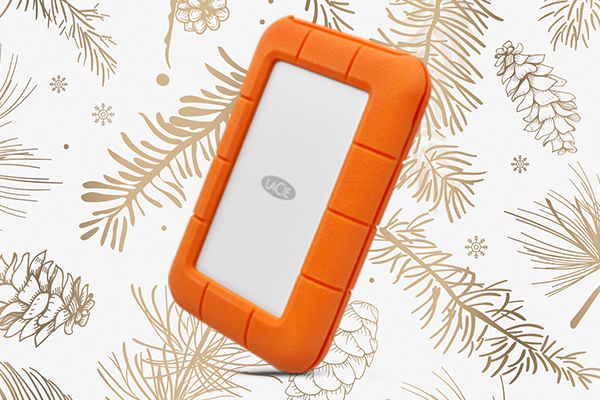
best LaCie hard drives rugged mini

We all know that one person who is constantly breaking their gear in new and inventive ways (if you don’t, it might be you). The LaCie Rugged Mini has been saving doomed data since it first hit the market way back in 2005.

In terms of durability, it has an IP67 (or ingress protection) rating. This number indicates that the Mini is completely dust-tight and can be submerged underwater at a depth of up to 1m. The Rugged Mini also boasts 1-ton crush resistance. So, although we don’t recommend it, you can technically run it over with a sedan without issue.

You can get it in 500 GB all the way up to 5TB depending on your storage needs. Regardless of your storage choice, this model has respectable transfer rates of 130 MB/s and supports both USB 3.0 and USB 2.0.

Design Lovers | The Mobile Drive

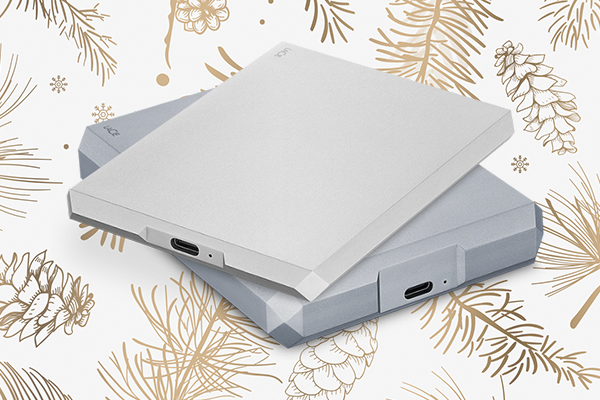
best LaCie hard drives Mobile Drive

The LaCie Mobile Drive is just that: a high-quality mobile drive. It’s an incredibly straightforward device. So what sets it apart from all the other hard drives out there?

Style.

The Mobile Drive is sleek, sophisticated, and powerful—it looks like something that James Bond might use to store government secrets. Its diamond-cut design is in honor of LaCie’s 30th anniversary and, while the 30th is technically the pearl anniversary, that would be significantly less lean.

It’s USB-C compatible and available with 1TB-5TB capacity in moon silver and Apple’s space gray. The 5TB iteration can store up to 500k high-res photos and 165 hours of video. However, it’s also great for housing music, documents or anything else the recipient deems important.

Impatient Creators On-The-Go | The Portable SSD

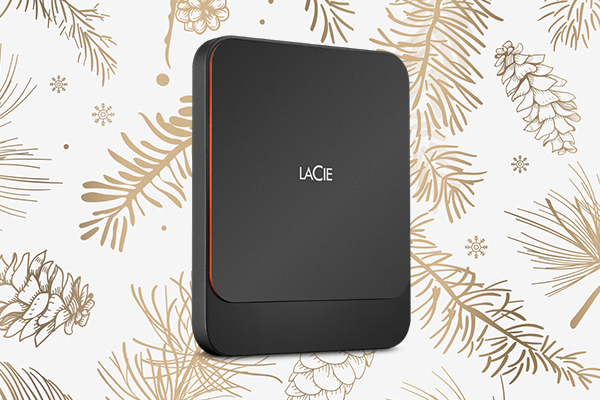
best LaCie hard drives portable SSD

This SSD (or solid-state drive) is ideal for people who travel often and want and/or need lightning-fast transfers.

As detailed in our review of the LaCie Portable SSD, SSDs don’t have moving parts like their hard disk drive (HDD) counterparts. This is advantageous for a few reasons. First, the lack of moving parts means that there are fewer elements to be broken or worn down. Second, SSDs are usually faster. And finally, SSDs are often smaller and quieter.

As a result, the LaCie Portable SSD is a streamlined, portable powerhouse. It facilitates 540MB/s file transfers, backups, and editing. Plus, for all the video editors out there, it allows users to simultaneously edit multiple streams of 4K video.

Content Collectors | The 2big RAID

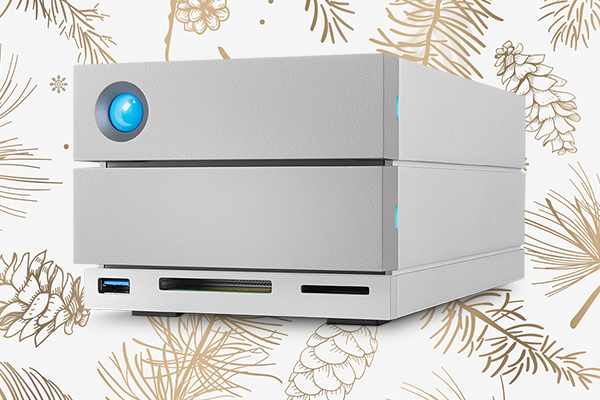
best LaCie hard drives 2big RAID

The final item on our list of the best LaCie hard drives is the 2big RAID. This model is great for content creators who hold onto everything they’ve ever created “just in case.”

This desktop-friendly RAID comes with two interchangeable, IronWolf Pro, enterprise-class hard drives. Those lightning-fast drives boast a 7,200-RPM/64MB cache and transfer speeds of up to 440 MB/s. 

They’re also on hot-swappable chassis for an added layer of convenience. In short, that means the drives can be switched in and out while the 2big RAID is still running. The biggest benefit here is convenience; you don’t have to waste time turning the device on and off to switch out hard drives.

The 2big RAID is reliable, easily-expandable, and gives you a reason to say the phrase “hot-swappable chassis.” What more could you want?

Don’t see your favorite backup drive on the list? Let us know what you think the best LaCie hard drives are in the comments below.