Home Blog Page 43

7 Stocking Stuffers for Photographers

Stocking stuffers for photographers? Yes, please! You might think that everything photography related is too expensive to stuff in a stocking, but we’ve found a handful of items that work perfectly as accents to the larger holiday splendor. So, if your favorite photographer is tired of of the traditional chocolate and nuts, candy canes, and gum, then take a look at some of these small-ish photography gifts.

Lensbaby Premium Microfiber Lens Cleaning Cloth, $16.98

Every photographer needs a cleaning cloth. This silky Lensbaby traps dirt and dust even better than conventional cleaning cloths, all while protecting sensitive lenses. Lint-free, non-abrasive, and hypoallergenic, it’s easily washed and reused.


Manfrotto PIXI Smart Mini Tripod, $34.88

Admittedly, this tripod is not for cameras – it’s for smartphones. Indeed, it’s great for steadying smartphone photography, as well as taking non-shaky videos. For videographers, the PIXI Smart Mini is useful as a little secondary shooter of B roll footage. This Mini also doubles as a stable holder with comfortable ergonomic grip for more freewheeling adaptability.

KNXUNM02-BLK

Knox Gear Bluetooth Selfie Stick, $9.99

Listen, most of us could use a selfie stick. Selfies in general get a rough rap among the public, but photographers face a particular ‘always the bridesmaid and never the bride’ brand of problem. Give them the joy of documenting their own adventures! Not just those of others. This Knox telescoping selfie stick comes with Bluetooth connectivity to snap shots from the hand grip.

Hoya 72mm 2X Neutral Density Multi-Coated Lens Filter, $49.35

Neutral Density filters prevent light from reaching cameras sensors. They let photographers stop down to open up their aperture or slow the shutter speed. It’s a great tool, even in the age of Photoshop. When photographing water, this filter creates a silky blur of movement. In bright light, it helps produce artsy Bokeh effects usually reserved for low light photography. It’s a great little gift, especially for those short on space in their photography bag.

Sony 32GB UHS-1 SDHC Memory Card, $39.99

We know, we know. Memory cards are boring – but super necessary! 32GB is the sweet spot of storage sizes. 16GB isn’t enough, but anything larger 32GB risks true disaster if the memory card fails. This Sony memory card has solid read/write speeds and file recovery downloadable software to search and rescue accidentally deleted photographs.

Sony Digital Camera Screen Protector Foils, $19.99

This is a very photographer specific gift, as you need to know a little something about your loved ones’ gear of choice. However, this Sony screen protector is super helpful in protecting the LCD screen from scratches, dust, and fingerprints. Made of polycarbonate, it features an adhesive layer that is easy to remove.

Vivitar X-Factor Tripod Camera Stabilizer Action Sports Grip Black, $26.95

For the videographer, this Vivitar sports grip helps both amateurs and professionals capture impossible angles with stability, thanks to its rubber grip rail.  Constructed from durable ABS plastic, it’s lightweight with a standard shoe-mount for a video light, flash, or microphone.

These photography gifts will delight and excite the photographers in your home. A few are a bit more expensive than the customary stocking stuffer, but a bonus memory card or simple selfie stick gives any stocking an added umph. Plus, it will put them off the trail of that hidden Sony a9 under the tree.

Gifts for Photographers at Under $100

Photographers are tough to shop for. Their hobby is so technical, expensive, and complex, that many of us struggle with what to give them for the holidays. Lucky for you, we’ve put together a photography gift guide with presents for under $100 (and many under $50)! From straps to memory cards and tripods, we’ve got gifts for photographers of all stripes.

Honl Photo Traveller 8 Softbox, $69.89

Softboxes soften subjects’ appearance and create a circular catchlight in their eyes. Photographers often use them in portraiture and commercial photography — and this one works well for beginners. This Honl Photo Traveller is easy to set up and store, and attach a shoe-mount flash to.

Fujifilm Instax Mini 9, $69.95

Instant film cameras are, simply put, fun. There are a lot of new hybrid instant cameras out there that combine modern technology (ability to edit photographs in-camera with filters, for example) with old Polaroid analog. The Fujifilm Minis are simpler. With 5 different body color choices, the Mini is an easy analog camera that produces small, wallet-sized images with different brightness modes to accommodate surroundings.

Manfrotto National Geographic Africa DSLR/Laptop Rucksack, $99.95

This gorgeous Manfrotto bag comes in at just under the $100 mark. A lot of photography bags look like photography bags, but this backpack blends right in. With padded compartments for DSLR or Mirrorless cameras, plus upper storage for accessories and a rear compartment for laptop, it’s a stylish go-anywhere option. Plus, the breathable fabric makes it comfortable to cart around.

Lastolite Studio Umbrella, $39.95

Umbrellas soften and broaden light from a flash. Easily portable, the white satin Lastolite Studio Umbrella is designed for either bounce or shoot through. At 45”, it works as either a main umbrella for beginner photographers or a secondary travel umbrella for more advanced users.

Sony Extra Bass On-Ear Headphones, $38.00

Over-ear headphones run hundreds of dollars. While not ideal for editing video, these on-ear headphones will certainly get the job done. However, we’re more thinking of something for photographers to listen to music with while they edit photos. Comfortable and noise reducing, they come in lots of different colors, too!

Dolica 77″ Professional Monopod, $99.95

Monopods are nifty gifts because a lot of videographers, even professionals, don’t already own one. A monopod provides the same stability as a tripod, but with a bit more maneuverability for those shooting video. This model holds up to 25 pounds of camera gear thanks to its durable aluminum alloy body, and stretches to a maximum of 6 feet.

ONA Presidio Camera Strap, $89.00

A comfortable camera strap is another dependable stand-by gift. This Presidio features top-grain leather connector belts with handcrafted grey strap at 63” long. It holds even super heavy DSLR cameras and telephoto lenses up to 6 pounds.

You don’t need to learn all the ins and outs of photography to find the right gift for your favorite photographer this holiday season. Camera bags, filters, and camera straps are all great fallbacks. For videographers, look into monopods – or even microphones. If all else fails, put some instant film in a Mini 9 and document the Christmas party with them.

Beginner Cameras to Gift New Photographers

What’s the best way to welcome newbie photographers into the fold? With a new entry-level camera, of course! There are a lot of Mirrorless and DSLR cameras at or around the $600 mark, and we’re here to break them down for you. Nikon and Canon more or less corner the market on most entry-level models, but Fujifilm and Pentax offer up solid competitors! Whether it’s simple controls, ergonomic grip, or flip-over screen for selfies, there’s a right match for everyone.

Canon M100

We just wrote a review of the Canon M100, which you can read here. This light Mirrorless features a tilting-touch screen for selfies and options like Creative Assist and Self Portrait mode for beginners. (Plus, creative filters for those who have yet to uncover the many mysteries of Photoshop.) There’s built-in Wi-Fi, NFC, and Bluetooth connectivity to easily and immediately assimilate the camera among other gadgets. With 24.2 megapixels and 49 autofocus points, it’s a teeny bit above average when compared to other entry-level Mirrorless cameras of its generation.M100 Review

Nikon D3400

The touchscreen-less Nikon D3400 comes with excellent battery life, solid single-shot autofocus performance and a simple, ergonomic design. It’s notably easy for first time users. In fact, the Nikon D3xxx series is known for its bare-bones approach. With 24.2 megapixels, 1080p video capture, and range of ISO100-25,600, it’s on par with a lot of other DSLRs on our list. Plus, the camera’s 11-point AF system outstrips the Canon EOS Rebel T6. Nikon D3400 Review

Certainly, the D3400 has a small shell, so there isn’t a whole lot of room to grow – but it’s totally suitable for the next step after smartphones.

Canon EOS Rebel T6

Similar to the Nikon D3400/3300, the Canon EOS Rebel T6 comes with great battery life for less than $500 with the lens. Most of its tech is handed down from previous generations, with an intuitive control menu and auto mode options for newbies. The 9-point autofocus is a bit long in the tooth, but dependable enough. Moreover, while the pixel-level is left wanting at only 18 MP (you won’t want to blow up your images with this one), the image quality itself is solid with even colors and clarity in good light.

Canon Rebel t6 Review

Nikon D5600

For about $200 more, you can look into the Nikon D5600.  It’s small and lightweight, especially for a DSLR. For new users more comfortable with smartphone photography, the D5600 features an excellent touchscreen. Since it’s slightly higher quality, the D6500 is also a good fit for someone looking to move up from super beginner DSLRs – but not quite into mid-range. Like the M100, it features 24.2 megapixels but with 10 less AF points (only 39). The wide ISO range (100 – 25,600) offers solid low light performance. Nikon D3400 Review

Like all Nikons, the D5600 comes with SnapBridge connectivity, which might ruffle the features of new users who prefer something more familiar like Wi-Fi. However, Snapbridge consumes less power than Wi-Fi, so you get more bang for your battery life.

Canon EOS Rebel T7i

From the ashes of the T6i and T6s, it arose: the Canon EOS Rebel T7i. At $850 with a kit lens, it’s definitely in the upper limits of price in terms of starter DSLRs. But it’s a great camera! The 24MP resolution is in keeping with other Canons of its age, but the Dual Pixel AF system is a step up from the T6i and T6s. The autofocus is smooth for both video and stills in Live View mode with 45 cross-type focus points. Like the Nikon D5600, this T7i is on the higher end of beginner models. It’s receptive with a particularly quick locking focus (.1 seconds in bright light) with easy connectivity through built-in Wi-Fi.Canon Rebel EOS 7ti Review

Pentax K-70

The K-70, like all Pentax, is built to endure. Compact and rugged with anti-shake technology, this is more of a level up from an action camera than smartphone. Know any hikers? This is their model. Dustproof, weather-resistant and cold-resistant down to -10 degrees C, there are 100 seals on this thing. The APS-C CMOS sensor features 24.2 Mega Pixels, similar to the Canon M100. However, perhaps the coolest feature is the unique Astrotracer – also seen on pro-level Pentax K models. Here, Pentax uses GPS technology to track objects in the night sky, keeping them stationary so that they don’t streak through pictures.Pentax K-7 Review

Fujifilm X-A3

With a beautiful, retro build, the Fujifilm X-A3 is a good match for someone with a strong design aesthetic. It comes in a variety of colors for folks have to have a pink (or brown) camera. The controls are easy to use, a mix of physical and touchscreen, and there’s a built-in pop-up flash. The biggest problem here is the autofocus system, which can’t really compete with other starters in our list. In low light, you have to wait more than a second between clicking autofocus and capturing the image. However, the image quality itself is quite good with low noise and moderate ISO range.Fujifilm A-3 ReviewIf you’re easing into photography – or buying for someone who is – then any of these cameras are a good match. The Nikon D5600 or Canon EOS Rebel T7i are better for new-ish photographers who know their way around more than just a smartphone, while  the Canon EOS Rebel T6, Canon M100 or Fujifilm X-A3 are super beginner models. For action camera users looking to step up to DSLR, the Pentax K-70 is a good fit.

Overview: Canon Rebel SL2 is Super Portable

Meet the newest little Canon: the Canon Rebel SL2. Indeed, one of the best things about this starter model is its size. As the smallest model in the EOS Rebel line (only 453 g), the SL2 is a go-anywhere Mirrorless competitor. It’s great for travel photographers who are just starting out, or anyone short on space in their photography bag. Its competitors include the Nikon d3400, Canon M5, and Sony a6000.

At $500 for the body, $700 kit, this DSLR is a worthy descendant of the SL1. There’s a lot that’s new about the SL2, too – it’s been 4 years, after all. The Bluetooth, Wi-Fi, and NFC, and flip out LCD screen are welcome additions. In fact, the fully-articulated LCD is great for shooting video or live mode. There is, however, no 4K option.  It shoots at up to 1080/60p. There isn’t any automatic LCD brightness control either. Still, it’s perfectly fine for the average user. Plus, the external mic input is a nice touch for better sound.

Megapixels are up (18 to 24) along with ISO (25,600 to 51,200). So, you can anticipate solid low and medium light quality images, as well as better blow up potential. The deep hand grip is super ergonomic and easy to maneuver, while the controls themselves are well placed (zoom buttons, for example, rest comfortably beneath the thumb at a reasonable distance apart). According to Canon, “the EOS Rebel SL2 can be as easy to use as a smartphone” thanks to its Creative Zone settings for users who want to branch into more complicated to control.

Canon claims the startup time is .2 seconds, with the continuous shooting at 5fps—up from the 4fps. Meanwhile, the 9 point autofocus through the viewfinder is a little too old not to mention as a potential downside. It’s the same system that was in the SL1. However, shooting with live view should yield better results as it utilizes Dual Pixel AF technology.

Overall, the SL2 is a nice improvement over the SL1. It’s a compact Mirrorless competitor that’s friendly for beginners, and especially those looking to travel or save on space.

3 Tips for Better Time Lapses

Over the past 5 years, time lapses have become a popular storytelling tool. So much so, that the function is built into most modern cell phones. With the touch of a button, you can press record and your phone will do the rest of the work for you.

Say you’ve shot a couple of time lapses, and although they are pretty interesting, they’re not exactly as dynamic as what you’re seeing on Vimeo, Youtube, and television. No need to worry! Getting these amazing shots are not out of reach. Here are my tips on how to transition from smartphone time lapse to professional. Grab your DSLR.

1. Capture Movement

People, Traffic, Clouds, Stars. These are the most popular subjects to capture in time lapses. Why? Because they easily communicate the passage of time and are often very beautiful. Think about what you’re about to capture. Where can you place your camera to catch the most action in the scene? Are there times of the day where this scene is busier than others? More action is more interesting.

2. Lower your Shutter Speed

In photography, we love to use higher shutter speeds to capture crisp, clear photos. However, in time lapse, high shutter speeds will give your video a stuttering effect. Try slowing your shutter speed down to .5 and you’ll start seeing some motion blur. In the end, this will create streams of motion instead of stuttering subjects.

3. Pan and/or Slide

After you lock into these steps, there’s one more way to help hold your audience’s attention: adding motion to your frame with slides and pans. You don’t even need expensive equipment to get started. Effects like this are easily added in Premiere Pro or Final Cut.

Let’s say you have a 24mp camera — that’s a resolution of 6048 x 4032. Even if you’re creating a 4K time lapse, your image is still larger than the resolution of your video. This means that you can make your time lapse pan in, out, left or right in post. If you’re looking to get even more creative, check out the Syrp Genie and Syrp Genie Tracking Bundle. These tools can help you add elaborate pans or slides.

So there you have it! Now you’re off to add time-lapse photography to your storytelling toolkit. Have you shot any time-lapses lately? What’s your favorite subject to shoot? I’d love to see your work. Share a link in the comments below! You can take a look at our latest time-lapse film here.

How to Pick the Right Lens for Different Genres of Photography

If you’re transitioning from general photography to specialized photography, it’s difficult to know which lens to invest in. For every type of photography, there are a few lenses that get you the biggest bang for your buck. Whether it’s sport, aerial, landscape photography or photojournalism, here’s a rundown of what to consider.

portrait photography tutorial

Portraiture

An 85mm f/1.8 is the most commonly used portrait lens, and for good reason. Whether inside a studio or outside in the world, the wide-open aperture translates to shallow depth of field and beautiful bokeh. While anything between 70mm and 125mm is fine for a casual portrait photographer, 85mm is the sweet spot between facial distortion and flattened subjects.

sports photography tutorial

Sport

First things first: what kind of sport are you shooting? If you’re sitting court-side at a basketball game, then prime is fine. If it’s a distance sport like football, then consider a zoom. Some photographers carry both with them to sporting events, but zoom lens are often quite heavy – so fair enough if you only want to bring the bare minimum. Prime lenses let you snap sharper images in dimmer light, which is a huge boon if you’re shooting fast moving subjects. Obviously, if you want to get closer, you need to ‘zoom’ by running there yourself. Zoom lenses, meanwhile, give you a lot more dynamism to quickly shift with your subject.

aerial photography tutorial

Aerial

For helicopter photography, many photographers recommend a telephoto zoom lens. But they’re super difficult to manage in the air (too heavy). Instead, regular zoom lenses will help isolate subjects from above.  Of course, if you want to embrace the full grandeur of the sky, then go for a wide angle lens! Equally important is figuring out what kind of light to expect, and choosing a lens with the appropriate f stop. If you’re shooting at night, for example, a lens with a fast f stop is most important.

landscape tutorial photography

Landscape

Landscape photography traditionally requires a wide angle lens, and frankly, why mess with perfection? Capturing the vastness of the land in its fully glory requires the widest angle you can muster before running adrift in fisheye territory.  Something between 35mm and 14mm should do the trick.

travel photography blog

Travel

An easy standby for travel photography is 50mm, which seems a little bland to some. However, if you’re traveling –especially backpacking—you don’t have a lot of room to spare. This all-around lens isn’t very exciting, but it’s up for anything.  Plus, many 50mm lenses are relatively cheap, so you may feel more comfortable travelling with it, instead of running through Southeast Asia with your fanciest gear. Some travel bloggers recommend a more whimsical fisheye to communicate the other-worldliness and fun of travel, but only if you’ve got extra space.

photojournalism tutorialPhotojournalism

Photojournalism is a dynamic field, so there isn’t just one perfect lens. However, you can get by on two or three. Many photojournalists recommend multiple zoom lenses, like a 28-70mm and then a telephoto 70-200mm. If you’re just starting out, you can try limiting yourself to a 20mm and a 35mm, which are great for wide angles and street photography. Frankly, more important than the debate between zoom and prime is weather sealing, durability, and large apertures.

Investing in the right lenses early on in your photography career sets you up for a much easier time in the long run. While any lens can bring something new to a style or genre, it’s helpful to know what everybody else is using before you branch out.

Spanish Harlem Mailman Turned Sony Photographer

Jason Lau works at 190th street. Well, not at exactly, but throughout Spanish Harlem.  “When I’m walking [through the neighborhood], I think ‘oh my god – that’s a good shot! I need to come back.’” The mailman turned amateur photographer turned freelance photographer is totally self-taught, driven to capture the beauty of New York with an inexorable artistic compulsion.

“In the beginning, I didn’t know nothing,” he says. “I didn’t have anyone to help me.” A friend showed him shots on his camera, and Lau was hooked right away. “I said, ‘what’s the hottest camera in the world right now?’”  – this was 2015 – “and got a Nikon d750. Straight manual. I didn’t know what I was doing. Always to the top. Get the best equipment.”

While he’s certainly not the first person to buy a high-end professional camera on impulse, few rise to competence as quickly as Lau did – especially with zero prior training. “It was trial and error. I went to Barnes and Noble every week for the first year and a half. I was reading all the magazines in the store about photography. I watched a lot of YouTube videos.”

Then, it was simply a matter of practice. “Once I’m off [work], I’m out shooting,” he says. “I was up last night shooting until 3 in the morning. I called my friend, asked him to model. He said he’s not a model, and I said ‘it’s okay, I’ll direct you.’”

At least some of that creative confidence is inherited. His mom, Fatima Lau, worked as a bridal designer for Exquisite. “When I was a kid, my mom was always telling me [to get in] family pictures. She’ll pose me, and sit me on little stools and things. Go out to Chinatown, take pictures of me and my brother holding hands.” Now, she’s one of his biggest fans. “[She says] ‘get me those fashion photography photos.’ She gets inspiration from them.”

While Lau himself shoots runways and fashion, and recently shot for Rhianna favorite PluggedNYC, he loves cityscapes. When he’s out on his mail route, Lau keeps track of where he wants to come back and shoot with the Save Location App; filled with thrilling markers like “Awesome Place.” “I’m running out of cityscapes,” he confesses. Two years trekking through New York with Nikon in hand will do that. “I have to travel.”

Recently, Lau won as Sony a9 at the Focus Camera Sony Rooftop Event. “I packed up the Nikon,” he says. “Once I used [the Sony] and I noticed the focus peaking and the eye detection” – he makes a hand gesture to suggest that this was it for him. “The Nikon isn’t sharp enough. I wish I had gotten the Sony earlier.” He put it to work shooting Bridal Week 2017.  “I’m shooting models walking really fast now.”

Looking to the future, Lau hopes to transition from full time mailman to full time photographer. His mom loves the stability of his post office job, but Lau is ready for the next step. “Hopefully in the future someone would bring me on for something big, something that I’ll love.”

All images copyright Jason Lau. 

6 First-Time Aerial Helicopter Photography Tips

6 First-Time Aerial Helicopter Photography Tips Featured 1

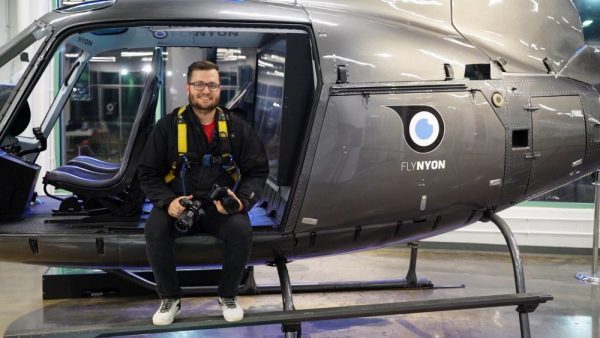
We recently went on a once-in-lifetime flight with FlyNYON over New York City at sunset to test our Sony a9. Apart from blowing our collective minds and getting some great shots, we also learned a lot. Aerial photography is coming into vogue with more and more photographers going up in helicopters. To save you from the mistakes we made, here are our top 6 beginner aerial helicopter photography tips.

Know Your Flight Etiquette

You will likely share the cockpit with several other photographers. So please, no man-spreading. Everyone paid a lot of money to be here, and being courteous in a small space goes a long way.

Dress Warm (and Smart)

We went up at the beginning of October when it was relatively warm, but boy did we feel a chill at 2,000 feet. As a rule, dress warmer than the day suggests. It’s cold at the top, and you’ll need the extra layers. Leather jackets, which take up less space than puffy winter coats, are good standbys—or thermal underwear. Make sure to take anything out of your pockets, and wear contacts if possible. Glasses are a lot less effective when they’re plastered against your forehead.

Ask Your Pilot for Recommendations

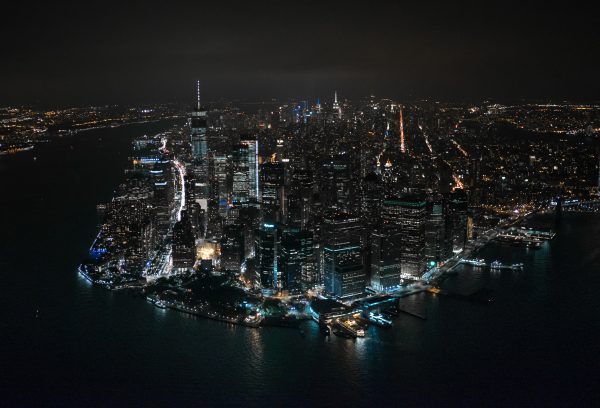
Your pilot will know things from years of flying and schlepping around photographers. You, in all likelihood, are not a pilot. You will not know the same things as a pilot, even if you think you do, so you should ask. Our pilot, Amanda Mercaldo, set up a call a week ahead of time to discuss our flight path. While we certainly had some idea of what we wanted to see (the Brooklyn Bridge, “the triangle building”—aka VIA 47 West), Amanda came ready with suggestions and solutions. We had no idea what the “money shot” was until Amanda told us about it (the view of south Manhattan). Building a line of communication with your pilot in advance of your flight helps you plan your shot list and accessories.

Helicopter Photography tips Matt Nelson
Our photographer, Matt Nelson, loaded down with gear.

Bring Multiple Cameras

There’s no lens switching mid-flight, but many flight companies let you strap on multiple cameras. We recommend bringing a wide-angle, zoom, and prime—of course, this also means you need three cameras. If you don’t own three cameras, then try to borrow at least a second camera for shot diversity. A wide-angle lens is ideal for panoramic views that (let’s be honest) you’re really paying for. Then, while telephoto zoom lenses are a little big for light aircraft like helicopters, regular zoom lenses will help you isolate a subject from above. Prime lenses take sharper photographs, but we only recommend them if you’re a little more experienced with aerial photography.

Take Light into Consideration

Know what kind of light to expect. Whether it’s blue hour, golden hour, midday, or midnight, quality and amount of light will have a huge effect on your pictures. If you’re flying at night, choose a lens with a fast f stop (we’re talking 1.8 or the fastest you own). Shooting during the day gives you more versatility, as you can use higher speeds without issue.

Helicopter Photography tips New York City at night
The #moneyshot.

Spray and Pray

If you’re shooting at lower shutter speeds, there’s a lot of spray and pray—and that’s okay. Especially if you’re inexperienced, taking too many shots to get 4 or 5 usable ones is perfectly reasonable. Just be sure to use a larger memory card or two smaller memory cards.

Aerial photography is totally worth the price of admission. Some photographers note a bit of performance anxiety in the days before the trip, but as long as you plan your shot list and prepare your gear, the photographs make themselves.

Review: Sony RX0 is Not an Action Camera

The Sony RX0 is something different, a new breed entirely: the virtual reality camera. With the help of Sony Playmemories App, you can link up five RX0s at the same time, or fifteen with a radio commander. It shoots fully immersive Virtual Reality video for about the price of a starter DSLR.

Plus, the build quality is excellent with an intuitive, ergonomic design and rounded corners. At almost $700, the RX0 costs a few hundred more than the Hero5 Black, which will definitely deter some photographers who think that they’re getting an action camera rival. However, keep in mind that the sensor is bigger than any available GoPro models at around the same size as the Hero series. Plus, the RX0 features a 24mm Zeiss wide angle camera lens at f/4 aperture, but without the typical fisheye distortion. Sounds good, right?


It is! In fact, the biggest problem with the RX0 is everyone else. It seems that some reviews interpret the RX0 as a would-be action camera, but it simply can’t compete with GoPro. First of all, the RX0 doesn’t have a working autofocus for video. An autofocus. In a would be action camera! Instead, it features single-shot autofocus mode, manual focus, and preset focus. There’s no internal 4K either. What it does have is a compact, rugged frame, a 1-inch sensor, and high quality Zeiss-made lens. You can still drop it (from 6.5 meters), dive with it (up to 330 feet) and otherwise push this little camera to its limits – but these features alone do not an action camera make.

Ultimately, if you’re looking for an action camera to rival GoPro, this isn’t it. But if you’re looking to move into the new and exciting world of rugged VR, then the RX0 is pretty cool.

Review: Fujifilm X-E3 Mirrorless Camera, Travel Companion

Taking a trip? This compact X-E series model is the ticket. The Fujifilm X-E3 Mirrorless Camera is small with a smartphone style touch screen, quick AF tracking, as well as both Bluetooth and Wi-Fi connectivity.

With a standard sensitivity range of 200-12,800 to an expandable 100-51,200, the X-E3 features a solidly usable ISO. It’s nothing to make you jump out of your skin, but the noise performance in low light is very agreeable. Megapixels get a nice boost too, though 24MP is fast becoming the standard for small Mirrorless cameras like this one. (The Canon M100, for example, boasts 24.2MP.)Fujifilm X-E3 Mirrorless CameraThe improved AF Tracking algorithms allow the X-E3 to track smaller, faster subjects.  While Fujifilm has been fine-tuning its algorithms since the X-Pro 2 and X-T2, the X-E3 features a new image-recognition algorithm for tracking subjects at half the size as previous models. Plus, the 91 tracking points (expandable up to 325) is a huge improvement from the 49 points of the X-E2. If you’re bouncing around the world snapping street and travel shots, quick tracking comes in extra handy.



One potential drawback is video. Although the X-E3 boots up to 4K, the recording limit is only 10 minutes or so with frame rates from 23.98p up to 29.97p at 100Mbps. Meanwhile, recording at 1080p lands you around 15 minutes. You can downgrade to 720p for 30 minutes, but for most videographers or video enthusiasts, this won’t come as an appealing alternative. However, there is a microphone input jack for better audio. For a travel camera, that might be enough of a compromise.

The touch screen, too, is a huge boon. It operates very similarly to a smartphone touch screen, letting you scroll through shots and magnify images easily. It doesn’t tilt, though – so no easy selfies. If you can stomach asking another rogue backpacker to take your picture for you, the X-E3 is a useful travel companion.